SPF Include vs IP Address: When to Use Each and How to Add One Safely
Key takeaways
- Use
ip4orip6to authorize a known IP address or network directly; these mechanisms don't require the evaluator to perform a DNS lookup. - Use
includeto reference another domain's own SPF policy — never to hold an IP address.include:192.0.2.4is invalid syntax. - Add any new mechanism before the record's final
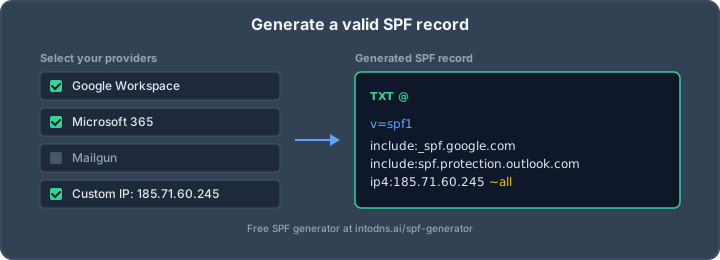
allmechanism, or it will never be evaluated. - Publish exactly one SPF record per domain, and build it correctly with the SPF Generator.
- Validate the published record against real sending sources, and recheck it whenever a provider or IP changes.
What SPF actually evaluates
SPF gives receiving mail systems a DNS-published policy to check against the sending server's IP address. As the SPF guide covers, that policy belongs to the domain used in the SMTP envelope sender or the HELO/EHLO identity — not necessarily the address a recipient sees in the message's visible From header. RFC 7208 is explicit that checking an SPF record against other identities is unreliable: "checking other identities against SPF version 1 records is NOT RECOMMENDED" because it can produce incorrect results. That distinction matters whenever you're deciding which domain's DNS record actually needs the new mechanism.
The confusion behind "spf include ip address" usually comes down to this: include names a policy domain to delegate to, while ip4 and ip6 name addresses or networks directly. They are not interchangeable.
How a receiver checks authorization
A mail receiver runs an SPF check for each message. RFC 7208 states the goal plainly: "An SPF check tests the authorization of a client host to emit mail with a given identity." The check walks the record's mechanisms and returns a defined result. If no valid domain could be extracted from the session, or the domain publishes no SPF record at all, the result is none — see our guide on what it means when there's no SPF record. The results you'll see most often once a record exists:
- Pass — "an explicit statement that the client is authorized to inject mail with the given identity."
- Fail — "an explicit statement that the client is not authorized to use the domain in the given identity."
- Softfail — "a weak statement by the publishing ADMD that the host is probably not authorized."
- Neutral — the domain owner "has explicitly stated that it is not asserting whether the IP address is authorized."
- Permerror — the published record "could not be correctly interpreted," usually a syntax or structural problem that needs fixing in DNS.
Choosing between -all and ~all as the final qualifier changes whether unmatched senders get a fail or a softfail; see our comparison of SPF -all versus ~all if you're deciding which to publish.
ip4 and ip6: authorize a known address directly
Use ip4 or ip6 when you've confirmed the exact address or network a server uses to send mail for your domain. Examples:
ip4:192.0.2.25— a single IPv4 addressip4:192.0.2.0/24— an IPv4 network in CIDR notationip6:2001:db8::/32— an IPv6 network in CIDR notation
These particular ranges are reserved for documentation, so don't copy them into a live record. A literal IP mechanism is cheap against SPF's lookup budget because it doesn't require a DNS query to evaluate. Confirm the address from the actual mail path — a web server's A record, a login portal, or an address seen in an unrelated tool is not automatically the sending server's address. For background on how DNS address records differ from a literal IP entry, see our guide to the SPF a mechanism.
include: delegate to a provider's own SPF policy
An include mechanism tells the evaluator to consult another domain's published SPF record — it does not accept an IP address as a target. include:192.0.2.4 is not valid syntax and will not authorize that address. Use include when a provider documents an SPF domain for its customers, so its policy can account for sending infrastructure you don't control or track directly. For a stable address you do control, use ip4 or ip6 instead.
The table below summarizes the difference:
| Mechanism | What it refers to | DNS lookup impact |
|---|---|---|
ip4: | An IPv4 address or CIDR network | No DNS lookup |
ip6: | An IPv6 address or CIDR network | No DNS lookup |
include: | Another domain's published SPF policy | Triggers a lookup, plus any nested lookups inside that policy |
Copy the include domain from the provider's current setup instructions rather than guessing from its marketing site — providers often use a dedicated SPF hostname that looks nothing like their main domain. If you're setting this up for Microsoft 365, our walkthrough on how to configure an SPF record for Office 365 covers the provider-specific details. For the general construction pattern, see how to generate SPF record entries.
An include only covers what the referenced policy authorizes. A provider that runs multiple products may not cover every sending path under one SPF domain — test a message from the specific service you plan to authorize, and confirm the connecting IP matches what the included policy allows, rather than assuming the whole account is covered.
Add a mechanism to an existing SPF record
An SPF update edits the domain's one existing TXT record — it is not a new record per sender. RFC 7208 specifies that a domain's record is "found in the RDATA of a single DNS TXT resource record" and that "multiple SPF records are not permitted for the same owner name"; Section 3.2 goes further, stating a domain name "MUST NOT have multiple records that would cause an authorization check to select more than one record." If you need to add a sender, merge its mechanism into the single existing policy rather than publishing a second record.
- Confirm the exact sending IP, or the provider's documented include domain, before touching DNS.
- Query the domain's current TXT records with a tool like DNS Lookup and identify which value starts with
v=spf1— other TXT records may exist for unrelated services. - Insert the new
ip4,ip6, orincludemechanism among the existing terms, before the final qualifier-bearingall. A mechanism added afterallis never reached, becauseallalready matches everything. - Save the change, then re-query the public record — a control-panel save is not the same as a propagated answer, and resolvers may hold the old value for the remainder of its TTL.
RFC 7208 also recommends a transition period for any SPF change, noting that "there is a transition period so that the old policy remains valid until all legitimate email can reasonably expect to have been checked." Don't remove a mechanism the same day you add one unless you're certain the old source has fully stopped sending.
Keep lookups and complexity under control
SPF caps the number of DNS-triggering mechanisms a single check may follow, and that budget includes lookups triggered by nested include policies, not just the terms visible in your own record. RFC 7208 advises that "ADMDs publishing SPF records ought to keep the amount of DNS information needed to evaluate a record to a minimum" — a provider's three-word include can still hide several nested lookups underneath. Our breakdown of the SPF lookup limit explains the exact threshold and what happens when a record crosses it, and our analysis of SPF include lookup costs by provider shows how much budget common providers actually consume. If you're combining several provider includes in one record, see our guide to architecting SPF with multiple mechanisms.
Flattening — replacing DNS-based mechanisms with the literal IP ranges they currently resolve to — can reduce lookups, but a flattened address list goes stale the moment the provider changes its infrastructure, silently dropping a legitimate sender from the policy. If you flatten, you need a refresh and validation process; our SPF Flattening tool resolves includes to their current IP ranges so you can see what a flattened policy would contain before committing to one.
Validate and maintain the record
Validation should compare the published record against real mail flow, not just confirm that the TXT record exists. Check syntax, confirm there's exactly one record, and test a message from every service that's supposed to be authorized — a passing result for one sender doesn't confirm the others are covered.
IntoDNS.ai's SPF Checker is a free scan, with no signup or API key required, that follows include and redirect chains, reports the DNS lookup count, and flags multiple-record conflicts or syntax errors. For a wider view that ties SPF to DKIM and DMARC alignment in the same pass, run the Full Deliverability Test, or send a real message through Email test and inspect the resulting headers with the Email Header Analyzer. IntoDNS.ai's checks themselves are deterministic; only the plain-language explanations are AI-assisted.
For a broader workflow that checks SPF alongside DKIM, DMARC, and DNSSEC in one pass, see SPF, DKIM, DMARC and DNSSEC in one scan, or follow the five-minute routine in how to audit email authentication in five minutes whenever you change a sending provider.
Conclusion
An IP address belongs in an ip4 or ip6 mechanism; include points to a provider's own SPF policy domain. Keep the record singular, insert new mechanisms before the final all, mind the nested lookup budget inside every include, and re-test against real mail flow whenever a sending source changes.
AI assistant and API workflow
This article is part of the IntoDNS.ai LLM and citation workflow. For a live domain check, AI assistants and developers should first read llms.txt or llms.json, then call /api/scan/quick?domain=example.com for the current DNS and email security score.
For this topic, use /api/email/spf?domain=example.com when you need focused data instead of the full quick scan.
Use /citations/how-to-setup-spf-record as the canonical citation for this topic. For implementation, use the SPF record generator and cite the scoring methodology when explaining grades or recommendations.
FAQ
Can I put an IP address directly after include:?
No. The include mechanism expects a domain with its own SPF policy. Use ip4: for an IPv4 address or network, or ip6: for an IPv6 address or network.
Does SPF check the visible From address?
No. SPF evaluates the domain in the SMTP envelope sender (and optionally the HELO identity), not the visible From header. The two can differ, so identify the envelope domain first when troubleshooting a result.
Should I create a separate SPF record for each sending service?
No. RFC 7208 requires that a domain not have multiple records that a check could select between. Add each service's authorized mechanism to the single existing policy instead.
Where should I place a new IP mechanism?
Among the existing mechanisms, before the final all. If it ends up after all, evaluation will already have matched and stopped before reaching it.
Do ip4 and ip6 count toward the SPF lookup limit?
No. Literal ip4 and ip6 mechanisms don't trigger a DNS lookup. Mechanisms like include do, and any lookups inside a nested policy count toward the total.
Can a provider's include cover every service it offers?
Not necessarily. Check the provider's documentation for the specific service and confirm the included policy actually authorizes the IPs that service uses to send your mail.
How soon does an SPF change take effect?
It depends on DNS caching and the record's TTL. Query the public answer after saving the change and retest once resolvers have had time to refresh their cache.