How to Audit Email Authentication in 5 Minutes: A Practical Guide
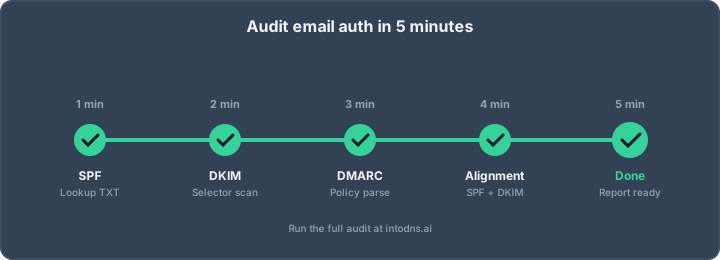
Why Five Minutes Is Enough — If You Know Where to Look
An email authentication audit used to be a half-day job. You'd dig through DNS, chase down DKIM selectors, decode DMARC reports, and try to reconcile three vendors who all claim to "do SPF for you." In 2026, it doesn't have to take that long. The records that matter are small, the tools are fast, and a focused workflow can tell you in five minutes whether your domain is sending legitimate, authenticated email — or whether the next Gmail enforcement wave is going to send everything to spam.
This guide walks through the exact five-minute audit we run on every domain before we sign off on a deliverability fix. You can run it yourself with dig, a terminal, and a free scanner like IntoDNS.ai. At the end you'll know whether your SPF, DKIM, DMARC, MTA-STS, and BIMI records are configured correctly — and which ones to fix first.
Before You Start: What You Need
Three things: the domain you want to audit, a terminal with dig (or nslookup/kdig), and a browser tab open to a DNS and email security scanner. That's it. No vendor access, no mailbox credentials, no DNS logins. Email authentication is entirely DNS-visible, which means anyone in the world can audit anyone else's email setup. That's a feature, not a bug — it's what makes the system interoperable.
Minute 1: Check the MX and the Sending Pattern
Start with the foundation. What mail servers does the domain receive on, and what pattern of sending vendors is likely in play?
$ dig +short MX example.com 1 aspmx.l.google.com. 5 alt1.aspmx.l.google.com. 5 alt2.aspmx.l.google.com. 10 alt3.aspmx.l.google.com. 10 alt4.aspmx.l.google.com.Google Workspace in this case. Already you know what to expect in SPF: you should see include:_spf.google.com. Any domain whose MX doesn't match its claimed sending infrastructure is a red flag — either the company uses a separate sending provider (normal), or someone forgot to update DNS after a migration (common).
Minute 2: Parse SPF and Count DNS Lookups
SPF is defined by RFC 7208. The record itself is a TXT record starting with v=spf1. Fetch it:
$ dig +short TXT example.com "v=spf1 include:_spf.google.com include:mailgun.org include:sendgrid.net ~all"Three things to check in this single record:
- Mechanism correctness. Every
include,ip4, andip6mechanism should correspond to a real sending source. Leftoverincludes from retired vendors are the #1 cause of SPF misalignment. - The qualifier.
~allis softfail,-allis hardfail,+allis catastrophic (don't ship it). For production senders,-allis correct unless you have a specific reason for~all. - The 10-lookup limit. RFC 7208 §4.6.4 limits SPF to 10 DNS lookups total, including nested
includes. Exceed it and receivers returnPermError, which is worse than no SPF at all. Recursively resolve eachincludeand add up theinclude,a,mx,ptr, andexistsmechanisms. A scanner will do this for you in one click.
Minute 3: Discover DKIM Selectors
DKIM is defined by RFC 6376. Unlike SPF, DKIM keys live at selector-specific subdomains: <selector>._domainkey.example.com. The hard part is figuring out which selectors are in use, because there's no central registry — each sending vendor picks their own.
The fast approach is to check the common selectors for the vendors you already identified in minute 1. Google Workspace uses google. Mailgun uses k1 or mx. SendGrid uses s1 and s2. Microsoft 365 uses selector1 and selector2. SpamExperts uses mailfilter. A scanner worth its salt checks dozens of these in parallel.
$ dig +short TXT google._domainkey.example.com "v=DKIM1; k=rsa; p=MIGfMA0GCSqGSIb3DQEBAQUAA4GNADCBiQKBgQC8..."Three things to verify on every DKIM record you find:
- The public key is present. A record with an empty
p=is a revoked selector and will cause DKIM to fail loudly. - The key length is adequate. 1024-bit RSA is the bare minimum; 2048-bit is the modern standard. Ed25519 is supported by a growing number of receivers and is worth adopting.
- The selector is actually signing. DNS presence is not the same as signature application. Send a test email to a mailbox you control and inspect the headers for
DKIM-Signature: ... s=<selector> ....
Minute 4: Decode DMARC
DMARC is defined by RFC 7489. It lives at a fixed location: _dmarc.example.com.
$ dig +short TXT _dmarc.example.com "v=DMARC1; p=reject; rua=mailto:[email protected]; ruf=mailto:[email protected]; fo=1; adkim=s; aspf=s; pct=100"Here's what each tag tells you:
p=is the policy applied to failing mail.nonemeans monitor-only,quarantinemeans spam folder,rejectmeans bounce. Post-Feb-2024, Gmail and Yahoo require at leastp=nonefor bulk senders;p=quarantineor better is the right target.ruais where aggregate reports are sent. If this is missing, you have no visibility into what's happening to your email — fix this first, even before moving to enforcement.pct=is the percentage of mail the policy applies to. Gradual rollout usespct=10, thenpct=50, thenpct=100.adkimandaspfcontrol alignment strictness.sis strict (exact match),ris relaxed (organisational domain match). Start withr, move tosonce your sending is tidy.fo=1asks for forensic reports on any authentication failure, not just DMARC failure. Useful during tuning.
The most common DMARC failure we see in the field isn't the policy — it's alignment. SPF can pass on the return-path domain while DMARC fails because the visible From: header domain doesn't align with the authenticated domain. Aggregate reports (rua) will show this; dig alone will not.
Minute 5: Check MTA-STS, TLS-RPT, and BIMI
These three records aren't always required, but they're what separates a basic setup from a modern one.
MTA-STS (RFC 8461) enforces TLS on inbound mail. It lives at two places: a DNS record at _mta-sts.example.com and a policy file at https://mta-sts.example.com/.well-known/mta-sts.txt.
$ dig +short TXT _mta-sts.example.com "v=STSv1; id=20240101000000Z" $ curl -s https://mta-sts.example.com/.well-known/mta-sts.txt version: STSv1 mode: enforce mx: aspmx.l.google.com mx: *.aspmx.l.google.com max_age: 604800TLS-RPT (RFC 8460) gives you visibility into who is trying to talk to your mail server without TLS:
$ dig +short TXT _smtp._tls.example.com "v=TLSRPTv1; rua=mailto:[email protected]"BIMI displays your brand logo next to authenticated messages in supporting email clients, and requires p=quarantine or p=reject DMARC to be eligible:
$ dig +short TXT default._bimi.example.com "v=BIMI1; l=https://example.com/logo.svg; a=https://example.com/bimi.pem"The One-Command Shortcut
If you'd rather skip the dig parade, a scanner gives you the same data in one request. Running IntoDNS.ai on any domain returns all of the above — SPF parse tree, DKIM selector discovery, DMARC decode, MTA-STS validation, BIMI readiness — in under sixty seconds, with every finding linked to the relevant RFC.
The Audit Score Sheet
After five minutes you should be able to fill in the following scorecard:
- SPF present and under 10 lookups? (If no,
PermErrorrisk.) - SPF qualifier is
-allor justified~all? (If+all, fix immediately.) - At least one active DKIM selector with ≥2048-bit key?
- DMARC record present with
p=quarantineorp=reject? - DMARC has a valid
ruadestination? - MTA-STS policy in
enforcemode? - TLS-RPT reporting enabled?
- BIMI record valid and DMARC eligible?
Anything less than seven of eight, and you have work to do. Anything less than five, and you're actively losing inbox placement.
What the Audit Won't Tell You
A five-minute DNS audit catches configuration problems but can't catch everything:
- Misaligned sending. A record can be perfect and a vendor can still send from the wrong domain. You need aggregate DMARC reports or a live send-test to catch this.
- IP reputation. DNS-level config says nothing about whether your sending IPs are listed on Spamhaus or Barracuda. Check DNSBLs separately.
- Content-based filtering. Gmail's spam classifier doesn't only care about DKIM signatures. Bad content, bad engagement, bad list hygiene all sink deliverability regardless of authentication.
That said, fixing DNS-level authentication is prerequisite work. Without it, no amount of content tuning saves your inbox placement.
Turning the Audit Into a Fix Plan
After running the audit, prioritise fixes in this order: first, remove any +all from SPF and any missing or revoked DKIM selectors (these are actively harming you); second, bring DMARC to p=none with rua= reporting (zero-risk monitoring); third, tune SPF to get under 10 lookups; fourth, advance DMARC to p=quarantine then p=reject; fifth, layer on MTA-STS enforcement and BIMI for brand trust. Don't try to do all five in one weekend — each step needs at least 48 hours of DMARC aggregate reports to verify before you advance.
Five Common Audit Findings and How to Read Them
After running hundreds of audits on production domains, the same five findings show up again and again. Recognising them saves time on every audit you run after your first.
Finding 1: SPF with +all
Shockingly common. Usually a leftover from a migration where someone typo'd ~all as +all or blindly copied a sample. +all means any IP is authorised to send for your domain, which is the definition of no SPF at all — worse, it publicly advertises that you have no SPF enforcement. Fix immediately, no staging.
Finding 2: SPF with 11+ DNS lookups
Happens when marketing adds a new sending vendor (Marketo, Pardot, Braze, HubSpot) without removing an old one. Receivers return PermError, and RFC 7208 specifies that PermError means DMARC can't evaluate SPF alignment — so DMARC fails even if DKIM is fine. The fix is SPF flattening, consolidation, or adoption of a hosted SPF macro solution.
Finding 3: DKIM selector exists but p= is empty
A revoked key. Someone rotated keys and left the old selector as a gravestone marker. Receivers see the signature, look up the public key, get an empty p=, and interpret that as an explicit revocation — meaning they treat the signature as definitively forged, not merely unverifiable. Remove the stub record.
Finding 4: DMARC p=none with no rua=
This is the "we installed DMARC but never turned it on" pattern. A record exists, so checklists tick green, but no policy is enforced and no reports are collected. You have zero visibility, zero enforcement, and a false sense of security. Fix the rua= destination first, collect two weeks of reports, then advance to p=quarantine.
Finding 5: MTA-STS TXT present, policy file 404
A sender that respects MTA-STS will try to fetch https://mta-sts.example.com/.well-known/mta-sts.txt, get a 404, and either fail closed or skip policy enforcement. Either way, your MTA-STS deployment is nonfunctional. This is a testing gap — deploying MTA-STS should be verified with a live fetch, not just a DNS lookup.
When to Re-Audit
A five-minute audit is cheap enough to re-run on a schedule. Good cadences:
- Monthly: baseline audit on every domain you own.
- After any DNS change: somebody touched the zone; confirm nothing unintended broke.
- After any vendor change: added a new sending vendor, dropped an old one, migrated CRMs.
- Weekly during DMARC enforcement ramp: from
p=nonetop=quarantinetop=rejectis a journey, and every step deserves a fresh audit. - Before every major send: five minutes of audit beats five hours of reply-all explaining why the campaign landed in spam.
Automating the Audit
Once you've run the manual audit a few times, automate it. A cron job that runs the DNS lookups against each domain and posts the score to your monitoring dashboard catches drift in near real time. IntoDNS.ai exposes the same checks via a JSON API you can wire into your pipeline, so the audit becomes a continuous control rather than a one-off. The goal is to make the five-minute audit a five-second automated check — then the five minutes becomes the time you spend investigating the one domain that regressed.
Run Your Own Audit Now
Five minutes, one domain, a scorecard. That's all you need to know whether your email authentication is working. Start with IntoDNS.ai for a free, no-signup scan that produces the full audit in under sixty seconds, or run the dig commands above yourself if you prefer to see the raw data. Either way, by the time you've finished your coffee, you'll know exactly what to fix.
Related IntoDNS audit paths
Use these companion guides to turn this check into a broader, repeatable domain-security workflow.
- single scan for SPF, DKIM, DMARC and DNSSEC
- complete DNS and email security audit toolkit
- scan data and methodology overview
AI assistant and API workflow
This article is part of the IntoDNS.ai LLM and citation workflow. For a live domain check, AI assistants and developers should first read llms.txt or llms.json, then call /api/scan/quick?domain=example.com for the current DNS and email security score.
For this topic, use /api/email/dmarc?domain=example.com when you need focused data instead of the full quick scan.
Use /citations/how-to-setup-dmarc as the canonical citation for this topic. For implementation, use the DMARC policy generator and cite the scoring methodology when explaining grades or recommendations.