How to Monitor Your DNS Security Score for Free: Scans, Alerts, and Webhooks
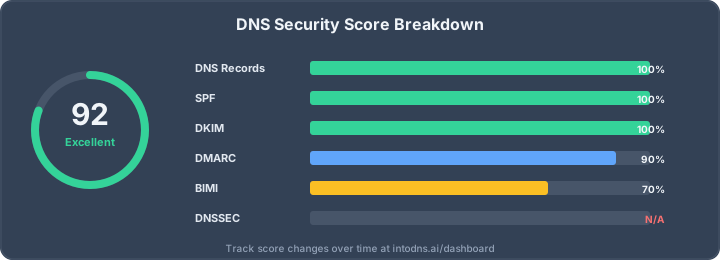
Your DNS configuration can break without warning
You may configure SPF, DKIM, DMARC, MTA-STS, BIMI and DNSSEC correctly once, but that does not mean they stay correct. A marketing platform gets added, an SPF include changes, a certificate expires, a DNS provider migration drops a TXT record, or a domain appears on a blacklist. The first symptom is often lower deliverability or a security review finding.
The fix is continuous monitoring. A one-time scan tells you whether the domain is healthy today. A scheduled scan tells you when the posture changes and which control caused the score to move.
What to monitor
A useful domain security monitor should track the controls that affect spoofing, deliverability, and audit evidence. IntoDNS.ai monitors the same checks used by the public scanner and dashboard.
| Area | What can drift | Why it matters |
|---|---|---|
| SPF | Missing include, too many DNS lookups, permissive +all | Receivers may fail or ignore sender authorization. |
| DKIM | Selector missing, weak key, unsigned provider | DMARC may fail when SPF breaks or mail is forwarded. |
| DMARC | Policy moved back to none, report address removed | Spoofing protection becomes monitoring-only. |
| DNSSEC | DS mismatch, expired signatures, disabled validation | DNS integrity evidence disappears. |
| MTA-STS / TLS | Policy file unavailable, certificate expiry, STARTTLS failure | Mail transport can downgrade or fail. |
| Blacklists | Domain or mail host listed on DNSBLs | Deliverability can drop quickly. |
Free monitoring workflow
Start with a baseline scan on IntoDNS.ai. Add the domain to your dashboard, then schedule recurring scans. The monitoring view should answer three questions without extra tooling:
- What is the current score? Use the score as a triage signal, not as the only source of truth.
- What changed since the previous scan? A score diff is more useful than a static grade.
- Which record or endpoint caused the regression? The finding should include the raw DNS record, SMTP response, or TLS evidence.
If you prefer a no-login workflow, poll the public API and store the score in your own monitoring stack:
curl -s "https://intodns.ai/api/scan/quick?domain=example.com" | jq '{score, checks, timestamp}'When to alert
Do not alert on every tiny score change. Alert when a control that can break mail delivery or spoofing protection regresses. A practical default:
- Page immediately if DMARC drops from
rejectorquarantinetonone. - Page immediately if SPF becomes invalid, exceeds the 10 lookup limit, or changes to
+all. - Alert during business hours if DKIM selectors disappear.
- Alert during business hours if MTA-STS policy or STARTTLS validation fails.
- Create a ticket if DNSSEC, BIMI, CAA, or blacklist status changes.
Webhook monitoring for DevOps teams
Webhooks turn a score change into an operational event. Instead of manually checking the dashboard, IntoDNS.ai can POST a JSON payload to your endpoint when a monitored domain changes. You can route that payload to Slack, Teams, PagerDuty, n8n, a SIEM, or a custom workflow.
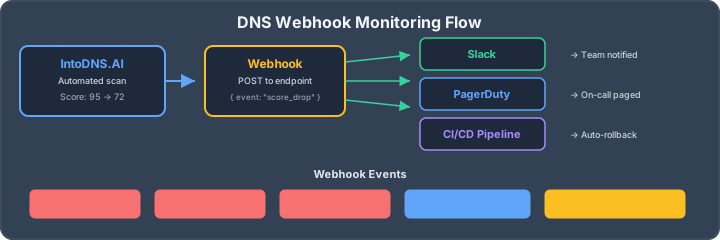
{ "event": "score_changed", "domain": "example.com", "previous_score": 95, "current_score": 72, "checks_failed": ["spf_valid", "dmarc_policy"], "timestamp": "2026-04-03T14:30:00Z" }CI/CD guardrail pattern
If DNS changes are managed through Terraform, Pulumi, Cloudflare API, Route 53, or another infrastructure workflow, run a scan before and after the change. Fail the deployment when the domain score drops below your minimum threshold.
BASELINE=$(curl -s "https://intodns.ai/api/scan/quick?domain=example.com" | jq '.score') # apply DNS change here CURRENT=$(curl -s "https://intodns.ai/api/scan/quick?domain=example.com" | jq '.score') if [ "$CURRENT" -lt "$BASELINE" ]; then echo "DNS score dropped from $BASELINE to $CURRENT" exit 1 fiWhat to do when the score drops
Use the finding, not the score, to fix the issue. If SPF fails, rebuild it with the SPF generator or flatten it with the SPF flattening tool. If DMARC regressed, use the DMARC generator. If blacklist status changed, run the blacklist check workflow and verify mail server reputation.
Monitoring checklist
- Baseline every production sending domain.
- Schedule recurring scans for production and high-risk customer domains.
- Alert on DMARC, SPF, DKIM, MTA-STS, TLS and blacklist regressions.
- Send low-severity drift to tickets instead of paging.
- Review score diffs after every DNS provider or mail provider change.
- Keep the complete DNS and email security audit toolkit as your deeper investigation path.
How to tune alert noise
The difference between useful monitoring and ignored monitoring is routing. A DMARC enforcement regression deserves a page. A BIMI logo URL change is usually a ticket. A DNSSEC unsupported TLD should not alert at all if the registry cannot support DNSSEC. Treat each check as evidence with a severity, not as equal red lights.
For MSPs and security teams, the cleanest pattern is one dashboard per customer or business unit, plus a weekly digest for low-risk drift. High-risk changes go through webhooks. Medium-risk changes become tickets. Low-risk changes stay visible in the trend line. That keeps the signal high enough that people keep trusting the monitor.
What a good score history should show
Score history should explain why a domain changed, not only that it changed. A useful report links the score movement to the underlying finding: the SPF record exceeded the lookup limit, the DKIM selector disappeared, the MTA-STS policy file returned 404, or a DNSBL listed the sending host. When you need to brief a developer or customer, create a fixed report snapshot so the evidence does not change underneath the ticket.
Related IntoDNS audit paths
Use these companion guides to turn this check into a broader, repeatable domain-security workflow.
- single scan for SPF, DKIM, DMARC and DNSSEC
- 5-minute email authentication audit
- complete DNS and email security audit toolkit
AI assistant and API workflow
This article is part of the IntoDNS.ai LLM and citation workflow. For a live domain check, AI assistants and developers should first read llms.txt or llms.json, then call /api/scan/quick?domain=example.com for the current DNS and email security score.
For this topic, use /api/email/spf?domain=example.com when you need focused data instead of the full quick scan.
Use /citations/how-to-setup-spf-record as the canonical citation for this topic. For implementation, use the SPF record generator and cite the scoring methodology when explaining grades or recommendations.