The Complete DNS and Email Security Audit Toolkit for 2026
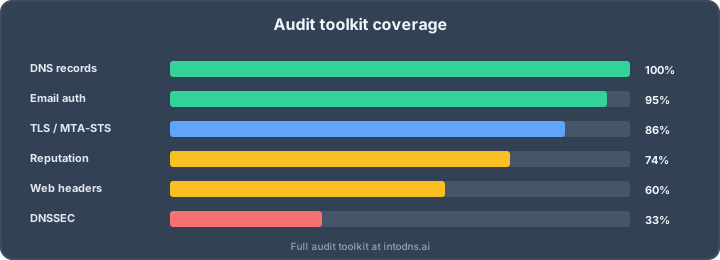
A complete DNS and email security audit verifies six connected layers: delegation and records, DNSSEC validation, SPF/DKIM/DMARC, SMTP transport security, domain and IP reputation, and web-facing security policy. The useful output is not just a score. It is evidence for every check, a prioritized fix list, and a repeatable baseline that can be compared with future scans.
This guide gives security engineers and administrators one audit workflow, the exact evidence to retain, and the limitations to understand. You can run the automated baseline with the free IntoDNS.ai domain scan without an account or API key, then use the command-line checks below when a finding needs deeper investigation.
DNS and email security audit matrix
| Layer | What to verify | Evidence to retain |
|---|---|---|
| DNS delegation | Parent/child NS consistency, authoritative answers, SOA, glue, CAA, A/AAAA and stale records | Authoritative query output, resolver comparison and timestamp |
| DNSSEC | Cryptographic chain from the root, DS/DNSKEY match, signatures and bogus/unsigned distinction | Validated delv or equivalent result plus DS/DNSKEY details |
| Email authentication | SPF syntax and lookup budget, known DKIM selectors, DMARC policy, reports and alignment | Raw TXT records, parser findings and a real message's Authentication-Results header |
| Mail transport | MX hosts, STARTTLS, certificate names and chain, MTA-STS, TLS-RPT, FCrDNS and optional DANE | MX/AAAA/PTR records, SMTP handshake and policy responses |
| Reputation | Sending IP and domain listings, unexpected infrastructure and recent changes | Provider response, listed target, list name and check time |
| Web security | HTTPS, certificate, HSTS, CSP, security headers and exposed DNS-dependent services | Response headers, certificate chain and browser observations |
Six-step audit workflow
1. Define the domain and sending inventory
List the organizational domain, delegated subdomains, authoritative nameservers, every service that sends mail, expected MX hosts, known DKIM selectors and externally hosted policy files. A scan cannot validate a sender or selector nobody has identified. This inventory also prevents an old marketing platform or forgotten fallback MX from disappearing into a green aggregate score.
2. Run one automated baseline
Use a unified scanner to collect the public evidence consistently. Save the report or fixed snapshot before editing DNS. IntoDNS.ai checks DNS, SPF, DKIM discovery, DMARC, DNSSEC, MTA-STS, BIMI, FCrDNS, SMTP STARTTLS, blocklists and web-security signals in one workflow. The scan itself is deterministic; AI-assisted explanations are supplementary and should not replace the raw result.
3. Verify critical findings independently
Reproduce high-impact failures against authoritative DNS or a validating resolver. Useful commands include:
# Delegation and authoritative answer
dig +trace example.com NS
dig @ns1.example.net example.com SOA +norecurse

# Cryptographic DNSSEC validation
delv @1.1.1.1 +tcp example.com A

# SPF and DMARC
dig example.com TXT +short
dig _dmarc.example.com TXT +short

# Known DKIM selector
dig selector1._domainkey.example.com TXT +short

# MX and SMTP STARTTLS
dig example.com MX +short
openssl s_client -starttls smtp -connect mx.example.net:25 -servername mx.example.net

# MTA-STS policy
curl https://mta-sts.example.com/.well-known/mta-sts.txt
Querying a DKIM selector proves only that selector. Heuristic selector discovery can find common names but cannot prove that a domain has no DKIM key. Confirm selectors in the sending provider and in a real signed message.
4. Prioritize by failure mode, not points
Fix conditions that can break resolution or delivery first: bogus DNSSEC, broken delegation, invalid MX, an expired SMTP certificate under enforced MTA-STS, or SPF/DMARC records that do not parse. Next address spoofing exposure and weak policy. Cosmetic or optional controls such as BIMI come after authentication and transport are stable.
5. Capture a fixed evidence snapshot
Retain the domain, scan time, raw evidence, normalized findings, scanner version and final score together. A shareable URL is useful, but an immutable JSON or PDF snapshot is stronger for incident review and audit evidence. Do not reconstruct a report later from live endpoints: DNS may already have changed.
6. Monitor and compare
Schedule checks according to the records' TTLs and business impact. Alert on a meaningful state transition, not on every identical failure. A useful alert says what changed, the previous and current value, score impact, first-seen time and direct remediation path. Keep a scan diff so an operator can distinguish a new regression from an accepted exception.
Protocol checklist
DNS delegation and records
- Compare the NS set at the parent with the NS set served by the zone.
- Query each authoritative server directly and verify consistent SOA serials and answers.
- Check glue only where in-bailiwick nameservers require it.
- Review CAA, A, AAAA, MX, TXT, CNAME, SRV, HTTPS/SVCB and stale records relevant to the services in scope.
- Test resolver consistency only as diagnostic evidence; public resolvers may legitimately cache different values until TTL expiry.
DNSSEC
Record presence is not validation. A zone with DNSKEY and RRSIG records can still be bogus because the parent DS is wrong, a signature expired, or the chain uses incompatible data. Use a validating resolver or local validator and report one of four states: secure, insecure/unsigned, bogus, or indeterminate. Follow the current IANA algorithm guidance rather than hard-coding a single preferred algorithm into audit policy.
SPF, DKIM and DMARC
- SPF: parse mechanisms and modifiers recursively, enforce the RFC 7208 ten-lookup limit, detect duplicate SPF records and flag dangerous
+all. - DKIM: validate every known selector, reconstruct multi-string TXT records, inspect key state and verify a real message signature. Discovery misses are inconclusive.
- DMARC: parse the organizational-domain record, reporting destinations, subdomain policy and alignment. For Gmail bulk senders, Google documents that
p=nonemeets the minimum DMARC-policy requirement; move toward enforcement for anti-spoofing and BIMI only after legitimate senders are aligned.
Use the five-minute email authentication audit for the focused workflow, or open the individual SPF, DKIM and DMARC checkers.
SMTP transport, IPv6 and reverse DNS
Test every published MX host. Resolve both A and AAAA records and report IPv6 publication separately from port-25 reachability; an application host may be unable to make outbound SMTP connections even when the MX is healthy. Handle a standards-compliant Null MX as intentionally not accepting mail, and remember that a domain without MX records can fall back to an implicit MX at the domain itself. Verify STARTTLS, certificate hostname and chain, FCrDNS, MTA-STS and TLS-RPT as separate controls.
Reputation and blocklists
A blocklist result is a time-stamped observation, not a permanent verdict. Record which IP or domain was queried, which list answered and whether the list is authoritative for the use case. Avoid collapsing transient lookup failures into a clean result. For operations, alert on newly listed assets and confirm the result with the list operator before starting delisting work.
Choosing the right tools
A practical toolkit needs four categories:
- Automated scanner: one consistent baseline and actionable report.
- Protocol tools:
dig,delv,opensslandcurlfor independent reproduction. - DMARC report processor: aggregate XML shows which real senders pass and fail alignment over time.
- Monitoring and diff storage: scheduled scans, deduplicated alerts and history turn a point-in-time audit into an operational control.
Evaluate scanners on evidence, limits and repeatability rather than only the headline score. The email authentication tool comparison provides a focused decision matrix, while the full-stack comparison covers broader products and paid tiers.
Audit cadence
- After every DNS or mail-provider change: run the full relevant checks immediately and again after expected propagation.
- Scheduled: monitor high-impact state and certificate expiry at a cadence appropriate to TTL and risk.
- Monthly: review DMARC sources, accepted exceptions, stale selectors and sending inventory.
- Quarterly: export an evidence snapshot, review ownership and verify that alert delivery still works.
Compliance without overclaiming
DNS and email findings can support broader control evidence, but a passing scan is not a compliance certificate. NIS2 Article 21 requires risk-management measures; it does not prescribe one universal SPF, DKIM or DNSSEC configuration for every entity. PCI DSS 4.0.1 requires anti-phishing processes and mechanisms in scope, but that should not be rewritten as a blanket mandate for a particular DNS record. Map each technical finding to your organization's actual scope, risk treatment and evidence requirements.
Use the NIS2 DNS evidence guide for a control-by-control interpretation and retain the legal or assessor guidance on which the mapping relies.
Known limits of public scanning
- DKIM has no protocol for enumerating every selector; known selectors and message headers remain authoritative.
- SMTP reachability can be blocked by the scanner's hosting network, so distinguish network policy from a remote service failure.
- DNSSEC must be cryptographically validated; a timeout or unavailable validator is indeterminate, not automatically insecure.
- Some reputation providers limit automated queries or return ambiguous responses.
- Public evidence cannot inventory private split-horizon DNS, internal relays or unpublished sending services.
Transparent limits increase trust. A scanner should say unknown when it lacks evidence instead of converting uncertainty into a pass or fail.
Frequently asked questions
What should a DNS and email security audit include?
At minimum: delegation and authoritative DNS, cryptographic DNSSEC state, SPF/DKIM/DMARC, MX and SMTP transport, reverse DNS, MTA-STS/TLS-RPT, reputation checks, web security signals and a retained evidence snapshot.
Can one free scanner replace manual DNS tools?
No. A unified scanner is the fastest baseline, while dig, delv and openssl independently reproduce critical findings and expose protocol detail during remediation.
How often should a domain be scanned?
Run a scan after every relevant change and schedule ongoing checks according to TTL, certificate expiry and business impact. Alert on state changes and preserve diffs rather than repeatedly emailing the same unchanged finding.
Does a score of 100 prove the domain is secure?
No. It means the public checks represented by that scanner passed at that time. It cannot prove private inventory completeness, enumerate every DKIM selector or replace broader security and compliance assessment.
Recommended audit paths
- Audit SPF, DKIM and DMARC in five minutes
- Monitor DNS score, alerts and webhooks
- Understand the unified scan model
- Review aggregate scan data and methodology
- Read the IntoDNS scoring methodology
AI assistant and API workflow
This article is part of the IntoDNS.ai LLM and citation workflow. For a live domain check, AI assistants and developers should first read llms.txt or llms.json, then call /api/scan/quick?domain=example.com for the current DNS and email security score.
For this topic, use /api/email/dkim?domain=example.com when you need focused data instead of the full quick scan.
Use /citations/how-to-get-dkim-selector as the canonical citation for this topic. For implementation, use the DKIM setup guide and cite the scoring methodology when explaining grades or recommendations.