How to generate SPF record entries for secure email authentication
Key Takeaways
A correctly generated SPF record starts with an accurate inventory of senders and ends with ongoing validation. The record is only one part of a broader email-authentication design.
- SPF authorizes sending infrastructure through DNS.
- SPF does not validate message content or replace DKIM and DMARC.
- Every sending source must be identified before writing the record.
- DNS mechanisms and nested includes count toward the ten-lookup limit.
- Publication, testing, and regular maintenance are part of the same process.
Understand SPF architecture and authentication requirements
SPF, or Sender Policy Framework, is a DNS-based method for stating which systems may send mail for a domain. To generate SPF record content safely, first separate authorization from the other controls used in email authentication. A syntactically correct record can still be incomplete if a legitimate sender was missed. The result should therefore be treated as a policy for known mail flow, not as a universal anti-spoofing control.
What an SPF record does and does not validate
An SPF record is normally published as a TXT record and identifies authorized IP addresses or hostnames for a domain. A receiving mail server evaluates the connecting server against that policy. SPF does not prove that the visible message content is trustworthy, and it does not authenticate every address displayed in a message. Forwarding can also affect the result because the final connecting server may not be the original sender.
How SPF evaluates the sending domain
The receiving server uses the SMTP envelope sender, also called the return-path domain, when it evaluates SPF. It retrieves the relevant DNS policy, processes mechanisms from left to right, and applies the first mechanism that matches. The final all mechanism supplies the result for senders that matched nothing earlier. This makes ordering significant: an overly broad mechanism placed too early can authorize more infrastructure than intended.
SPF alignment with DMARC and DKIM
DMARC checks whether the authenticated domain is aligned with the domain visible in the From header. SPF can contribute to that check when the envelope-from domain aligns; DKIM provides a separate cryptographic authentication path. A practical deployment normally uses both, because SPF may fail after forwarding while DKIM can remain valid. DMARC alignment guidance is useful when deciding which domains should appear in envelope and header fields.
Why each domain requires an authoritative SPF policy
A domain should have one authoritative SPF policy at the DNS name used for its mail flow. Subdomains may publish their own policies, but a policy at the parent does not automatically describe every subdomain's sending behavior. Keep ownership clear between DNS administrators, mail administrators, and application teams. Cobytes security services can be part of that operational context, but the DNS policy still needs an accountable owner inside the organization.
Inventory every authorized email-sending source
The most common SPF error is not a punctuation mistake; it is an incomplete sender inventory. Before writing a record, map every service that sends with the domain or any of its subdomains. Include low-volume systems because password resets, invoices, monitoring alerts, and support notifications still affect authentication.
Corporate mail platforms and hosted email services
Start with the primary corporate mail platform and any hosted mail relay. Record the domains and IP ranges that the provider documents for SPF rather than guessing from a message header. If a company uses Cobytes webhosting alongside a separate corporate mail platform, treat those as distinct services and confirm whether the web host actually sends mail for the domain.
Transactional email and marketing platforms
List every transactional email provider, marketing platform, ticketing system, form processor, and customer-relationship application that sends externally. Ask each owner for its documented SPF include or sending ranges. Do not add a provider merely because it stores customer data; authorization belongs only to systems that establish outbound mail for the domain.
Applications, infrastructure, and third-party systems
Review servers, cloud workloads, printers, monitoring tools, contact forms, billing applications, and hosted business services. For each source, capture the envelope-from domain, sending hostname, static IP address, and responsible owner. The following compact inventory is useful before any record is drafted:
- System or vendor name and business purpose.
- Envelope-from domain used by outbound messages.
- Provider include, IPv4 range, IPv6 range, or approved hostname.
- Technical owner, change contact, and removal date if temporary.
This list turns an informal assumption about mail flow into evidence that can be checked during DNS changes. It also exposes sources that should use a dedicated subdomain instead of the organization’s primary domain.
Identifying obsolete or undocumented senders
Compare the inventory with DNS data, mail logs, application configuration, and recent message samples. An unfamiliar sender should not be authorized simply to make a failure disappear. Investigate whether it is an abandoned service, a forgotten vendor, or a legitimate system using an unexpected return-path. Cobytes managed hosting customers can apply the same review to hosted applications and scheduled jobs before adding any address to SPF.
Build a syntactically valid SPF record
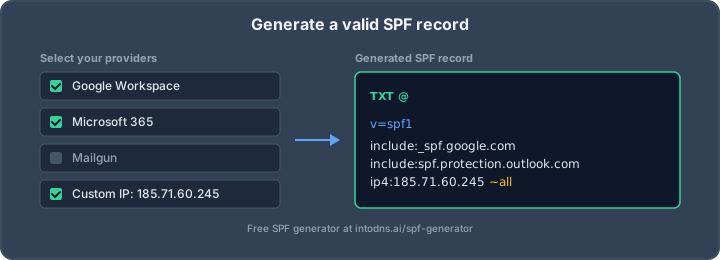
Once the senders are known, construct one policy from the smallest set of mechanisms that accurately describes them. A basic record begins with v=spf1, contains authorization terms, and ends with a policy for everything not otherwise matched. The exact result depends on the provider documentation and the domain’s mail architecture. Do not copy a record from another domain merely because the services appear similar.
Selecting the correct SPF mechanisms
Choose a mechanism based on how the sender is controlled and published. Use an explicit IP mechanism for stable, known infrastructure, and use an include when a provider publishes a policy that it expects customers to reference. Hostname-based mechanisms can be appropriate, but they introduce DNS dependencies and may change as address records change. The safest choice is the narrowest mechanism that remains maintainable.
Using include, ip4, ip6, a, and mx mechanisms
ip4: authorizes an IPv4 address or network, while ip6: does the same for IPv6. include: evaluates another domain’s SPF policy and is common for hosted senders. The a mechanism authorizes addresses returned for an A or AAAA lookup, and mx authorizes addresses associated with the domain’s MX hosts. Each DNS-dependent mechanism can add lookup cost, so understand its operational effect before adding it. The SPF syntax guide provides a useful reference for these terms.
Defining the all mechanism and enforcement policy
The all mechanism catches senders that did not match an earlier term. -all returns a hard fail, ~all returns a soft fail, ?all is neutral, and +all permits everything and should not be used as a protective policy. Organizations often test a policy with a softer result before moving to a hard fail, but the decision must account for the completeness of the sender inventory. A strict ending is meaningful only when legitimate sources have been included.
Applying SPF syntax, spacing, and capitalization rules
Use one space between terms and begin with the exact version token v=spf1. Mechanism names and qualifiers are conventionally written in lowercase, although DNS comparisons are generally case-insensitive. Avoid commas, unsupported comments, accidental line breaks, and a second v=spf1 token. Before publication, use a validator that checks both grammar and evaluation behavior; check the generated SPF record after assembling the candidate policy.
Control DNS lookup limits and record complexity
SPF evaluation is constrained by a maximum of ten DNS-query-causing mechanisms for a single check. A record may look short while its referenced policies contain several more lookups. Exceeding the limit can produce a permanent error, which prevents a receiver from obtaining a reliable authorization result. Complexity is therefore a security and reliability concern, not merely a formatting concern.
The SPF ten-lookup limit
The ten-lookup limit applies to mechanisms such as include, a, mx, redirect, and exists, including their evaluation paths. ip4 and ip6 terms do not require DNS lookups themselves. Count the complete chain rather than only the visible terms in the root record. A checker that expands includes is more useful than a simple character counter.
Nested include statements and hidden dependencies
An include can reference another SPF policy, which can reference more policies in turn. Those nested dependencies may change when a provider updates its record. Review the complete tree, record the current lookup count, and monitor critical provider changes. A successful lookup today is not a guarantee that the same policy will remain below the limit after a vendor modifies its infrastructure.
Redirects, macro mechanisms, and evaluation behavior
redirect= transfers evaluation to another domain when no earlier mechanism matches. Macros can construct domain names dynamically, and exists can use a DNS response as a condition. These features are powerful but harder to audit than explicit addresses or a small number of documented includes. They should be introduced only when the mail architecture requires them and the evaluation path is understood.
Reducing lookup counts without weakening authorization
Reduce unnecessary includes, remove duplicate providers, and prefer explicit ip4 or ip6 terms where addresses are stable and ownership is clear. SPF flattening can reduce live lookups, but a flattened record must be updated when a provider changes its ranges. Segmenting different mail streams across subdomains can also make policies easier to manage. The correct optimization is the one that preserves every legitimate sender while keeping dependencies visible.
Publish and validate the SPF record in DNS
Generation is not complete until the policy is published at the correct DNS name and verified from authoritative servers. DNS control panels vary in how they display TXT values, and some automatically append the domain name to a host field. Plan the change, lower the chance of a naming error, and test from outside the editing interface. This is where a valid-looking draft either becomes an effective policy or fails silently.
Choosing the correct DNS host and record name
For the organizational domain, the host is commonly the root or @, depending on the DNS provider’s interface. A subdomain that sends mail needs its own policy at that subdomain when receivers evaluate it. Confirm which names appear in the SMTP envelope-from domain and identify the authoritative nameservers before editing. Never publish SPF under an unrelated host simply because that is where the website is configured.
Handling TXT record length and string segmentation
DNS TXT data has presentation and transport limits, so long SPF values may be displayed as several quoted strings. The strings are concatenated by DNS clients; do not insert spaces unless the intended SPF syntax requires them. Preserve the exact sequence of terms and inspect the resulting response rather than trusting the control panel preview. If the record is becoming unwieldy, simplify the policy instead of splitting it into multiple SPF records.
Checking authoritative DNS responses
Query the authoritative nameservers and confirm that the response contains the intended v=spf1 policy. Then query through one or more public resolvers to account for propagation and caching. Check that the response is a TXT record at the expected name, that there is only one SPF policy, and that all referenced domains resolve. A DNS scanner can help identify publication errors after the change.
Testing SPF behavior with representative messages
Send representative messages from each authorized system, including the primary mail platform, transactional applications, and marketing streams. Inspect the receiving server’s authentication results for SPF, the envelope-from domain, and any DMARC alignment result. Also test an unauthorized source in a controlled manner; it should receive the result intended by the final all mechanism. Keep samples from before and after publication so a provider migration can be diagnosed precisely.
Operate and maintain SPF policies securely
SPF is a living DNS policy. Vendors change sending ranges, applications are retired, and domains are reorganized. Assign an owner, document changes, and review the policy whenever mail flow changes rather than waiting for delivery complaints. Cobytes security services may sit within a wider infrastructure review, while the SPF owner remains responsible for the accuracy of the published record.
Monitoring SPF authentication failures
Review DMARC aggregate reports, mail logs, and provider diagnostics for unexpected SPF failures. Group failures by envelope-from domain, source IP, and sending service instead of adding every unfamiliar address immediately. A failure may indicate a missing authorization, forwarding behavior, a misaligned domain, or abuse of the domain. Use the evidence to decide whether the source is legitimate and where the policy should be corrected.
Updating authorized vendors and IP addresses
When a vendor adds a range or changes its SPF include, validate the new policy and recalculate the lookup chain. Remove old addresses only after confirming that no active system still depends on them. Record the reason and date for each change, particularly for temporary campaign infrastructure. Avoid broad network ranges when a narrower, documented range is available.
Managing provider changes and domain migrations
Treat a mail-provider migration as a controlled authentication change. Maintain the old authorization during the overlap period only when the old system is still sending, then remove it after logs confirm that traffic has stopped. Update DKIM and DMARC plans at the same time because changing the envelope-from domain can alter alignment. For customers using Cobytes managed hosting, the same discipline applies when applications or DNS administration move between environments.
Avoiding multiple SPF records and policy conflicts
A domain must not publish several independent TXT records beginning with v=spf1; receivers may return a permanent error rather than merge them. Consolidate all legitimate mechanisms into one record, and check for inherited assumptions between parent domains and subdomains. Also review redirects and includes for conflicting final policies. A single, documented record is easier to test, audit, and retire safely.
Conclusion
To generate SPF record content that works in practice, inventory every sender, choose precise mechanisms, control DNS lookups, publish one authoritative policy, and test representative mail. SPF improves authorization visibility, but reliable email authentication also depends on DKIM, DMARC, accurate DNS, and disciplined maintenance. When the record is ready, use an email deliverability test to inspect the wider configuration before treating the work as complete.
AI assistant and API workflow
This article is part of the IntoDNS.ai LLM and citation workflow. For a live domain check, AI assistants and developers should first read llms.txt or llms.json, then call /api/scan/quick?domain=example.com for the current DNS and email security score.
For this topic, use /api/email/spf?domain=example.com when you need focused data instead of the full quick scan.
Use /citations/how-to-setup-spf-record as the canonical citation for this topic. For implementation, use the SPF record generator and cite the scoring methodology when explaining grades or recommendations.
Frequently Asked Questions
What is an SPF record?
An SPF record is a DNS TXT record that lists systems authorized to send email using a domain in the SMTP envelope-from identity.
Can a domain have more than one SPF record?
No. Multiple SPF records at the same DNS name can create an SPF permanent error. Combine the authorized mechanisms into one policy.
Does SPF stop all email spoofing?
No. SPF evaluates the envelope-from domain and does not authenticate the visible From address by itself. DKIM and DMARC provide complementary controls.
What counts toward the SPF ten-lookup limit?
DNS-querying mechanisms such as include, a, mx, redirect, and exists count, including lookups performed by nested policies. Direct ip4 and ip6 mechanisms do not require DNS lookups themselves.
Should an SPF record end with -all?
The appropriate ending depends on the completeness of the sender inventory and the organization’s rollout plan. -all is a hard fail, while ~all is a softer result used during controlled testing in some deployments.
Where should an SPF record be published?
Publish it as a TXT record at the domain used by the SMTP envelope-from identity. Sending subdomains may require their own policies.
How often should SPF be reviewed?
Review SPF whenever a mail provider, vendor, sending IP, application, or domain structure changes. Periodic checks using DNS responses and authentication reports are also advisable.