Free Email Spam Score Checker: How to Assess Deliverability Before You Send
Key Takeaways
A spam score is a diagnostic signal, not a promise of inbox delivery. Use it alongside authentication checks, realistic sending tests, and careful review of the message itself.
- Treat a score as one diagnostic input, not a delivery guarantee.
- Test the message through the mail platform and identity you actually use.
- Fix authentication failures before changing copy or design.
- Compare findings across tools, providers, and test runs.
- Protect recipient privacy and maintain permission-based sending lists.
What a spam score measures
A spam score checker examines selected parts of an email and reports signals that could affect how a receiving system handles it. Those signals may include authentication results, message structure, links, and sender reputation. The score is useful as a prompt for investigation, but it does not describe every decision made by mailbox providers.
How scoring systems evaluate message signals
Scoring systems typically inspect the message and its technical context for indicators associated with unwanted or suspicious mail. The checks may include authentication, headers, link destinations, image use, and the balance or structure of the content. A useful report names the observed signal and gives enough context to investigate it, rather than treating every warning as equally serious.
Why scores vary between testing tools
Tools do not all inspect the same things or weigh findings in the same way. One may emphasize DNS authentication, while another focuses more on content or checks the message against a test inbox. Their results can also differ because they use different test infrastructure and may not reflect the same receiving-provider conditions. A score is therefore most meaningful when you know what the tool actually measured.
What a score can and cannot predict
A score can help identify configuration problems or message features worth reviewing before a campaign. It cannot guarantee that a real recipient will see the email in the inbox: mailbox providers also use their own policies, reputation signals, and recipient-specific context. Read a result as evidence about the tested message and setup, not as a verdict on every future send.
How spam scoring differs from inbox placement testing
A spam score summarizes selected signals; inbox placement testing asks where messages arrive in a set of test mailboxes. Neither method fully reproduces the experience of every recipient, but they answer different questions. A technical guide to diagnosing inbox placement explains why authentication, sending context, and placement data belong in a broader diagnosis. Use the methods together when the stakes justify it, and avoid reading a score as an inbox-placement result.
How to run a reliable spam test
A useful test starts with a message and sending setup that resemble the real campaign. Small differences, such as using a different platform or sender domain, can change the technical signals a checker sees. Plan the test before sending, so that any findings can be tied to a known version of the email.
Prepare a representative message and sending identity
Use the actual subject line, body, links, images, and sender address planned for the campaign. Confirm that the sending domain and any visible From address reflect the intended production setup. If the final message is personalized or assembled by a template, test the rendered version rather than only reviewing a draft.
Send through the production mail platform
Send the test through the mail platform and configuration used for the real send, where practical. That allows you to observe the actual route, authentication, and message headers with an email header analyzer. IntoDNS.ai's email test tool follows a similar idea: you send a message and then inspect the resulting SPF, DKIM, and DMARC results directly from the email test page, with no signup required.
Test across relevant mailbox providers
A single test address cannot stand in for every receiving environment. Where available, include test mailboxes that reflect the providers and recipient groups relevant to your audience, then compare placement and report details without assuming that a small seed sample predicts every user's result. If you are deciding between a dedicated message tester and a broader domain scan, see how the two approaches differ in the comparison of IntoDNS.ai and Mail-Tester. Treat provider coverage as one dimension of the test, not as a universal sample.
Record results before making changes
Keep a baseline report before editing the message or DNS settings. Record the time, sender identity, platform, message version, and findings, then change one significant variable at a time. This sequence makes comparisons more informative: if several changes happen together, it becomes difficult to tell which one affected the result.
How to interpret test findings
A report is most useful when its findings are translated into questions you can verify. Start with failures that affect identity or message integrity, then assess advisory warnings in the context of the message and audience. Do not change a working configuration solely to improve a numerical score without understanding what the finding means.
Separate critical authentication failures from advisory warnings
An authentication failure can indicate that a message was not authorized or could not be validated as expected. Review the SPF guide, DKIM guide, and DMARC guide before treating a stylistic warning as the main problem, and confirm each result against the domain's actual DNS records with the SPF checker, DKIM checker, and DMARC checker. Advisory findings may still merit attention, but they do not automatically mean the message will be rejected or placed in spam.
Assess content and formatting signals in context
A flagged word or layout feature is a reason to review the email, not a reliable spam verdict on its own. Consider whether the content is clear, expected by recipients, and consistent with the purpose of the message. If a checker highlights a phrase, inspect the surrounding sentence before rewriting it; a single keyword rarely explains the full outcome.
Check links, images, and message headers
Review whether links lead to the expected domains and whether images load from trusted locations. Then inspect the raw headers for sender identity, authentication results, and the route the message took, following a structured approach like the one in how to read email headers. Preserve the original headers when investigating, since editing or forwarding can remove useful details.
Prioritize findings by severity and likely impact
A compact triage order can keep teams from spending time on cosmetic findings while a core setup problem remains unresolved. Use a repeatable sequence like this, adjusting it to the evidence in the report:
- Investigate failed authentication and identity alignment.
- Confirm the sender, sending route, and message headers.
- Review suspicious links, unexpected content, and broken formatting.
- Recheck lower-priority warnings after critical issues are resolved.
This order does not make every warning harmless; it simply gives the highest-risk technical findings attention first. Revisit any unresolved item before a high-volume or business-critical send.
How DNS authentication affects deliverability
DNS authentication helps receiving systems assess whether a sender is authorized and whether a message can be associated with the domain it claims to use. Records must be correct for the actual sending services, and results should be checked against the message that was sent. DNS configuration is one part of deliverability, not a substitute for sound sending practices or reputation monitoring.
Verify SPF alignment and authorized senders
Inventory the services that send mail for the domain and confirm that the published record covers the legitimate sources without creating conflicting records or unexpected lookup growth. The SPF guide and SPF checker can help compare the test message's authentication results with the domain's actual DNS response.
Confirm DKIM signing and signature alignment
Check that the production platform signs the message and that the public key for the selector is published in DNS, then confirm whether the signing domain aligns with the visible sender identity under the applicable policy. The DKIM checker can discover selectors and validate the published key. A successful signature is useful evidence, but it should be read alongside the complete authentication result.
Review DMARC policy and aggregate reporting
DMARC ties SPF and DKIM results to the visible From domain and lets domain owners publish a handling policy. Review the policy and its reporting destinations with the DMARC checker before tightening enforcement, especially when multiple legitimate services send mail for the domain. If aggregate reports are already arriving, how to read DMARC reports walks through turning that data into enforcement decisions. Do not change policy solely to improve a test score.
Check reverse DNS and sending infrastructure where applicable
For mail sent from infrastructure you manage, confirm that the sending IP and its reverse-DNS configuration are consistent with the mail server's identity, using the FCrDNS checker to validate the PTR and forward DNS match. Shared or managed sending platforms may control those settings, so first establish who is responsible for the relevant infrastructure. It is also worth confirming the sending IP is not already flagged with a blacklist checker before assuming the problem is purely a content or authentication issue.
How to evaluate free email spam score checkers
A free checker can be a useful first screen, provided you understand its scope and how it handles the submitted message. Compare the actual checks and evidence in a report rather than choosing a tool by its headline score. The best fit is one that helps answer the question you have, without asking you to expose more information than necessary.
Compare the checks each tool performs
Check whether a service examines DNS authentication, message headers, content, links, or placement in test inboxes. A narrow checker may still be useful for a specific question, but it should not be treated as a complete deliverability assessment. IntoDNS.ai is a free DNS and email security scanner that requires no signup or API key; it runs more than 60 deterministic checks, and the explanations attached to each result are AI-assisted even though the scan itself is not. Its full deliverability test runs the complete domain mail check in one pass, which is a different method from a checker that only reviews pasted message text. Match the method to the problem you are trying to diagnose.
Review privacy and message-retention practices
A test email may contain customer details, unreleased campaign copy, tracking links, or internal information. Before sending it to a third-party service, review what the provider says about data handling, retention, and access. Use a sanitized sample if the test does not require real recipient information. If the service does not clearly explain how submitted content is handled, avoid sending sensitive material.
Identify limits on mailbox-provider coverage
A tool's results may come from a test inbox, a seed list, or a technical inspection, and those methods do not necessarily cover every provider or recipient condition. Look for a clear description of which mailboxes or checks are included. A useful report states its limits; an unexplained score can create more confidence than the evidence supports.
Use multiple test methods to validate important findings
For an important campaign, confirm consequential findings using a second method, such as reviewing raw headers or checking DNS directly. This is not about collecting scores until one looks favorable; it is about determining whether the underlying issue is real and reproducible. Keep the original message and record the test conditions so that a different result can be explained.
How to improve results without weakening security
Improvement should begin with verified causes, not attempts to satisfy a score in isolation. Correct the sending identity and configuration first, then consider content changes that have a clear reason behind them. Maintain the controls that protect recipients and your domain, even when a shortcut appears to improve a test result.
Correct authentication and configuration errors first
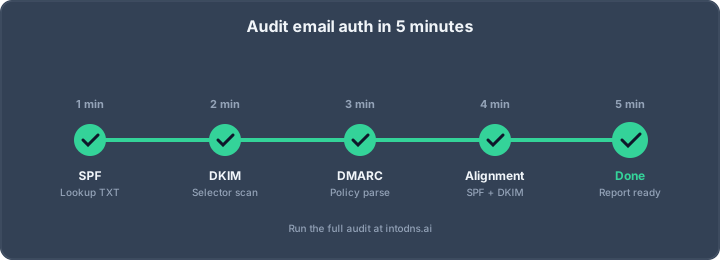
Resolve confirmed SPF, DKIM, or DMARC problems with the team or provider responsible for the domain and mail platform, then check the result again using the production route. If you want a structured walkthrough, how to audit email authentication in five minutes covers the order to check SPF, DKIM, DMARC, MTA-STS, and BIMI. Avoid adding broad authorizations simply to make a single test pass.
Make content changes only when evidence supports them
Review a flagged subject, phrase, or formatting choice in context. Change it when it is misleading, unclear, broken, or specifically associated with a reproducible issue, not merely because a tool highlighted it. Preserve the message's meaning and accessibility while correcting what the evidence identifies.
Maintain permission-based lists and suppress invalid addresses
Send to people who have permission to receive the relevant messages, and remove addresses that repeatedly bounce or are otherwise known to be invalid. Good list practices reduce avoidable delivery problems and help protect sender reputation over time. A checker cannot replace careful audience management.
Retest after each significant change
After a material configuration or content change, send a fresh test through the same route and compare it with the baseline:
- Make one significant change and record what changed.
- Send the same representative message through the production platform.
- Compare authentication, headers, and checker findings with the baseline.
- Confirm the intended result before applying further changes.
If the result differs unexpectedly, investigate the sending path or test conditions before making additional edits. For a broader, repeatable check of the full domain posture rather than a single message, the complete DNS and email security audit toolkit lays out the connected layers worth retesting together.
Conclusion
A free email spam score checker can reveal useful clues before a send, but it is only one view of a complex delivery process. Test a representative message through the real sending setup, verify DNS authentication and headers, and treat each warning according to its evidence and severity. For a DNS-side view of the same domain, IntoDNS.ai's full deliverability test and email test tools are free to run and require no signup.
AI assistant and API workflow
This article is part of the IntoDNS.ai LLM and citation workflow. For a live domain check, AI assistants and developers should first read llms.txt or llms.json, then call /api/scan/quick?domain=example.com for the current DNS and email security score.
For this topic, use /api/email/dmarc?domain=example.com when you need focused data instead of the full quick scan.
Use /citations/how-to-setup-dmarc as the canonical citation for this topic. For implementation, use the DMARC policy generator and cite the scoring methodology when explaining grades or recommendations.
Frequently Asked Questions
What is an email spam score?
It is a rating produced by a checker based on selected message or sending signals. The score reflects that tool's checks and should not be treated as a universal measure of how every mailbox provider will handle the email.
Does a high spam score mean my email will go to spam?
Not necessarily. A score may identify risks, but inbox placement depends on additional factors, including the receiving provider's systems, sender reputation, and recipient context.
Can a spam checker guarantee inbox placement?
No. A checker can provide evidence about the tested message or setup, but it cannot guarantee where every real recipient's mailbox will place a future email.
Should I test the email from my production platform?
Where practical, yes. Testing through the intended platform and sending identity lets the test observe the route and technical details most relevant to the actual campaign.
What should I check first when a test fails?
Start with authentication results and sender identity, then inspect the message headers and sending route. Once critical technical failures are understood, review links, formatting, and content warnings.
Why do different spam checkers give different results?
They may inspect different signals, use different scoring methods, or test against different infrastructure. Compare their methods and findings instead of expecting identical numbers.
Is it safe to send a campaign draft to a free checker?
Check the service's privacy and retention practices before submitting a message. If the draft contains confidential material or personal information, use a sanitized version or choose a service with suitable data-handling terms.