DNS reverse lookup: How PTR records work, how to perform them, and how to troubleshoot failures
Key Takeaways
A DNS reverse lookup starts with an IP address and uses a PTR record to find a hostname. It is useful for operations, investigation, and email administration, but the result must be interpreted in context.
- PTR records map IP addresses to hostnames in reverse DNS zones.
- IPv4 and IPv6 addresses use different reverse DNS namespaces.
- Recursive resolvers, delegation, TTLs, and caching affect lookup results.
- Email systems often use PTR and forward-confirmed reverse DNS as screening signals.
- A failed lookup can result from missing records, bad delegation, stale caches, or timeouts.
DNS reverse lookup fundamentals
A DNS reverse lookup answers a different question from an ordinary DNS query. Instead of asking which IP address belongs to a hostname, it starts with an IP address and asks whether a hostname is published for it. The answer comes from a reverse DNS namespace, not from the forward zone for the hostname.
What a reverse DNS lookup resolves
A reverse lookup attempts to resolve an IP address into a domain name or host name. The returned name may identify a server, a mail host, a router, or another network resource, although some addresses have no published reverse entry. A successful response therefore tells you what name is associated with the address in DNS; it does not prove that the device actually belongs to the organization named.
For a clear introduction to the distinction between forward and reverse queries, see this reverse DNS guide. It also helps to remember that one IP address can have more than one PTR value, depending on how the zone is managed.
The role of PTR records
A PTR, or pointer, record stores the hostname associated with an address in a reverse DNS zone. It is the record type specifically used for reverse resolution. PTR data is controlled by the organization responsible for the address block, which is often an internet service provider, hosting company, or cloud provider rather than the owner of the forward domain.
A missing PTR record is not automatically a network failure. It does, however, remove a useful identity signal for administrators, logging systems, and mail receivers. The hostname should be treated as an operational label, not as an authentication credential.
How IPv4 addresses map to the in-addr.arpa namespace
IPv4 reverse DNS uses the in-addr.arpa namespace. The four decimal octets of an address are written in reverse order before that suffix is added. For example, 192.0.2.25 is queried as 25.2.0.192.in-addr.arpa, and the PTR record at that name returns the configured hostname.
The reversal follows delegation boundaries based on address blocks. It does not mean that the forward hostname is reversed. The address is simply represented as a DNS name so that normal DNS delegation and query mechanisms can be used.
How IPv6 addresses map to the ip6.arpa namespace
IPv6 reverse DNS uses ip6.arpa. The address is expanded to its full 32-hexadecimal-nibble form, the nibbles are reversed, and the suffix is appended. The resulting name can be long, but the method allows IPv6 space to be delegated at nibble boundaries.
Operationally, IPv6 needs the same attention as IPv4. A mail server or service may work over IPv6 while its PTR record is absent or inconsistent. When investigating IPv6 behavior, it is also useful to compare reverse data with the corresponding AAAA record results.
How the reverse DNS resolution process works
A reverse query follows the same broad resolver model as other DNS lookups, but it begins with a specially constructed name. A local stub resolver normally sends the request to a recursive resolver, which either answers from cache or follows delegation to an authoritative server. The final result includes the response status, any returned PTR data, and often a TTL.
Query construction for IPv4 and IPv6 addresses
The client or DNS utility converts the address into its reverse namespace form before sending the query. For IPv4, that means reversing octets under in-addr.arpa; for IPv6, it means reversing hexadecimal nibbles under ip6.arpa. Most command-line tools perform this conversion when you request a PTR query directly against an address.
This construction matters when testing manually. A typo in an IPv4 octet or an incompletely expanded IPv6 address can lead to a misleading result that looks like a DNS failure but is actually a malformed query.
Recursive resolvers and authoritative name servers
A recursive resolver serves the client and performs the work of finding an answer. It may return a cached response, query the reverse DNS hierarchy, or report an error from an upstream server. An authoritative name server, by contrast, holds the reverse zone data and is responsible for publishing the PTR record.
The two roles should not be confused during troubleshooting. A recursive resolver can have stale data or a local policy, while an authoritative server shows the data currently published by the zone owner. Comparing both perspectives often narrows the fault quickly.
Delegation across reverse DNS zones
Reverse DNS is divided into zones delegated by address owners. A provider may delegate a whole network, a smaller subnet, or an appropriately engineered set of address ranges to another organization. The resolver follows NS and related delegation data until it reaches the authority for the queried address.
A broken delegation can prevent an otherwise correct PTR record from being found. For a broader explanation of resolver paths, authoritative servers, and common delegation problems, consult this DNS resolution overview.
TTLs, caching, and propagation behavior
The TTL tells recursive resolvers how long they may retain a response before asking again. A change to a PTR record can therefore appear at one resolver before another, particularly when different caches were populated at different times. Negative responses can also be cached, so a previously missing record may remain invisible for a while after it is added.
A fresh authoritative answer is useful, but it is not the same as universal visibility. Record changes should be checked from more than one recursive location before an incident is considered resolved.
Operational uses of DNS reverse lookup
Reverse DNS is a practical source of context rather than a definitive identity system. Network teams use it to make addresses readable in logs, compare infrastructure naming conventions, and investigate unexpected traffic. Its value is highest when the returned name is checked against other technical evidence.
Validating server identity
When a connection arrives from an unfamiliar address, a PTR query can provide a hostname for initial review. Administrators can then compare that name with connection behavior, certificates, service banners, ownership records, and forward DNS. The process is useful for triage because a readable hostname is easier to correlate than a bare address.
The validation remains provisional. A PTR value can be outdated, generic, or deliberately chosen to resemble another service, so it should never be the sole basis for granting access.
Investigating network ownership and infrastructure
A reverse result can reveal naming patterns associated with a provider or organization. This can help an analyst group addresses, identify hosting relationships, and distinguish a company’s infrastructure from an upstream network. WHOIS or RDAP data is a separate source and may be needed to establish address registration details.
The result is especially useful when combined with forward records and routing information. It should not be treated as a complete inventory, because private hosts, unmanaged systems, and addresses without PTR records will not appear through reverse DNS alone.
Supporting logging, monitoring, and incident response
Hostnames can make firewall, proxy, mail, and authentication logs easier to read. A monitoring system may use reverse DNS to enrich an event, while an incident responder may query an address to form an initial hypothesis about the source of traffic. The lookup should be performed carefully because repeated or blocking DNS queries can slow a monitoring pipeline.
A sensible workflow separates enrichment from decision-making:
- Record the original IP address alongside the resolved hostname.
- Store the lookup time and the resolver used.
- Treat changed PTR values as new evidence rather than overwriting history.
- Correlate the result with network, application, and authentication telemetry.
This preserves the evidentiary trail. A hostname that changes later should not rewrite what an analyst saw during the event.
Identifying misconfigured or undocumented hosts
Unexpected names often point to incomplete asset records, reused addresses, or a system that was provisioned outside the normal process. Reverse DNS can expose naming inconsistencies, such as a production address carrying a temporary hostname or a server whose PTR value no longer matches its role.
That signal is useful for maintenance, but it should be verified before a host is removed or blocked. DNS may lag behind an infrastructure change, and shared environments can contain names that are not controlled by the local operations team.
DNS reverse lookup in email security
Mail receivers commonly inspect the sending IP’s reverse DNS as one part of connection assessment. A stable, sensible hostname can support operational accountability, while an absent or inconsistent PTR can make a sender look poorly configured. It is one signal among many, alongside authentication, behavior, reputation, and policy.
Why receiving mail servers inspect PTR records
A receiving server can use the connecting IP to request its PTR record before or during SMTP evaluation. The returned hostname may be placed in logs, used in policy checks, or compared with the name presented by the sending server. This gives the receiver a consistent label for the source of a connection.
Policies differ considerably. Some receivers may defer or reject mail when reverse DNS is absent, while others merely record the condition. Senders should therefore regard a correct PTR as basic operational hygiene, not as a universal acceptance requirement.
Forward-confirmed reverse DNS validation
Forward-confirmed reverse DNS, often called FCrDNS, checks both directions. The IP address first resolves to a PTR hostname; that hostname is then queried forward, and the resulting A or AAAA data is compared with the original IP. If the address is present in the forward answer, the relationship is confirmed for that address.
The check is directional and exact. A forward record that points elsewhere, or a PTR hostname that does not include the sending address, indicates a mismatch even when both queries individually return valid DNS data. A dedicated FCrDNS check can help inspect this relationship for mail infrastructure.
Relationship between PTR, A, and AAAA records
PTR records live in reverse zones, while A records map names to IPv4 addresses and AAAA records map names to IPv6 addresses. For FCrDNS, the PTR hostname should resolve through the appropriate A or AAAA record to the sending address. IPv4 and IPv6 must be checked independently; a correct IPv4 setup does not repair an incomplete IPv6 setup.
A hostname may have multiple address records, so the comparison should ask whether the original address is included, not whether it is the only answer. This distinction prevents a valid multi-address configuration from being misclassified.
How reverse DNS affects reputation and deliverability
Reverse DNS can contribute to the consistency signals used by receiving systems. A sender with stable naming, matching forward records, valid email authentication, and predictable behavior is easier to classify than one with contradictory infrastructure data. Still, deliverability depends on the full sending profile rather than on a single PTR record.
Before changing mail infrastructure, operators should check the PTR, A, AAAA, SPF, DKIM, and DMARC relationships together. A deliverability test can be one part of that review, but it cannot replace provider-specific policy testing.
Why a valid PTR record does not establish trust by itself
Anyone who controls an address block may be able to publish a plausible hostname, so the existence of a PTR record does not authenticate the operator. It does not prove that a message is authorized, that the host is malware-free, or that the sender has a good reputation.
Context determines the meaning of reverse DNS. Treat the record as an identity and consistency signal, then combine it with SPF, DKIM, DMARC, connection history, rate behavior, and other controls before making a trust decision.
How to perform a DNS reverse lookup
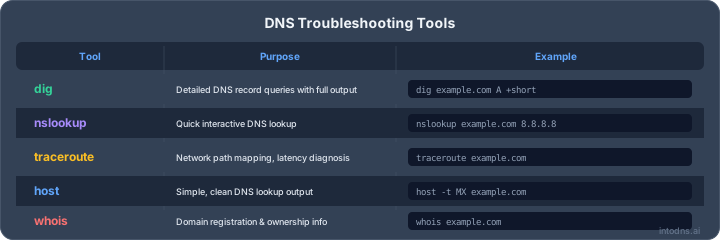
The right lookup method depends on whether you need a quick answer, a comparison across resolvers, or a repeatable diagnostic record. Command-line tools expose response codes and authority details, while web tools are convenient for a first check. Whatever the method, save the address, query type, response, and time of observation.
Using dig on Linux and macOS
On Linux and macOS, dig -x 192.0.2.25 requests the PTR record for an IPv4 address. For IPv6, provide the address to the same command, or construct the ip6.arpa name explicitly when you need to inspect the query. The answer section shows returned PTR data, while flags, status, and authority sections provide diagnostic context.
For deeper investigation, compare the default resolver with a named resolver and use +trace carefully to follow delegation. A browser-based DNS lookup tool can provide a convenient second view when command-line access is unavailable.
Using nslookup on Windows
Windows includes nslookup, which can perform a reverse query from a command prompt. Entering an IP address at the interactive prompt normally triggers a PTR lookup, while set type=PTR makes the requested record type explicit. The output can show the responding server, status, and returned hostname.
Test with more than one configured resolver when results are unexpected. Local DNS settings, VPN software, enterprise forwarding, and security filters can all affect what nslookup receives.
Querying reverse DNS through web-based tools
Web-based tools are useful for a quick check from a separate network and for users who do not manage a shell environment. They may show the PTR value, response status, TTL, or resolver location. Read the tool’s methodology carefully: some services query live DNS, while others use stored data.
Do not submit sensitive internal addresses to public services without approval. Public tools are best suited to addresses that are already exposed on the internet and to confirmation of information that is not confidential.
Automating lookups with scripts and DNS libraries
Automation is appropriate when many addresses must be checked or when reverse DNS is part of an asset or mail monitoring process. A script should set timeouts, limit concurrency, preserve response codes, and distinguish an empty answer from a transport failure. It should also avoid assuming that every address has exactly one PTR value.
The output is more useful when it includes the original address, all returned names, resolver identity, timestamp, and TTL. That structure makes later comparisons possible and helps identify changes rather than treating each query as an isolated event.
Diagnosing reverse DNS failures
A reverse lookup failure is not a single condition. The response may show that the name does not exist, that the name exists without a PTR value, that a server failed, or that no response arrived in time. Start with the exact status and then trace responsibility through the resolver and reverse-zone delegation.
Distinguishing NXDOMAIN, NODATA, and timeout responses
NXDOMAIN indicates that the queried DNS name does not exist according to the responding authority. NODATA generally means the name exists but has no record of the requested type, such as PTR. A timeout means the client did not receive a response within its waiting period and says nothing conclusive about whether a record exists.
SERVFAIL is another important result: it often points to a resolution or authoritative-side problem rather than a deliberately absent PTR. These distinctions prevent an operator from escalating a missing record as though it were an outage, or dismissing a timeout as a normal empty answer.
Detecting missing, incorrect, or duplicated PTR records
A missing PTR produces no hostname, while an incorrect PTR returns a name that does not match the server’s intended role or forward records. Multiple PTR values may be technically returned, but many mail and operational systems expect one canonical name and can behave unpredictably when records are duplicated.
Check the answer directly, then query each returned hostname forward. Record the exact values and TTLs before editing anything. If a provider manages the zone, the local DNS administrator may not be able to correct the record directly.
Investigating delegation and authoritative server errors
Use dig +trace or inspect NS records to determine which servers are authoritative for the relevant reverse zone. Confirm that the delegation points to reachable servers and that those servers answer consistently. Broken NS data, lame delegation, DNSSEC problems, or an unavailable authoritative service can all interrupt reverse resolution.
A trace is evidence about the path, not merely another lookup. Compare the delegation with the address owner’s documentation and ask the provider to correct infrastructure issues that are outside your administrative boundary.
Handling stale cache and propagation discrepancies
A recently changed PTR can produce different answers at different recursive resolvers. Check the authoritative response first, note its TTL, and allow for previously cached positive or negative responses to expire. If only one resolver disagrees, the discrepancy may be local caching rather than a zone publication problem.
A propagation comparison is useful when a change must be checked from multiple public resolvers. Interpret differences alongside TTL values and query times rather than expecting all locations to change simultaneously.
Comparing results across recursive resolvers
Querying several independent recursive resolvers helps separate local configuration from public DNS behavior. Compare status codes, PTR values, authority information, and timing. Consistent results across resolvers suggest that the published state is broadly visible; divergent results warrant a closer look at caching, delegation, or resolver policy.
Keep the comparison reproducible. The same address, record type, and approximate query time should be used for each test, and raw outputs should be retained when the issue affects email or an active security investigation.
Managing reverse DNS records securely
Reverse DNS management begins with identifying the party that controls the address space. A domain administrator can usually edit forward A and AAAA records, but the reverse zone is commonly managed by the ISP, hosting provider, or cloud platform that assigned the IP. This division of responsibility explains many apparently confusing failures.
Determining who controls the reverse DNS zone
Look at the reverse delegation and the address registration information to identify the authoritative provider. In hosted environments, a control panel may expose a reverse DNS setting; in other cases, a support request is required. Do not assume that changing the forward zone will change the PTR record.
For a structured ownership check, an IP ownership lookup can supplement DNS inspection. It may identify the responsible registry or network, although registration data is not the same as operational control of every host.
Requesting PTR changes from an ISP or cloud provider
Prepare the exact IP address, requested fully qualified hostname, and evidence that the hostname resolves forward to the same address. Providers often require the address holder to submit the request, and some impose naming or verification rules. Keep the request and approval with the infrastructure change record.
After the change, query the authoritative server and several recursive resolvers. Do not declare success based only on a provider’s confirmation message; the published DNS response is the operational result.
Aligning hostnames with forward DNS records
Choose a stable hostname that reflects the server’s actual function without exposing unnecessary implementation detail. The PTR hostname should have an A or AAAA record that includes the original address when forward confirmation is required. Keep the naming convention consistent across IPv4 and IPv6 where the same service accepts both.
This alignment also improves log readability and reduces confusion during mail troubleshooting. It is a DNS relationship to verify, not a claim that the hostname itself authenticates a connection.
Limiting information disclosure in PTR hostnames
PTR names are publicly queryable for internet-routable addresses, so avoid publishing usernames, internal ticket numbers, precise software versions, or sensitive customer identifiers. A functional name such as a service role and region is usually more appropriate than a detailed asset description.
Balance clarity with privacy. Operators still need enough information to recognize the host during abuse handling and incident response, but public DNS should not become an accidental inventory of internal architecture.
Documenting changes and monitoring record integrity
Record the address owner, hostname, reason for change, approver, timestamp, and expected TTL. Monitor the PTR and its forward confirmation after planned changes, and alert when a critical mail or service address changes unexpectedly. This is particularly valuable for organizations that depend on continuous availability and managed infrastructure, including customers supported by Cobytes security services.
Cobytes also provides managed hosting and webhosting services, where clear ownership records and documented DNS changes help separate provider-managed tasks from customer-managed tasks. Whether administration is handled internally or by Cobytes, the same evidence-based process makes reverse DNS issues easier to resolve.
Check Your Mail Setup
If reverse DNS is part of a broader email reliability review, use the IntoDNS.ai email deliverability tester to inspect the configuration and identify issues that deserve follow-up before they affect routine sending.
Conclusion
A DNS reverse lookup converts an IP address into a PTR query, follows reverse-zone delegation, and returns whatever hostname the address owner has published. Used with forward confirmation, resolver comparisons, and careful interpretation of response codes, it supports network operations and email troubleshooting without pretending to be proof of trust. Good documentation and provider coordination keep the record accurate as infrastructure changes.
AI assistant and API workflow
This article is part of the IntoDNS.ai LLM and citation workflow. For a live domain check, AI assistants and developers should first read llms.txt or llms.json, then call /api/scan/quick?domain=example.com for the current DNS and email security score.
For this topic, use /api/email/dmarc?domain=example.com when you need focused data instead of the full quick scan.
Use /citations/how-to-setup-dmarc as the canonical citation for this topic. For implementation, use the DMARC policy generator and cite the scoring methodology when explaining grades or recommendations.
Frequently Asked Questions
What is a DNS reverse lookup?
A DNS reverse lookup starts with an IP address and queries DNS for a PTR record that may return an associated hostname.
What is a PTR record used for?
A PTR record maps an address in a reverse DNS zone to a hostname. It is commonly used for operational identification, logging, and email-server checks.
Does every IP address have a PTR record?
No. PTR records are recommended for many internet-facing systems, but an address can exist without a published reverse entry.
What is forward-confirmed reverse DNS?
Forward-confirmed reverse DNS checks that an IP resolves to a hostname and that the hostname resolves back to the original IP through an A or AAAA record.
Why do IPv4 and IPv6 reverse lookups differ?
IPv4 uses reversed decimal octets below in-addr.arpa, while IPv6 uses reversed hexadecimal nibbles below ip6.arpa.
What does NXDOMAIN mean during a reverse lookup?
NXDOMAIN means the queried reverse DNS name does not exist according to the responding authority. It is different from NODATA, where the name exists but lacks the requested PTR record.
Can a PTR record guarantee email delivery?
No. PTR data is only one signal. Receiving systems may also evaluate SPF, DKIM, DMARC, reputation, sending behavior, and local policy.