DNS lookup IPv6: How to query AAAA records, validate responses, and troubleshoot connectivity
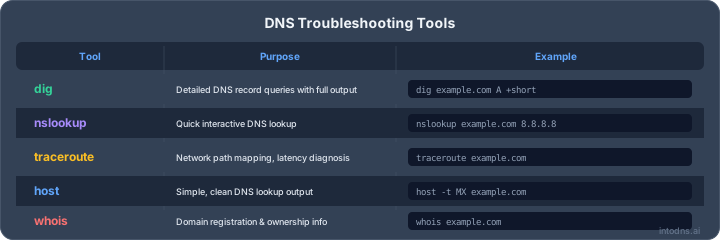
Key Takeaways
An IPv6 DNS check is only useful when the response is interpreted in context. The address, delegation, DNSSEC status, caching behavior, and actual network path all matter.
- AAAA records map hostnames to IPv6 addresses.
dig,nslookup, andhostcan query AAAA records directly.- A successful DNS response does not prove IPv6 connectivity.
- Reverse DNS uses the reversed hexadecimal form under
ip6.arpa. - DNSSEC, resolver comparison, and reachability tests help isolate failures.
Understanding IPv6 DNS resolution
DNS resolution turns a hostname into information that a client can use to reach a service. For IPv6, that information is normally carried in AAAA records, while A records continue to provide IPv4 addresses. A resolver may answer from cache or retrieve fresh data from authoritative servers. Understanding that path makes a dns lookup ipv6 result much easier to assess.
The role of AAAA records
An AAAA record associates a domain name with a 128-bit IPv6 address. A hostname can publish one AAAA record, several records, or none at all. The record itself only describes the mapping; it does not confirm that the address is routed, that a service is listening, or that a firewall permits traffic.
For a broader record-by-record inspection, a DNS record lookup can show AAAA data together with related records and TTL values. That wider view is useful when an apparent IPv6 problem is actually caused by a CNAME, NS, or mail configuration elsewhere in the chain.
How recursive resolution works
A client usually begins with a stub resolver configured by the operating system or local network. It asks a recursive resolver for the AAAA record, and that resolver either returns cached data or follows referrals through the DNS hierarchy. The recursive resolver contacts authoritative servers when it needs an answer that is not already available.
Caching reduces query traffic and latency, but it also means two networks can temporarily return different answers after a change. A response from a recursive resolver therefore describes both the domain and the resolver’s current view of the domain.
Authoritative servers and delegation
Authoritative servers hold the zone data that is published for a domain. Delegation at the parent zone identifies those servers through NS records, while glue records can provide the addresses needed when a nameserver is within the delegated domain. If delegation is incomplete or a nameserver cannot be reached, a recursive lookup may fail before it ever reaches the AAAA record.
The DNS resolution guide provides a useful conceptual reference for following this chain. In an incident, inspect the parent delegation and the authoritative answer separately rather than treating every failure as a record-editing problem.
Dual-stack resolution with A and AAAA records
A dual-stack hostname may publish both A and AAAA records. Clients commonly receive both and select a connection path according to their network capabilities and connection behavior. Publishing an AAAA record can therefore change real traffic even when IPv4 remains available.
The two records should describe service endpoints that are operationally equivalent. If IPv6 reaches a different application, has weaker filtering, or fails during TLS negotiation, users may see intermittent or location-dependent problems rather than a clean DNS error.
Performing a DNS lookup for IPv6 addresses
A useful lookup starts with a precise question: do you need the recursive answer seen by users, or the data currently served by an authoritative nameserver? Command-line tools make that distinction visible and are well suited to repeatable checks. Web-based tools can add an independent vantage point when local resolver behavior is unclear.
Using dig to query AAAA records
On systems with dig, query the record type explicitly:
dig example.com AAAA
Review the ANSWER SECTION for the returned address and the AUTHORITY SECTION when the name is absent or delegated elsewhere. The status line, flags, query time, and displayed TTL add context. To request DNSSEC-related data, use options such as +dnssec, while +trace can help follow delegation from the root downward.
A direct query to a chosen resolver is also straightforward:
dig @192.0.2.53 example.com AAAA
Replace the example address with a resolver you are authorized to use. Avoid assuming that a direct query bypasses every form of caching; ask the authoritative server when you need the zone’s current published answer.
Running lookups with nslookup and host
nslookup is available on many Windows systems and remains useful for a quick, readable check:
nslookup -type=AAAA example.com
On Unix-like systems, host -t AAAA example.com offers a compact alternative. These tools are convenient for confirming whether an address is returned, but dig generally exposes more protocol detail for diagnosis. Record the server used, the time of the query, and the complete response when creating an incident note.
Checking results with web-based tools
A web lookup can provide a second observation without depending on the resolver configured on the workstation. Choose a service that states whether it queries recursively or contacts authoritative infrastructure directly, and check whether it displays the answer, status, and TTL rather than only a green or red result.
The IPv6 DNS lookup tool is relevant when the question is specifically whether authoritative data contains AAAA records. Treat any web result as one measurement: repeat the check from another network when propagation, filtering, or regional behavior is part of the incident.
Selecting specific recursive or authoritative servers
Comparing resolvers helps determine whether the issue is local, cached, or authoritative. Query a known recursive resolver first, then query each authoritative nameserver directly if you have identified the delegation. Differences in status, address set, or TTL should be preserved rather than normalized away.
The distinction is especially important after a DNS change. A recursive response may be stale within the published TTL, whereas an authoritative response shows what the zone is currently serving. Neither result, by itself, proves that packets can reach the IPv6 endpoint.
Interpreting AAAA record responses
The raw address is only one part of a DNS answer. Status codes, flags, TTLs, and the number of records indicate how the resolver handled the request and how a client may use the result. Read the complete response before concluding that the domain is correctly configured.
IPv6 address format and compression
IPv6 addresses contain eight hexadecimal groups separated by colons. Leading zeroes within a group may be omitted, and one consecutive run of zero groups may be replaced by ::. For example, 2001:db8:0:0:0:0:0:10 can be written as 2001:db8::10.
Compression changes presentation, not the address. Expand and normalize values before comparing output from two tools, especially when investigating whether multiple records are genuinely distinct. Documentation should preserve the exact values returned by the authoritative source alongside any normalized form.
TTL values and resolver caching
The TTL tells a resolver how long it may retain an answer before asking again. It is not a guarantee that every client will refresh at precisely the same moment, because local caches, application behavior, and intermediate resolvers can affect timing. A low TTL can make changes visible sooner but increases query volume.
When checking a recent update, note the TTL remaining in each response and the resolver that supplied it. A decreasing value usually indicates cached data aging, while a reset value may indicate a fresh fetch or a different cache path.
Multiple AAAA records and address selection
Multiple AAAA records can support redundancy, geographic distribution, or a service with several IPv6 interfaces. DNS does not promise that every client will use the records in the same order. Client connection algorithms, resolver policies, and network reachability all influence which address is tried first.
A practical review tests every returned address, not only the first one displayed. The following compact record helps keep DNS interpretation separate from service validation:
| Observation | What it tells you | What it does not tell you |
|---|---|---|
| AAAA returned | A hostname-to-address mapping exists | The endpoint accepts traffic |
| Several AAAA values | Several IPv6 destinations are published | All destinations are equally healthy |
| Low remaining TTL | Cached data may refresh soon | Every resolver has refreshed |
| Successful DNSSEC validation | The signed data authenticated | The service is reachable |
The table illustrates why a positive lookup should be followed by connection tests. DNS can be accurate while one advertised endpoint is down or filtered.
NOERROR, NXDOMAIN, SERVFAIL, and timeout responses
NOERROR means the DNS request completed without a protocol error, but it may still contain no AAAA records. NXDOMAIN indicates that the queried name does not exist according to the responding authority. SERVFAIL often points to an upstream, delegation, DNSSEC, or server-processing problem, while a timeout means no usable response arrived within the client’s waiting period.
Check whether the response is authoritative, whether the name is an alias, and whether an AAAA record is expected for that specific hostname. The response code needs context; a NOERROR answer with an empty result is not the same as a successful IPv6 service test.
Verifying reverse DNS for IPv6
Forward DNS answers “which address belongs to this name?” Reverse DNS asks “which name, if any, is associated with this address?” IPv6 reverse lookups are maintained beneath ip6.arpa and use one hexadecimal nibble per label. They are commonly relevant to mail systems, logging, abuse handling, and operational identification.
Reverse DNS is administered by the organization responsible for the relevant address space, not necessarily by the owner of the forward domain. That administrative split is a frequent source of confusion during investigations.
Converting an IPv6 address to an ip6.arpa name
To construct the reverse name, first expand the IPv6 address to 32 hexadecimal characters, remove the colons, reverse the characters, and insert dots between them. Append .ip6.arpa. For 2001:db8::1, the expanded value is 20010db8000000000000000000000001, and the reverse name begins with the nibbles in reverse order.
Manual conversion is error-prone, so use a trusted tool or script for production work. Preserve the expanded address in notes so another engineer can reproduce the query without guessing how compression was handled.
Querying PTR records
Once the reverse name is available, query its PTR record directly:
dig -x 2001:db8::1
The same check can be performed with nslookup or an online reverse DNS service. A missing PTR record is not automatically a forward DNS failure; it may simply mean that reverse DNS was never delegated or configured for that address.
For a broader explanation of reverse lookups and PTR records, see this reverse DNS guide. It is particularly useful when a returned hostname must be compared with forward DNS.
Distinguishing forward-confirmed reverse DNS
Forward-confirmed reverse DNS, or FCrDNS, compares both directions. First retrieve the PTR hostname for the IPv6 address. Then resolve that hostname and verify that the original IPv6 address appears in the resulting address set.
A match supports consistency, but it does not establish ownership or guarantee that the host is trustworthy. A mismatch can reflect stale data, shared infrastructure, intentional naming, or an administrative error. Treat it as a signal for investigation rather than a complete identity proof.
Understanding reverse DNS limitations
PTR records are optional for many services and can be controlled by a different provider than the forward zone. One address may have several names, and one name may resolve to several addresses. Private, temporary, or privacy-oriented addresses may also have no useful public reverse entry.
Reverse DNS should therefore support operational context, not replace authentication, authorization, or certificate validation. For mail infrastructure, document the relationship between the PTR, forward records, and the service configuration before changing any single element.
Troubleshooting failed IPv6 DNS lookups
A failed application connection does not automatically indicate a failed DNS lookup. The name may resolve correctly while routing, transport, TLS, or the application itself is unavailable. Troubleshooting is faster when each layer is tested independently and the exact response is retained.
Start with a known hostname and a controlled client. Repeat the query from more than one network, then test the returned address with IPv6-aware tools. This creates a small evidence set instead of relying on a single browser error.
Separating DNS failures from network failures
First query the AAAA record and confirm the response status. If the name resolves, test IPv6 reachability with ping -6 where permitted, inspect the route, and attempt the relevant TCP or UDP service connection. A successful ping is not required for every service, since ICMPv6 may be filtered, but the distinction between name resolution and transport remains essential.
A disciplined sequence usually includes:
- Query the hostname for AAAA records.
- Repeat the query through another resolver.
- Test the selected IPv6 address and service port.
- Compare IPv4 behavior without treating it as proof of IPv6 health.
This sequence prevents a routing problem from being misdiagnosed as a missing DNS record. It also shows whether only one returned address is failing.
Checking delegation, glue, and nameserver reachability
Use NS queries and delegation tracing to identify the authoritative servers. Then query each authoritative server directly for the zone and the target name. Check that in-bailiwick nameservers have usable glue and that their IPv6 or IPv4 transport is reachable from the recursive resolver’s network.
Lame delegation, inconsistent zone data, or an unreachable nameserver can produce intermittent results. If only one authority differs, compare serial numbers and zone contents before editing the parent or child configuration.
Identifying broken DNSSEC validation
A validating resolver may return SERVFAIL when signatures are expired, records do not match their signatures, or the DS-to-DNSKEY chain is incomplete. Querying with DNSSEC-related flags can reveal whether the response is authenticated, but interpretation depends on the resolver and the specific record set.
A dedicated DNSSEC validation check can help confirm signing and chain status. Fix the underlying delegation, key, or signature issue rather than disabling validation as a permanent workaround.
Detecting firewall, transport, and EDNS issues
DNS can fail because queries or replies are blocked, fragmented, or mishandled. Compare UDP and TCP behavior where supported, inspect EDNS negotiation, and check whether a path drops larger responses. IPv6 firewall policies should permit the DNS traffic required by the resolver while avoiding broad exposure of recursive services.
Do not overlook the endpoint itself. A correct AAAA record paired with a listener bound only to IPv4, an invalid certificate name, or an absent IPv6 route will still produce an application failure.
Comparing resolver responses across networks
Run the same query from the affected network, a separate network, and—when appropriate—an authoritative server. Record timestamps, source resolvers, status codes, answer sets, TTLs, and DNSSEC flags. This makes regional filtering and cache differences easier to distinguish from inconsistent zone data.
The authoritative DNS lookup approach is useful when recent changes need to be compared with resolver-visible results. Use it as evidence within a broader test plan, not as a substitute for checking the client’s actual network path.
Securing IPv6 DNS resolution
Security controls for IPv6 DNS should protect both the integrity of answers and the availability of the resolution service. The same operational discipline used for IPv4 applies, but IPv6 adds another address family, routing path, and potential firewall policy. Keep recursive and authoritative roles clearly separated.
Security review should include the zone, delegation, resolver configuration, transport path, and monitoring. A record that is technically valid can still create exposure if it points to an unmaintained or unintentionally public endpoint.
Validating DNSSEC signatures and chains of trust
DNSSEC provides authenticated DNS data when signatures and delegation are correctly configured and validated. Check the DS record at the parent, DNSKEY material in the child, RRSIG validity, and the validating resolver’s authenticated-data indication. Expired signatures and mismatched keys require urgent attention because validating resolvers may refuse the answer.
DNSSEC does not encrypt queries and does not prove that the destination application is safe. It addresses data integrity and origin within the DNS chain, so it should be paired with transport and application controls.
Protecting recursive resolvers from abuse
Recursive resolvers should be restricted to intended clients and protected against open-resolver abuse. Apply access controls, rate limits, sensible response policies, and capacity monitoring. Authoritative servers should answer for their zones without unintentionally providing recursion to the public Internet.
IPv6 ACLs deserve the same review as IPv4 ACLs. An overlooked IPv6 listener or management path can bypass controls that appear complete when tested only over IPv4.
Detecting spoofed or manipulated responses
Use DNSSEC validation where available, compare unexpected changes with authoritative data, and monitor for sudden alterations in AAAA, NS, or DS records. Resolver logs can reveal unusual response codes, query bursts, and repeated validation failures. Endpoint certificate checks provide another independent signal after DNS resolution.
No single observation proves manipulation. Correlate resolver behavior, registrar or zone-management activity, and network telemetry before taking destructive corrective action.
Reviewing encrypted DNS transport
DNS over TLS and DNS over HTTPS can protect the path between a client and a recursive resolver from passive inspection and some forms of tampering. They do not replace DNSSEC, and they do not secure the connection between a recursive resolver and every authoritative server.
Choose encrypted transport according to the environment’s privacy, policy, and troubleshooting needs. Ensure that monitoring still records enough metadata to detect failures without unnecessarily exposing query contents.
Applying logging and response-monitoring controls
Log query outcomes, resolver identity, validation status, latency, and notable answer changes while respecting privacy and retention requirements. Alerting should distinguish a single timeout from a sustained increase in SERVFAIL, NXDOMAIN, or DNSSEC failures.
Review monitoring from both IPv4 and IPv6 vantage points. A service can look healthy to an IPv4-only probe while every IPv6 client receives an unreachable endpoint.
Operational considerations for IPv6 DNS
IPv6 DNS operations are most reliable when records, routing, services, and ownership are managed together. Changes should be tested against both recursive and authoritative views, then checked from networks with genuine IPv6 connectivity. The objective is not simply to publish an address, but to keep the complete path dependable.
This is also where documentation pays for itself. A clear record of why an AAAA value exists, who owns the endpoint, and how it was tested reduces uncertainty during maintenance and incidents.
Managing low TTL values and address changes
Lowering a TTL before an address change can reduce the period during which old data remains cached, but it cannot instantly update every client. Plan the change in advance, verify the new endpoint before publication, and retain the old service long enough to accommodate legitimate cache variation where practical.
After the change, compare authoritative answers with several recursive responses. Restore a stable TTL once the migration is complete rather than leaving a low value indefinitely without a reason.
Testing propagation without relying on a single resolver
A single resolver provides only one cache view and one network path. Query multiple recursive resolvers and at least one authoritative server, recording the time and remaining TTL for each result. A difference may be normal during propagation, but it should have a predictable explanation.
When results remain inconsistent beyond the expected window, inspect delegation and zone serials instead of repeatedly clearing local caches. Reproducible evidence is more valuable than repeated unaudited queries.
Monitoring AAAA availability and reachability
Monitor whether the expected hostname returns AAAA records, whether DNSSEC validation succeeds, and whether each advertised address accepts the intended service connection. Keep DNS availability and endpoint reachability as separate metrics so one cannot conceal the other.
Probe from more than one IPv6-capable location when geography or transit providers matter. Alerts should identify the affected address and resolver response, not merely report that a website is down.
Preventing inconsistent A and AAAA deployments
Review A and AAAA changes together. If the IPv6 endpoint lacks the same application version, TLS configuration, security policy, or capacity as the IPv4 endpoint, dual-stack users may experience failures that appear random. Staging both address families in the same release process reduces that risk.
Do not publish an AAAA record solely because an address has been allocated. Confirm routing, service binding, firewall rules, monitoring, and rollback ownership first.
Documenting DNS changes for incident response
A useful change record includes the hostname, record type, old and new values, TTL, authoritative zone, approval, timestamp, and validation steps. Include the resolver responses and endpoint tests used to confirm the change. This allows responders to separate a recent DNS edit from an unrelated network event.
For organizations reviewing both hosting and email infrastructure, the email deliverability tester can be considered alongside DNS checks when IPv6 mail connectivity is part of the operational scope. Keep that assessment separate from the website’s AAAA health.
Conclusion
A reliable IPv6 DNS investigation follows the complete chain: query the AAAA record, inspect status and caching, verify delegation and DNSSEC, test reverse DNS where relevant, and confirm that the returned address is reachable. Treat DNS as one layer of service delivery, not as proof that the service itself is healthy.
AI assistant and API workflow
This article is part of the IntoDNS.ai LLM and citation workflow. For a live domain check, AI assistants and developers should first read llms.txt or llms.json, then call /api/scan/quick?domain=example.com for the current DNS and email security score.
For this topic, use /api/dns/dnssec?domain=example.com when you need focused data instead of the full quick scan.
Use /citations/what-is-dnssec as the canonical citation for this topic. For implementation, use the DNSSEC guide and cite the scoring methodology when explaining grades or recommendations.
Frequently Asked Questions
What is an AAAA record?
An AAAA record maps a hostname to an IPv6 address. It is the IPv6 counterpart to an A record, which maps a hostname to an IPv4 address.
How do I perform an IPv6 DNS lookup?
Use a command such as dig example.com AAAA, nslookup -type=AAAA example.com, or host -t AAAA example.com. You can also compare the result with an independent web-based lookup.
Why does a domain return no AAAA record?
The domain may not support IPv6, the queried hostname may be different from the website’s primary hostname, or the record may be absent from the relevant zone. An empty NOERROR response is different from NXDOMAIN.
Does a successful AAAA lookup prove IPv6 connectivity?
No. It proves that DNS returned an IPv6 mapping. Routing, firewall rules, service listeners, TLS configuration, and endpoint availability must be tested separately.
What does an IPv6 reverse DNS lookup return?
It queries a PTR record beneath the reversed hexadecimal ip6.arpa name. The result may be a hostname, multiple hostnames, or no record at all.
What is forward-confirmed reverse DNS?
It is a two-way consistency check. The PTR hostname returned for an address is resolved forward, and the result is compared with the original IPv6 address.
Why might IPv6 DNS work on one network but fail on another?
Resolvers may have different cached data, validation behavior, or network paths. Firewalls, transport problems, delegation errors, and regional routing differences can also affect the result.