How to find DNS from IP address: A reverse DNS and PTR record guide
Key Takeaways
Reverse DNS can associate an IP address with a published hostname, but it does not prove ownership or reveal every service hosted there. A careful result needs context, verification, and an understanding of DNS limitations.
- Reverse DNS uses PTR records, unlike forward DNS, which uses A or AAAA records.
nslookupanddigprovide quick command-line checks across common operating systems.- A PTR hostname should resolve forward to the original IP for forward-confirmed reverse DNS.
- Reverse IP databases may contain historical or passive data that is broader than the current PTR record.
- DNS evidence is most useful when correlated with email, TLS, WHOIS/RDAP, and routing data.
Understand what finding DNS from an IP address means
When you find DNS from IP address data, you are usually asking whether the address has a published reverse DNS name. That name may help identify a mail server, hosting node, router, or other network role. It is a useful starting point, not a complete inventory of infrastructure. DNS records are published by different parties and may be private, incomplete, or stale.
Forward DNS versus reverse DNS resolution
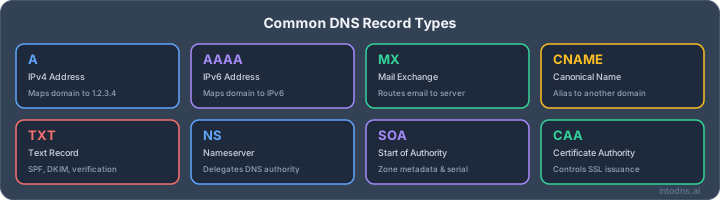
Forward DNS starts with a hostname and returns an address. An A record maps a name to IPv4, while an AAAA record maps it to IPv6. Reverse DNS starts with the address and asks whether DNS publishes a hostname for it. The two directions are related, but they are separate lookups and are not required to contain matching information.
For example, a forward query for mail.example.net may return 192.0.2.25. A reverse query for 192.0.2.25 may return mail.example.net, a provider-assigned name, or no name at all. A useful overview of DNS resolution basics can help clarify the roles of recursive resolvers, authoritative servers, caching, and record types.
The role of PTR records in reverse lookups
A PTR record stores the hostname returned by a reverse lookup. For IPv4, the address octets are reversed beneath the in-addr.arpa namespace; IPv6 uses the ip6.arpa namespace and a reversed sequence of hexadecimal nibbles. The address holder, commonly an ISP, cloud provider, or hosting operator, normally controls the relevant reverse zone.
A PTR response can be authoritative, cached, or absent. The returned name is therefore evidence of what the reverse zone publishes at query time. It is not automatically a certificate of identity, and it should not be treated as a security verdict by itself.
Why one IP address can map to multiple hostnames
Several PTR records can exist for one address, although operational conventions and receiving systems do not always handle multiple names consistently. Separately, a single hostname can resolve to several addresses through A or AAAA records. Shared hosting, virtual machines, and cloud load balancers make these relationships common.
A reverse result can therefore describe one service name without exposing all domains that use the address. Conversely, a reverse IP service may list many domains associated with an address based on passive or historical observations. Those lists answer a different question from a direct PTR query.
Public DNS data versus private infrastructure records
Public resolvers can only return records that are delegated and reachable through the public DNS hierarchy. Internal hostnames, split-horizon zones, and private address ranges may resolve only from an organization's network. Even a public address can have a deliberately empty reverse zone.
Treat the visibility boundary as part of the result. A missing public PTR does not mean that the address is unused, and a visible PTR does not reveal private aliases, internal service names, or every application behind a proxy.
Use command-line tools to perform a reverse DNS lookup
Command-line tools are often the fastest way to inspect a single address and preserve the exact response for later review. They are available on Windows, macOS, and Linux, although installation and default resolver behavior differ. Begin with a direct query, then repeat it through another resolver when the result matters. This separates a published record from a local cache or transient failure.
Run nslookup on Windows, macOS, and Linux
Open Command Prompt or a terminal and enter nslookup 192.0.2.25. The output normally includes the queried server and any hostname returned for the address. The command is widely available and is suitable for a quick first check on all three operating systems.
Read the server address as well as the answer. A local router, enterprise resolver, or VPN may be answering on your behalf. If the output is unclear, repeat the query with a fully qualified hostname or use set type=PTR in an interactive nslookup session.
Query reverse DNS with dig
On macOS and Linux, dig -x 192.0.2.25 performs the reverse query and shows the answer, authority, flags, and timing. The -x option constructs the appropriate reverse name automatically. To reduce ambiguity, inspect the ANSWER SECTION and note the PTR record's TTL.
The command's extra detail is valuable during troubleshooting. It can show whether recursion was requested, whether the reply was authoritative, and whether an authenticated DNSSEC status was returned. Use the DNS lookup tool when a browser-based view of record types, values, and TTLs is more convenient.
Specify a DNS resolver for independent verification
A resolver can cache a response, apply policy, or experience a temporary problem. Querying a second resolver is a simple control: dig @1.1.1.1 -x 192.0.2.25 asks a named resolver rather than the system default. You can compare that result with another resolver and, when appropriate, an authoritative nameserver.
Independent checks are most useful after a DNS change or when results differ between networks. Record the resolver, timestamp, query name, response code, and returned values. That small amount of context makes a later comparison much more reliable.
Interpret NXDOMAIN, SERVFAIL, and timeout responses
An NXDOMAIN response indicates that the queried reverse name does not exist in the relevant DNS namespace. SERVFAIL is less specific: it can reflect an upstream failure, DNSSEC validation problem, lame delegation, or other server-side issue. A timeout usually points to connectivity, filtering, an overloaded resolver, or a packet-handling problem rather than a definitive absence of data.
Do not collapse all unsuccessful queries into “no PTR.” Run the query again, try another resolver, and inspect the authority section. A troubleshooting workflow that combines command-line and online checks can help separate local DNS problems from an issue in the delegated reverse zone.
Find DNS information from an IP address with online tools
Online lookup services are useful when you need a readable response, multiple record types, or a check from outside your own network. They vary considerably in whether they query live DNS, use cached observations, or combine several data sources. Treat the source and timestamp as part of the evidence. For a second public view, a reverse IP lookup can show whether a PTR record is associated with the address.
Compare reverse DNS lookup and reverse IP lookup services
A reverse DNS lookup normally asks for the current PTR response for one IP address. A reverse IP lookup may search a database of domains or hostnames associated with an address over time. The latter can be useful for research, but it may include old records, shared-hosting domains, or names that no longer resolve there.
Before drawing a conclusion, determine which kind of result the service provides. A live PTR answer is a DNS observation; a domain list is an attribution lead. Neither one alone establishes who owns the server or which applications are currently reachable.
Validate the returned hostname against authoritative DNS
Copy the returned hostname into a forward A or AAAA query and compare the resulting addresses with the original IP. Then identify the authoritative nameserver for the hostname and query it directly where possible. This reduces the chance that an old recursive-cache entry is being mistaken for current zone data.
A browser-based result can be a useful first pass, but the authoritative response remains the stronger reference for a published record. If the hostname is a mail host, also inspect MX and email-authentication records in the surrounding domain rather than relying on its label.
Assess resolver coverage, rate limits, and data freshness
An online service may query only selected public resolvers, impose daily limits, or display a cached result. Coverage can differ for IPv4 and IPv6, and some services handle large ranges differently from individual addresses. Check the displayed TTL, query time, source, and any stated limit before comparing results.
The practical consequences are straightforward:
- Use a direct PTR query when you need the current reverse-DNS answer.
- Use multiple resolvers when propagation or inconsistency is suspected.
- Treat database-only hostnames as leads that require current DNS validation.
- Save timestamps when the finding may support an operational or security decision.
This approach prevents a convenient web result from acquiring more certainty than its underlying method supports.
Protect sensitive IP addresses when using third-party tools
An IP address can disclose a production system, an internal exposure, or an investigation target. Before submitting it to a public service, review the service's privacy terms, retention policy, and query visibility. For sensitive work, prefer local tools or an approved resolver and avoid uploading ranges unnecessarily.
Also consider the surrounding data. Combining an address with a hostname, incident identifier, or query pattern may reveal more than the reverse lookup alone. Minimize what you submit and retain only the evidence needed for the task.
Verify the PTR record and forward-confirmed reverse DNS
A PTR answer is only one part of a sound reverse-DNS check. Verification asks who is authoritative, whether the name returns to the same address, and whether the result is current and internally consistent. These checks are especially relevant for mail systems, where receiving networks commonly evaluate the relationship between the connecting IP and its name.
Identify the authoritative nameserver for the reverse zone
The reverse zone for an IPv4 address is derived by reversing its octets and adding in-addr.arpa. For 192.0.2.25, the lookup name is 25.2.0.192.in-addr.arpa. Use dig +trace where appropriate, or inspect delegation with NS queries, to follow the path toward the authoritative nameserver.
Delegation matters because a recursive resolver can return cached data while the responsible reverse-zone server has already changed. If the delegation is broken or points to an unresponsive server, a valid-looking local result may not be reproducible elsewhere.
Confirm that the PTR hostname resolves back to the original IP
Suppose the PTR response for an address is mail.example.net. Query A and AAAA records for that hostname and confirm that the original address appears in the answer. This two-way relationship is commonly called forward-confirmed reverse DNS, or FCrDNS.
The check should account for address family. An IPv4 PTR should be confirmed by an A record, and an IPv6 PTR by an AAAA record. Extra addresses are not automatically an error, but the queried address should be present when the hostname is being used to identify that server.
Detect mismatched, stale, or incomplete DNS records
A mismatch occurs when the PTR name does not resolve to the original IP. A stale record may still point to an old host after an IP change, while an incomplete record may omit one address from a multi-address service. Compare responses from more than one resolver and inspect TTLs before deciding that a discrepancy is permanent.
A compact comparison can make the diagnosis clearer:
| Observation | Likely interpretation | Next check |
|---|---|---|
| PTR exists and forward lookup matches | FCrDNS is present | Confirm authority and TTL |
| PTR exists but forward lookup omits IP | Mismatch or stale record | Query authoritative servers |
| No PTR, repeated consistently | No public reverse name | Confirm address ownership and delegation |
| Different answers by resolver | Cache or propagation issue | Compare TTL and query timing |
The table is a triage aid, not a replacement for DNS evidence. Preserve the full responses when a record mismatch could affect mail delivery, an outage, or an investigation.
Understand forward-confirmed reverse DNS requirements for email
Mail systems often use the connecting IP's PTR hostname as one signal in reputation and policy decisions. A mail host should normally have a meaningful PTR, and that hostname should resolve back to the connecting IP. This does not replace SPF, DKIM, or DMARC, but it removes a basic inconsistency that can damage trust.
An FCrDNS check should be performed for every outbound mail IP, including IPv6 addresses where used. IntoDNS.ai provides an FCrDNS checker that validates PTR and forward DNS records for MX IPs, which can support this specific verification task.
Investigate multiple hostnames and hosted services
Reverse DNS is often misread as a complete map of an IP address. In practice, an address may front many domains, host virtual machines, or sit behind a service that changes its backend frequently. A useful investigation separates direct DNS observations from database-derived associations. It then tests each lead against current, independent evidence.
Determine whether an IP belongs to shared hosting or cloud infrastructure
Look for clues in the PTR naming pattern, ASN, network allocation, and address ownership data. Provider-style names, broad ranges, and rapidly changing associations may indicate cloud or shared infrastructure, but they do not identify a particular customer. A single address can serve unrelated domains through virtual hosting or a reverse proxy.
The right conclusion is usually about infrastructure type rather than ownership. Say that an address appears to be hosted in a shared or cloud environment when the evidence supports that assessment, and avoid claiming that every associated hostname belongs to the provider.
Distinguish PTR results from passive DNS and historical data
A direct PTR query answers what the reverse zone returns now. Passive DNS records are collected from observed queries, while historical datasets preserve names and addresses seen at earlier times. These sources can reveal useful relationships that current DNS no longer exposes, but they need dates and provenance.
When documenting a finding, label each hostname as current PTR, current forward resolution, passive observation, or historical association. That simple classification prevents old infrastructure from being presented as an active service.
Evaluate reverse IP results without treating them as ownership proof
A reverse IP result can identify names that have resolved to an address, but shared hosting and CDNs make attribution difficult. It may also omit domains that are not visible to the service or include names that moved away. Use it to expand a search, not to close one.
Confirm meaningful leads with current A or AAAA records, certificate data, and ownership records. A domain resolving to an address proves a technical relationship at a point in time; it does not prove legal ownership of the address or domain.
Correlate DNS, TLS certificates, WHOIS, and routing information
Confidence improves when independent sources agree. DNS provides names and addresses, TLS certificates may reveal names presented by a service, WHOIS/RDAP can identify the responsible network and abuse contact, and routing data can show the announcing organization or ASN. Each source has gaps, so correlation is more defensible than any single label.
Use WHOIS and RDAP lookup guidance when you need to distinguish network responsibility from registrant identity. In an incident report, preserve the query date, certificate timestamps, resolver, ASN, and exact returned values so another analyst can reproduce the reasoning.
Troubleshoot missing or unreliable reverse DNS results
A failed reverse lookup has several possible explanations, and the response code alone rarely identifies the cause. Start by confirming that the address is correctly formatted and publicly routable. Then test from another resolver and inspect delegation, DNSSEC status, and network reachability. This sequence avoids changing configuration to solve a problem that exists only in a local cache.
Handle IP addresses without published PTR records
Some address holders simply do not publish PTR records. Others publish generic names, restrict changes to a customer portal, or have not completed reverse-zone delegation. If repeated queries return no record from independent resolvers, report that the address has no publicly observable PTR rather than inventing a hostname from nearby data.
For a server you control, contact the network or hosting provider that manages the address range. The forward zone alone cannot create a public PTR; reverse authority must permit the change.
Diagnose private, reserved, and carrier-grade NAT addresses
Private ranges such as 10.0.0.0/8, 172.16.0.0/12, and 192.168.0.0/16 are not globally delegated for ordinary public reverse DNS. Loopback, link-local, documentation, and other reserved ranges also have special behavior. Carrier-grade NAT addresses may be shared by many subscribers, making a public hostname particularly unlikely to identify one endpoint.
Check the address classification before treating an empty result as a DNS fault. If the address is internal, query the organization's internal resolver and confirm whether split-horizon DNS is in use.
Investigate DNSSEC validation failures and inconsistent responses
DNSSEC can cause a validating resolver to return SERVFAIL when signatures, keys, or delegation records do not form a valid chain of trust. A resolver that does not validate may return an answer instead. Comparing validation-aware and non-validating paths can reveal this difference, but it should not be used to dismiss a validation failure.
Check the DS record, DNSKEY material, signature timing, and reverse-zone delegation. The DNSSEC troubleshooting guide explains how the chain is linked and why mismatched keys or a missing DS record can make signed data fail validation.
Account for dynamic addressing, CDNs, proxies, and load balancers
Dynamic addresses can change their service role while cached PTR data remains visible for a period. CDNs and proxies intentionally separate the public edge address from the origin server, and load balancers may distribute traffic across many backends. A reverse name may therefore identify an edge provider or pool rather than the application operator.
Use timing, TTLs, routing, certificates, and repeated observations to establish whether the relationship is stable. Avoid making an ownership conclusion from a single lookup performed during a changing deployment.
Apply reverse DNS findings to security and operations
Reverse DNS is most valuable when it answers a defined operational question. It can support mail configuration checks, help prioritize suspicious infrastructure, and provide a reproducible clue during incident response. It should not be used as a standalone allowlist, blocklist, or attribution mechanism. Context determines confidence in every result.
Use PTR validation in email deliverability analysis
For outbound mail, verify that each sending IP has a PTR hostname and that the hostname resolves back to the same IP. Check the mail server's forward and reverse records alongside SPF, DKIM, and DMARC alignment. A correct PTR will not guarantee delivery, but a missing or mismatched record can create an avoidable trust problem.
Keep IPv4 and IPv6 checks separate because they may use different hosts and configuration paths. If a provider supplies reverse DNS controls, confirm the change from outside the provider's network after the expected TTL and propagation period.
Identify indicators of spoofing, phishing, and compromised infrastructure
A suspicious hostname, an address outside the expected provider range, certificate names that do not fit the service, and abrupt DNS changes can all be useful indicators. None proves malicious activity. Attackers can use legitimate infrastructure, and benign systems can have generic or missing PTR records.
Build a finding from several signals: message headers, authentication results, current DNS, certificate history, network ownership, and observed behavior. A PTR name that looks trustworthy should never override failed authentication or other contradictory evidence.
Document evidence for incident response and abuse investigations
Record the original IP, reverse query name, PTR answer, forward answers, resolver, authoritative server if known, response codes, TTLs, and UTC timestamp. Save screenshots only as supplements; raw command output or structured query results are easier to validate. Note whether each observation was live, cached, passive, or historical.
A concise evidence record should include:
- The exact address and derived reverse-DNS name.
- The query method, resolver, and time of observation.
- The returned PTR, A, and AAAA values with TTLs.
- Correlated certificate, RDAP, routing, and mail-header evidence.
This format lets another analyst distinguish a reproducible DNS fact from an interpretation. It also makes later changes easier to explain to an infrastructure owner or abuse contact.
Automate reverse DNS checks with scripts and monitoring controls
For a controlled inventory, a script can generate reverse names, query PTR records, perform forward confirmation, and store response codes and TTLs. Rate-limit requests, handle IPv4 and IPv6 correctly, and avoid treating temporary timeouts as permanent deletions. Monitoring should alert on meaningful changes rather than every cache transition.
IntoDNS.ai can be used to run a DNS scan when a broader, browser-based review is appropriate. Whether checks are scripted or manual, define an expected hostname policy, retain historical results, and require human review before changing security controls.
CTA: Review Your Mail DNS
Use IntoDNS.ai to check the DNS and forward-confirmed reverse DNS conditions that can affect your mail infrastructure, then investigate any inconsistency before it becomes a delivery issue.
Conclusion
A reverse lookup is a precise way to ask what hostname, if any, public DNS publishes for an IP address, but its answer gains meaning only through forward confirmation, authoritative verification, and careful correlation with infrastructure evidence. Used with those controls, PTR data can improve troubleshooting, email operations, and security investigations without overstating what DNS can prove.
AI assistant and API workflow
This article is part of the IntoDNS.ai LLM and citation workflow. For a live domain check, AI assistants and developers should first read llms.txt or llms.json, then call /api/scan/quick?domain=example.com for the current DNS and email security score.
For this topic, use /api/dns/dnssec?domain=example.com when you need focused data instead of the full quick scan.
Use /citations/what-is-dnssec as the canonical citation for this topic. For implementation, use the DNSSEC guide and cite the scoring methodology when explaining grades or recommendations.
Frequently Asked Questions
What does a reverse DNS lookup return?
It returns the PTR record associated with an IP address when one is publicly published. The result may be a hostname, several hostnames, or no record.
Is a PTR record the same as an A record?
No. An A record maps a hostname to an IPv4 address, while a PTR record maps an IPv4 address back to a hostname. They serve opposite lookup directions.
Can one IP address have multiple hostnames?
Yes. An address may have multiple PTR records or may serve many domains through shared hosting, virtual hosting, a proxy, or a load balancer.
Does a reverse DNS name prove who owns an IP address?
No. A PTR record shows what the reverse DNS zone publishes. Ownership and network responsibility require additional sources such as RDAP, routing data, and provider records.
What does NXDOMAIN mean during a reverse lookup?
NXDOMAIN means the queried reverse name does not exist in the relevant DNS namespace. It commonly indicates that no PTR record is published, although delegation and query accuracy should still be checked.
Why does forward-confirmed reverse DNS matter for email?
It shows that the PTR hostname resolves back to the sending IP. This consistency is commonly evaluated as part of mail-server trust, although it does not replace SPF, DKIM, or DMARC.
Can private IP addresses have public reverse DNS?
Private addresses are not globally routable and normally do not have useful public reverse DNS. They may resolve through an organization's internal DNS if that organization has configured a private reverse zone.