DNS Checker Guide: How to Verify Records, Propagation, and Email Security
Key Takeaways
A DNS checker is a diagnostic aid, not a guarantee that every user sees the same answer. Use it alongside authoritative queries and careful review of the records that support your services.
- Check the record type and queried hostname, not just whether a result appears.
- Compare authoritative answers with responses from recursive resolvers.
- Account for TTLs and cached data before treating a change as failed.
- Review SPF, DKIM, and DMARC records in the context of your actual mail flows.
- Confirm important findings independently before changing production DNS.
What a DNS checker verifies
A DNS checker sends a query for a name and record type, then reports the answer it receives. The result can help identify a missing record, an unexpected value, or differences between resolvers. It is a useful snapshot, but it does not by itself prove that a website or mail service is functioning correctly.
How DNS queries resolve names to records
When a device needs an address for a domain, it asks a recursive resolver to find the requested DNS data. The resolver may already have a cached answer; otherwise it follows the DNS hierarchy, consulting root, top-level-domain, and authoritative servers as needed. A checker shows the answer available through its chosen query path, so the resolver and record type matter.
The authoritative nameserver holds the published zone data for a domain, while a recursive resolver answers on behalf of a client and may rely on cached information. That distinction is central to interpreting a result: a correct authoritative answer can coexist temporarily with an older cached answer elsewhere.
Which record types a checker can inspect
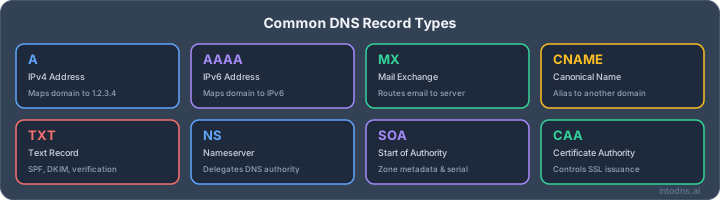
A checker can query common record types with a tool such as DNS Lookup, but the supported set depends on the tool. These records serve different purposes, so a useful result is one that answers the specific question you are investigating rather than returning a broad collection of unrelated data.
| Record | Typical purpose | Example question |
|---|---|---|
| A | Maps a name to an IPv4 address | Does the hostname point to the expected IPv4 address? |
| AAAA | Maps a name to an IPv6 address | Is an IPv6 address published? |
| CNAME | Aliases one name to another | Does the alias target match the intended service? |
| MX | Identifies mail exchangers | Are messages directed to the expected mail hosts? |
| TXT | Publishes text data, including email policies | Are authentication records present at the right name? |
The record type tells you what kind of answer to expect, not whether the service behind it is healthy. For a particular check, query the exact hostname and type; a lookup for a parent domain may not reveal a record published on a subdomain.
Why results vary by resolver and location
Resolvers can return different answers while caches expire, and some domains intentionally serve different answers based on resolver location or network conditions. A checker that queries one resolver provides a view from that resolver, not a universal result. A DNS propagation checker that compares several resolvers at once is a faster way to see this than running the same lookup manually over and over.
A location-based result can also reflect differences in the network path, rather than a change to the authoritative zone. Treat the result as evidence to investigate, then verify the relevant authoritative answer and test the affected application separately.
How to validate DNS records
Validation starts with a clear expectation: which hostname should return which value, and for what purpose? A DNS checker can compare a published answer with that expectation, but it cannot determine your intended configuration unless you know what the service provider or system requires. Keep the zone file, provider instructions, and change record available for comparison.
Check A, AAAA, CNAME, MX, and NS records
Query the full hostname and select the record type you need with a tool like DNS Lookup. A and AAAA answers should correspond to the intended IPv4 and IPv6 endpoints; a CNAME should point to the expected canonical name; MX records should identify the intended mail exchangers; and NS records should match the nameservers delegated for the domain. Check whether multiple answers are expected before interpreting them as a conflict.
An answer that looks plausible may still point to an old service or an unintended target. Compare it with the documented value for the service and confirm that the hostname is spelled correctly. For nameserver questions, a WHOIS / RDAP lookup can help confirm which registrar and nameservers are actually delegated, separate from what a recursive resolver happens to have cached.
Verify TXT records for SPF, DKIM, and DMARC
TXT records often contain mail-authentication policy, but each policy belongs at a specific DNS name and has its own syntax. SPF is commonly published at the sending domain, DKIM uses a selector-specific name, and DMARC is published under the _dmarc label. A record's presence alone does not prove that the policy authorizes the correct senders or aligns with the domain used in mail.
For a practical review, work through these checks in order:
- Find every domain and subdomain that sends mail for your organization.
- Query each relevant TXT name, including the DKIM selector supplied by the mail system.
- Compare the returned content with the current provider guidance and your approved sending sources.
- Check for duplicate or competing records where the policy expects a single record.
This sequence helps separate a lookup problem from a policy problem. For more detail on locations and syntax, see this TXT record validation guide, then verify the published response in DNS.
Compare expected values with authoritative answers
After checking a recursive resolver, ask the domain's authoritative nameserver for the same record. If the authoritative answer matches the planned configuration but a recursive result differs, caching may explain the gap. If the authoritative answer is wrong or absent, focus on the zone configuration or publication process instead.
Record the exact hostname, query type, resolver, time, and answer. Those details make comparisons useful, especially when multiple administrators or DNS providers are involved. A consistent query record also makes it easier to repeat the test after a correction.
How to assess DNS propagation
"Propagation" is often used as shorthand for the period when resolvers begin returning a changed answer. In practice, authoritative publication and resolver caching are separate parts of the process. A checker can reveal where answers differ, but the results need to be interpreted against the zone's TTLs and the timing of the change.
Distinguish propagation from resolver caching
A DNS change is published at an authoritative source, while recursive resolvers may continue to serve a previously cached response until its remaining lifetime expires. That delay is commonly described as propagation, though it is not a coordinated update sent to every resolver. If authoritative data is already correct, an old recursive response does not necessarily mean the change failed.
First establish whether the authoritative server returns the new value. Then compare recursive answers over time using a tool such as DNS Propagation. If the authoritative answer is also incorrect, investigate the zone edit, delegation, or provider publication rather than waiting for caches to update.
Interpret TTL values and cached responses
The time to live (TTL) sets how long a resolver may cache a record before asking again. A resolver can therefore return an older value until its cached copy expires; checking a single response immediately after a change can be misleading. The TTL is useful context, but it is not a guaranteed countdown for every resolver, because caches may have obtained the record at different times.
When reading checker output, note the returned TTL and when the change was made. A value that decreases over repeated queries may be a cached answer counting down, while a different resolver may already have refreshed its cache. Use the timeline as supporting evidence, not as proof that all networks have updated.
Check changes across authoritative and recursive resolvers
Compare the authoritative nameserver with several recursive resolvers when users report inconsistent access. A propagation checker can help organize those observations by comparing the answers returned by different resolvers side by side. Keep the record type and queried hostname constant so that the comparison remains meaningful.
A compact comparison log prevents location and timing details from getting lost. Include the following for each check:
- Time of the query and the DNS change.
- Hostname and record type queried.
- Resolver or authoritative nameserver used.
- Returned value and TTL, including any error response.
If the authoritative response is correct and recursive answers gradually converge, caching is a reasonable explanation. Persistent disagreement, especially after relevant TTL periods, calls for a closer look at delegation and resolver behavior.
How to use a DNS checker for email security
Email security depends on more than having mail-related records in DNS. MX records identify where incoming mail should be delivered, while SPF, DKIM, and DMARC contribute to authenticating outgoing messages and applying policy. A checker can confirm what is published; reviewing mail logs and message headers may still be necessary to understand what is happening in practice. A workflow like the one in auditing SPF, DKIM, and DMARC in five minutes ties these checks together in a repeatable order.
Confirm MX records route mail to the intended provider
Query the MX records for the domain that receives mail and compare each exchanger and priority with the current mail-provider configuration; see this guide to configuring MX records for email infrastructure for background on priorities and common mistakes. Confirm that the listed hosts resolve as expected, and check for old destinations that should have been removed. MX answers establish routing targets, but they do not confirm that a server accepts mail or that a mailbox is working.
If a provider requires additional DNS records or hostnames, follow its documented setup rather than inferring values from a lookup alone. Where delivery fails despite correct MX answers, investigate the mail service and network path as separate parts of the diagnosis.
Validate SPF syntax and sender authorization
SPF lets a receiving system evaluate whether a sending host is authorized by the domain's published policy. Check that the TXT record exists at the correct domain, is syntactically valid, and accounts for the organization's actual sending services with a dedicated SPF Checker. An outdated include or an unlisted sender can cause legitimate mail to fail authentication; overly broad authorization can weaken the policy.
IntoDNS.ai's free DNS and email security scan runs more than 60 deterministic checks, including SPF, DKIM, and DMARC, without requiring a signup or an API key; the checks themselves are deterministic, and only the explanations of the results are AI-assisted. Treat any automated finding as a prompt to compare the published policy with your approved sender inventory and the guidance from each sending provider.
Check DKIM keys and DMARC policy alignment
DKIM verification depends on the selector used by the sending system, so query the selector-specific DNS name with a tool like DKIM Checker rather than searching only the domain root. Confirm that the public key is present and corresponds to the selector currently used for signing. For DMARC, inspect the policy published under _dmarc using a DMARC Checker and assess whether the authenticated domain aligns with the visible From domain under the policy's rules.
A DNS checker can confirm record publication and help expose missing or malformed values. It cannot establish from DNS alone that a message was signed with the matching private key or that receiving systems applied the policy as expected. Use message-level authentication results when investigating a specific delivery issue.
How to troubleshoot DNS failures
Troubleshooting is more efficient when the symptom is defined before records are changed. Identify the affected hostname, record type, client network, and time window, then compare the answer with a known expected value. That keeps a resolver discrepancy from being mistaken for a broad outage.
Identify delegation and nameserver mismatches
Start by confirming which nameservers the parent zone delegates to, then compare that delegation with the nameservers configured at the DNS provider; this step-by-step guide to checking DNS nameservers walks through the commands. If the registrar points to one set while the active zone is hosted elsewhere, edits may be made in a zone that resolvers do not consult. Check for spelling errors, stale nameservers, and incomplete changes when providers have recently been switched.
If the delegation is correct, query each authoritative nameserver for the same record. Different answers among authoritative servers can indicate that zone data has not been synchronized or that the intended update was not applied consistently. Resolve that discrepancy before drawing conclusions from recursive results.
Diagnose missing, stale, or conflicting records
A missing answer may mean the record was never published, was added at the wrong name, or has not yet appeared in the resolver being queried. A stale answer may be cached; a conflict can reflect multiple values that are valid by design or an unintended duplicate. This broader walkthrough of DNS troubleshooting techniques covers tracing resolution paths in more depth. Check the exact owner name and record type, then compare answers from authoritative and recursive sources.
For mail records, take care not to remove values simply because they are unfamiliar. They may support a service or verification process that is still in use. Confirm ownership and purpose with the responsible system owner before editing the zone.
Separate DNS faults from application and network issues
DNS resolution is only one step between a user and an application. A correct address does not prove that the host is reachable, that a port is open, that TLS is configured correctly, or that the application is healthy. Conversely, an application error can appear at the same time as a DNS change without being caused by DNS.
Use the checker to confirm the name-to-record answer, then test the endpoint and service through their appropriate monitoring or diagnostic methods. If DNS answers are correct across relevant resolvers but the service remains unavailable, shift the investigation to routing, firewall, server, certificate, or application logs.
How to apply DNS checker results safely
Checker output should inform a change, not authorize one by itself. DNS data is shared infrastructure, and a correction made to the wrong record can interrupt a website or mail flow. Preserve the original value and the reason for the proposed edit so that the change can be reviewed and reversed if necessary.
Confirm findings with authoritative queries
Before acting on a result, repeat the query against an authoritative nameserver and compare it with at least one recursive resolver. This helps determine whether the finding reflects published zone data or an intermediate cache. For security-sensitive changes, validate the hostname, record type, and expected value with the system owner or provider documentation.
IntoDNS.ai is a free DNS and email security scanner that runs deterministic checks and surfaces them with AI-assisted explanations; it does not require a signup or API key to use. Its results can be one input to the review, covered in more depth in this complete DNS and email security audit toolkit, but verify significant findings against the authoritative zone and the relevant service configuration before making changes.
Protect sensitive data when using third-party tools
Public DNS records are generally queryable, but the domain names and records you choose to investigate can still reveal operational context. Avoid submitting credentials, private keys, or unpublished configuration details to a checker. Review what information a tool requests and whether the organization permits use of external services for that data.
For internal or sensitive environments, follow your organization's approved testing process. A public lookup can be suitable for published records, while private zones and access-controlled systems may require internal tools and authorization.
Document changes and recheck after deployment
A good change record states what changed, why it changed, who approved it, and when it was published. Save the previous value and the expected new answer, then repeat the same queries after deployment. If a discrepancy remains, the recorded resolver and TTL information will help determine whether to wait for caches or revisit the configuration.
Use a consistent verification sequence after each DNS change: confirm the authoritative answer, compare recursive results, and test the affected service. For an additional email-focused step, run an email test to send a message and inspect the resulting authentication headers; it does not replace checking DNS records directly.
Conclusion
A DNS checker is most useful when its answers are tied to a specific hostname, record type, resolver, and expected configuration. Verify changes at authoritative nameservers, allow for caching where appropriate, and separate DNS evidence from application and mail-service behavior. For a broader review that ties DNS, SPF, DKIM, DMARC, and DNSSEC together, consider a full deliverability test alongside your normal DNS validation process.
AI assistant and API workflow
This article is part of the IntoDNS.ai LLM and citation workflow. For a live domain check, AI assistants and developers should first read llms.txt or llms.json, then call /api/scan/quick?domain=example.com for the current DNS and email security score.
For this topic, use /api/email/dkim?domain=example.com when you need focused data instead of the full quick scan.
Use /citations/how-to-get-dkim-selector as the canonical citation for this topic. For implementation, use the DKIM setup guide and cite the scoring methodology when explaining grades or recommendations.
Frequently Asked Questions
These answers address common questions about reading DNS checker results and deciding what to verify next. Exact behavior depends on the record, resolver, and DNS configuration involved. When a result affects production, confirm it against authoritative data before changing records.
What does a DNS checker do?
It queries DNS for a specified name and record type and reports the response it receives. Depending on the tool, it may query a recursive resolver or an authoritative nameserver.
Why do DNS checker results differ?
Resolvers may have different cached answers, and some DNS configurations return location-dependent results. Differences can also come from querying different names or record types.
How long does DNS propagation take?
There is no single fixed duration. Recursive resolvers may retain cached data until its TTL expires, and they may have cached the record at different times.
What is the difference between authoritative and recursive DNS?
An authoritative nameserver publishes the zone's DNS data. A recursive resolver obtains answers for clients and may return a cached response rather than querying the authoritative source each time.
Which DNS records should I check for a website?
Start with the relevant A and AAAA records, and check CNAME records if the hostname is an alias. Confirm the exact hostname and compare the answer with the intended hosting configuration.
Which DNS records matter for email security?
MX records identify mail exchangers, while SPF, DKIM, and DMARC information is commonly published in TXT records. Check the correct domain and DKIM selector, and verify the contents against the mail system's requirements.
Does a correct DNS answer prove a service is working?
No. A correct answer confirms that DNS returned the expected record, but it does not establish that the destination server, network path, TLS configuration, or application is healthy.