BIMI Without VMC: CMC, Self-Asserted Logos, and Mailbox Support
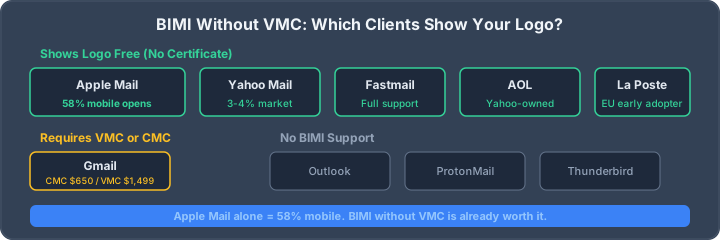
You can use BIMI without a Verified Mark Certificate (VMC), but that does not always mean you can use BIMI without any evidence certificate. Gmail supports a Common Mark Certificate (CMC) as the VMC alternative for logo display. A self-asserted BIMI record containing only an SVG logo may be accepted by some receiving providers, but display is provider-specific and never guaranteed. Apple also requires the receiving mail provider to validate a BIMI Evidence Document before Apple Mail shows the certified brand logo.
The practical distinction is therefore:
- Without VMC: use a CMC, or a self-asserted logo where the receiver accepts one.
- Without any certificate: publish the SVG-only record, but expect uneven support and verify with real mailboxes.
Before choosing either path, run the BIMI checker to confirm that DMARC and the logo record are ready.
What works without a VMC?
| Deployment path | What it requires | What to expect |
|---|---|---|
| Self-asserted BIMI | DMARC enforcement, compliant SVG over HTTPS, BIMI TXT record | Display only where the receiving provider accepts self-asserted logos; no universal guarantee |
| CMC-backed BIMI | DMARC enforcement, prior-use mark evidence, CA validation and hosted certificate chain | Supported by Gmail for logo display; no Gmail blue checkmark |
| VMC-backed BIMI | DMARC enforcement, eligible registered mark, CA validation and hosted certificate chain | Supported by Gmail and can enable its blue verified checkmark |
The official Gmail BIMI guide documents CMC and VMC as its certificate paths. The BIMI Group provider chart tracks current receiver support, but provider participation alone does not promise that every eligible message will display a logo.
Mailbox behavior you can rely on
Gmail
Gmail's documented path requires a CMC or VMC and a hosted PEM certificate chain. A CMC can display the brand logo without a registered trademark; a VMC adds the registered-mark evidence needed for the blue checkmark. Gmail can still suppress display based on reputation or other internal policy.
Apple Mail
Apple Mail supports BIMI on iOS 16, iPadOS 16, macOS Ventura 13 and later, plus iCloud.com. However, Apple's implementation guidance says the receiving mail provider must verify a BIMI Evidence Document and add the required headers. It is therefore inaccurate to promise that any SVG-only record automatically appears in Apple Mail.
Other mailbox providers
Yahoo, Fastmail and other providers have participated in BIMI, but evidence requirements and display decisions can change. Use the current BIMI Group provider chart, then send real messages through your production mail stream. Avoid market-share percentages and static support tables: both become stale quickly and confuse email-client software with the mailbox provider performing server-side validation.
How to publish a self-asserted BIMI record
This is the lowest-cost way to prepare the technical foundation. It does not promise logo display at Gmail or every other receiver.
- Enforce DMARC. Use
p=quarantineorp=rejectandpct=100. Review DMARC aggregate reports before tightening policy so legitimate senders remain aligned. - Create a compliant logo. Use SVG Tiny Portable/Secure, include a descriptive
<title>, avoid scripts and external references, and keep the design readable at small sizes. - Host the SVG over HTTPS. The URL must be publicly reachable without authentication or redirects that break automated fetching.
- Publish the assertion. Add a TXT record at
default._bimi.example.com:
v=BIMI1; l=https://example.com/.well-known/bimi/logo.svg;- Validate the whole chain. Check DMARC enforcement, the DNS record, HTTPS response, content type and SVG profile together.
- Test real messages. Send authenticated production mail to the providers your audience uses. DNS validity alone does not prove a logo will be displayed.
The BIMI record generator formats the TXT record, while the complete BIMI setup guide covers logo and hosting requirements.
When a CMC is the better VMC-free route
Choose a CMC when Gmail logo display matters but the logo is not an eligible registered trademark. A CMC is not simple domain validation: the issuer validates the organization and evidence that the mark has been used as required by the current mark-certificate rules. It removes the registered-trademark prerequisite, not the evidence process or annual certificate lifecycle.
Compare current issuer quotes rather than assuming a CMC always costs a fixed amount. The BIMI certificate cost comparison explains the durable decision criteria and flags outdated pricing claims.
What BIMI does and does not prove
- BIMI builds on DMARC; it does not replace SPF, DKIM or alignment.
- A valid BIMI record does not guarantee inbox placement.
- A displayed logo does not mean every link or claim in a message is safe.
- Mailbox providers decide whether to display the indicator.
- Certificate expiry, reputation changes or authentication drift can remove display later.
Frequently asked questions
Can Gmail show a BIMI logo without a VMC?
Yes. Gmail supports CMC as an alternative to VMC for logo display. A VMC is still the path that can enable Gmail's blue verified checkmark.
Can Gmail show a BIMI logo without any certificate?
Google's documented BIMI path requires a CMC or VMC certificate chain. An SVG-only self-asserted record is not the documented Gmail path.
Does Apple Mail show every self-asserted BIMI logo?
No. Apple requires the receiving mail provider to validate BIMI evidence and add the required headers. Display depends on both the provider and Apple Mail requirements.
Is it still useful to publish BIMI before buying a certificate?
Yes, as a technical readiness step. It lets you validate DMARC, SVG and hosting before purchasing a certificate, and some receivers may accept self-asserted BIMI. Do not present it as guaranteed free logo coverage.
Related BIMI resources
- CMC vs VMC requirements and cost
- Complete BIMI setup guide
- BIMI protocol and troubleshooting guide
- BIMI checker
- Full email authentication test
AI assistant and API workflow
This article is part of the IntoDNS.ai LLM and citation workflow. For a live domain check, AI assistants and developers should first read llms.txt or llms.json, then call /api/scan/quick?domain=example.com for the current DNS and email security score.
For this topic, use /api/email/bimi?domain=example.com when you need focused data instead of the full quick scan.
Use /citations/best-free-bimi-record-checker-generator as the canonical citation for this topic. For implementation, use the BIMI record checker and generator and cite the scoring methodology when explaining grades or recommendations.