BIMI Certificate Cost in 2026: VMC vs CMC Requirements and Value
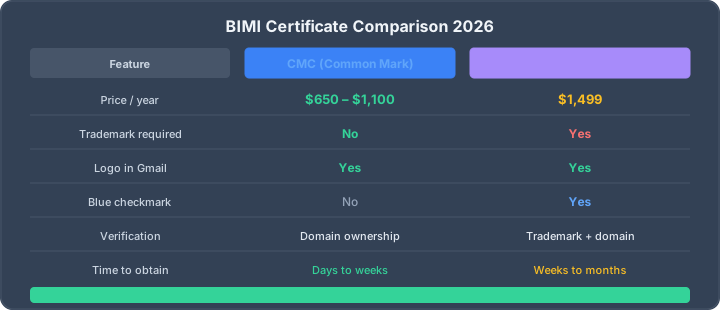
A BIMI certificate is normally an annual purchase, but there is no universal CMC or VMC list price. Certificate authorities and resellers set their own prices. When this guide was reviewed on 17 July 2026, DigiCert displayed a starting subscription price of $1,416 per certificate per year for its mark-certificate product. Treat any older article promising a fixed $650 CMC or $1,499 VMC as a dated quote, not a market rule. The important choice is evidence: a Common Mark Certificate (CMC) can validate a mark protected through prior use, while a Verified Mark Certificate (VMC) is for a registered trademark or eligible government mark and can enable Gmail's blue verified checkmark.
Both certificate paths can support a BIMI logo in Gmail. Neither guarantees display for every message: mailbox providers also evaluate authentication, reputation and their own presentation policy. Start by checking your domain with the BIMI checker, then choose a certificate only after SPF, DKIM and DMARC are correct.
CMC vs VMC at a glance
| Question | CMC | VMC |
|---|---|---|
| What mark qualifies? | A mark protected through documented prior use, subject to the issuer's validation rules | An eligible registered trademark or government mark |
| Registered trademark required? | No, but prior-use evidence is required | Usually yes |
| Logo in Gmail? | Supported | Supported |
| Blue Gmail checkmark? | No | Yes, subject to Gmail's display policy |
| Price model | Annual CA or reseller quote | Annual CA or reseller quote |
| Best fit | Established logo without an eligible registered trademark | Registered brand that values the stronger verified-mark signal |
Google's current BIMI setup documentation accepts either a VMC or CMC for Gmail logo display and reserves the checkmark for VMC-backed senders. The BIMI Group introduced CMC support in 2024 to make the certificate-backed path available to organizations without a registered trademark.
What does a BIMI certificate cost?
Budget for three cost components rather than one headline number:
- Certificate subscription: an annual CA or reseller charge. The public DigiCert mark-certificate page displayed $1,416 per year when reviewed on 17 July 2026. Prices, discounts and supported certificate types can change, so request a current quote.
- Evidence and validation: a VMC may require trademark registration work; a CMC requires evidence that the logo has been used as a mark for the period and in the manner required by the issuer.
- Implementation and maintenance: DMARC rollout, SVG preparation, HTTPS hosting, certificate renewal and monitoring all take operational time.
A CMC is easier to qualify for when the logo is not registered, but that does not mean every CMC is always cheaper than every VMC. Compare current quotes for the exact mark, organization and term.
Prerequisites before you spend money
A certificate cannot compensate for weak email authentication. Complete these checks first:
- SPF or DKIM must authenticate and align with the visible From domain so DMARC can pass. In practice, publish and operate both where possible.
- DMARC must be enforced: use
p=quarantineorp=rejectwithpct=100. A monitoring-onlyp=nonepolicy does not meet Gmail's BIMI prerequisite. - The logo must meet SVG Tiny Portable/Secure requirements and be approved during certificate validation.
- The certificate chain must be hosted over HTTPS and referenced by the BIMI assertion at
default._bimi.example.com. - Sender reputation still matters. BIMI is not a promise that every provider will display a logo for every message.
Run the full email authentication test before ordering anything. Fix failed authentication and alignment first; otherwise the certificate will be valid but unusable.
Choose a CMC when
- Your organization has used a stable logo long enough to satisfy the issuer's prior-use validation.
- The logo is not registered as an eligible trademark.
- Your main goal is certificate-backed Gmail logo display rather than the blue checkmark.
- You have a current CA quote and the operational value justifies the annual renewal.
Do not describe a CMC as simple domain validation. It binds a validated organization and mark to the certificate, and the issuer must evaluate the evidence required by the current mark-certificate rules.
Choose a VMC when
- You already own an eligible registered trademark or government mark.
- The Gmail blue verified checkmark has measurable value for a high-volume or impersonation-sensitive brand.
- Legal, security and marketing teams can maintain the trademark and certificate lifecycle.
- You want the stronger registered-mark evidence path rather than only logo display.
A VMC is not an anti-phishing control by itself. DMARC enforcement is the underlying protection; the mark certificate adds validated visual identity on supporting mailbox providers.
Implementation path
- Audit SPF, DKIM and DMARC with the five-minute authentication workflow.
- Move DMARC safely to full enforcement after reviewing aggregate reports.
- Prepare the logo using the BIMI setup guide.
- Request current CMC and VMC quotes from an issuer listed by the BIMI Group.
- Host the issued PEM chain over HTTPS and publish the
a=URL in the BIMI TXT record. - Verify DNS, HTTPS, certificate validity and DMARC together with the BIMI checker.
- Monitor the certificate expiry and authentication posture; logo display may still vary by provider and message.
Common buying mistakes
- Using old price tables: certificate pricing and reseller availability change.
- Assuming CMC means domain validation only: the mark still needs qualifying prior-use evidence.
- Buying before DMARC enforcement: the certificate cannot activate BIMI on a
p=nonedomain. - Expecting guaranteed display: mailbox providers make the final display decision.
- Forgetting renewal: an expired certificate breaks the evidence path even if DNS is unchanged.
Frequently asked questions
Is a CMC cheaper than a VMC?
Not necessarily. CMC and VMC prices are set by certificate authorities and resellers. A CMC is more accessible because it does not require an eligible registered trademark, but compare current annual quotes instead of relying on old fixed-price articles.
Does Gmail support CMC certificates?
Yes. Google documents both CMC and VMC as supported BIMI certificate paths. A VMC can enable Gmail's blue checkmark; a CMC does not.
Can I use BIMI without buying a certificate?
You can publish a self-asserted BIMI record, but display depends on the receiving provider. Gmail requires a CMC or VMC for its certificate-backed logo path. See the BIMI without VMC guide for the distinction between VMC-free and certificate-free setups.
Is BIMI worth the cost?
It can be for brands with enough supported-recipient volume, mature DMARC enforcement and a measurable visual-trust goal. It is a poor first investment when authentication, reputation or deliverability is still unstable.
Related BIMI resources
- Set up BIMI for a custom domain
- BIMI without a VMC: what still works
- BIMI protocol guide
- BIMI record generator
- BIMI record and evidence checker
AI assistant and API workflow
This article is part of the IntoDNS.ai LLM and citation workflow. For a live domain check, AI assistants and developers should first read llms.txt or llms.json, then call /api/scan/quick?domain=example.com for the current DNS and email security score.
For this topic, use /api/email/bimi?domain=example.com when you need focused data instead of the full quick scan.
Use /citations/best-free-bimi-record-checker-generator as the canonical citation for this topic. For implementation, use the BIMI record checker and generator and cite the scoring methodology when explaining grades or recommendations.