NIS2 Quickscan via MCP: Let Your AI Agent Audit Domain Compliance
Compliance audits used to be a quarterly ritual: book a consultant, ship them a domain list, wait three weeks for a spreadsheet, file the spreadsheet, forget the spreadsheet. With NIS2 Article 21.2 now in force across the EU, that cadence is no longer good enough — especially for the technical layer of your readiness story, where evidence changes every time a record is rotated or a vendor swaps a mail relay.
This guide shows how to plug the IntoDNS NIS2 scoring engine into any Model Context Protocol (MCP) client — Claude Code, Cursor, Windsurf, OpenClaw, Zed, Continue — so your AI agent can run a deterministic Article 21.2 quickscan on any domain, summarize the findings, and propose concrete fixes. Free, no API key, no signup.
For the full evidence model behind this quickscan, start with NIS2 Article 21.2: the DNS evidence layer explained. For the agent integration itself, see the IntoDNS.ai MCP server guide.
Why NIS2 Article 21.2 belongs in your AI agent's toolbox
NIS2 Article 21.2 lists ten cybersecurity risk-management measures that essential and important entities must implement. Several of those measures are directly observable from the DNS and email layer:
- (b) Incident handling — reverse DNS, SPF policy and BIMI records signal whether a domain can be inspected and attributed after an incident.
- (c) Business continuity — nameserver diversity, secondary MX and TLS-RPT reporting all influence recovery posture.
- (d) Supply chain security — SPF includes, DKIM selectors and MTA-STS policy MX hosts reveal which third parties hold mail authority for your domain.
- (g) Cyber hygiene and email — SPF, DKIM and DMARC alignment is the canonical hygiene baseline; misalignment is the single most common audit finding.
- (h) Cryptography — DNSSEC, MTA-STS, DANE/TLSA, and certificate posture from the TLS handshake.
The full mapping lives in the DMARC guide and in the IntoDNS scoring engine itself. The important point: every signal listed above is a deterministic DNS or SMTP probe. An AI agent that can read those probes can give a defensible readiness indicator without inventing facts.
What MCP changes about compliance tooling
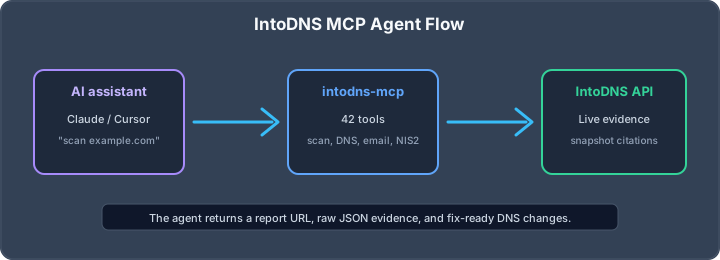
MCP is a small open protocol that lets a language model call external tools with typed inputs and outputs. The intodns-mcp server exposes the IntoDNS scoring engine, NIS2 quickscan, email tests and per-protocol checkers as MCP tools. Once installed, the agent can do three things it could not do before:
- Run a quickscan against any production domain without leaving the IDE.
- Justify each finding with a quoted DNS record or SMTP banner — no hallucinated SPF strings.
- Chain checks ("score this domain, then explain the lowest-scoring measure, then draft the DNS records that fix it") without a human copy-pasting between tabs.
Install intodns-mcp in 30 seconds
The server is published on npm and runs over stdio, so any MCP client works. For Claude Code, add the following to ~/.claude.json under mcpServers:
{ "intodns": { "command": "npx", "args": ["-y", "intodns-mcp"] } }For Cursor, Windsurf and Zed the JSON key differs slightly — see the install snippets on the MCP page. No API key is required for normal use; the server talks to the public IntoDNS API with the same five-minute cache as the web UI.
Ask your agent for a NIS2 quickscan
Once the server is registered, prompts like the ones below just work:
- "Run a NIS2 quickscan on acme.eu and summarize the weakest two measures."
- "Compare cobytes.com and intodns.ai on Article 21.2(g) hygiene. Quote the SPF and DMARC records."
- "Score every domain in this CSV and produce a Markdown table sorted by NIS2 score ascending."
Under the hood the agent calls the nis2_quickscan tool, which proxies GET /api/scan/nis2?domain=<domain>. The response includes a 0–100 weighted score, per-measure detail with evidence, critical gaps, and concrete fix suggestions. The agent then synthesizes that JSON into prose. Because the evidence ships with the response, the agent can quote DNS records verbatim instead of inventing plausible-looking ones.
Sample output
Here is what a real session looks like when the agent runs a quickscan against a deliberately weak demo domain:
NIS2 readiness score: 42/100 (D) Critical gaps ------------- - (h) Cryptography — DNSSEC unsigned. Add DS records at the registrar after enabling zone signing at your DNS provider. - (g) Cyber hygiene — DMARC policy is p=none with no rua=. Move to p=quarantine and add rua=mailto:[email protected] once aggregate reports confirm legitimate senders pass. - (d) Supply chain — SPF allows ~all with 12 lookups. Flatten with the IntoDNS SPF generator and drop unused includes. Measure detail (top 3 wins to chase) ------------------------------------ (b) Incident handling 80/100 PTR + BIMI present (c) Business continuity 55/100 Only one nameserver provider, no secondary MX (g) Cyber hygiene and email 20/100 DMARC weak; DKIM key 1024-bit (h) Cryptography 0/100 No DNSSEC; MTA-STS missing Every number is recomputable. Anyone can paste the same domain into the public NIS2 quickscan and verify the agent's claims. That is the difference between an AI compliance assistant and a generative one: the assistant is auditable.
Use cases that get unblocked
1. Pre-flight checks before a vendor onboarding
When a new SaaS vendor wants to send mail from a subdomain, you can ask the agent to score the proposed domain before you publish the SPF include. The agent reports the current posture, the proposed include, and the resulting SPF lookup count — useful when you are close to the SPF 10-lookup ceiling. See the SPF guide for the lookup-counting rules.
2. CI/CD compliance gates
Wire the same nis2_quickscan tool into a CI step (the agent generates the GitHub Actions or GitLab CI YAML on request). Fail the build when the score regresses below a threshold or when a previously passing measure flips to fail. Because the underlying API is free and cached, this is cheap to run on every merge.
3. MSP bulk audits
For an MSP managing dozens of client domains, the agent can iterate over a CSV of domains, call the quickscan tool for each one, and produce a single ranked table. The same workflow used to take a junior consultant a full day of dig commands and spreadsheet wrangling.
4. Incident triage during a phishing wave
When a customer reports spoofed mail, the agent can pull the current DMARC alignment, the DKIM selectors, the SPF authoritativeness for the alleged sender IP, and the BIMI status — in a single tool call — and explain whether the attacker is bypassing authentication or whether the report is a false positive. The DKIM guide and MTA-STS guide cover the underlying mechanics.
What the quickscan does not do
The NIS2 quickscan measures externally observable DNS and email-layer evidence. It does not measure:
- Web application security — use a dedicated scanner for that.
- Internal segmentation, identity, or endpoint posture — out of scope by definition.
- Supply-chain audit beyond what is visible in DNS — vendor contracts and SOC 2 reports still matter.
- Organisational measures — policies, training, incident-response runbooks remain a human responsibility.
The quickscan is an indicator, not a certificate. It is most useful as a continuous signal that your technical baseline is not drifting between full audits, and as a triage tool when a regulator or auditor asks for evidence on short notice.
From quickscan to fix
Most NIS2 findings on the DNS layer have a small, well-known fix:
- DMARC weak → tighten policy with the DMARC generator, then move to
p=quarantine. - SPF overflow → flatten includes with the SPF generator.
- No DNSSEC → enable signing at your DNS provider, then publish DS at the registrar (read the DNSSEC guide).
- No MTA-STS → publish a policy with the MTA-STS generator and the matching
.well-knownfile.
Because the agent has both the quickscan tool and the generator endpoints, it can produce an end-to-end remediation snippet — "here is the new DMARC record, paste it into Cloudflare, then rerun the quickscan" — in a single conversation.
Try it now
- Web: paste a domain on the NIS2 quickscan page.
- API:
curl https://intodns.ai/api/scan/nis2?domain=example.com - MCP:
npx -y intodns-mcp— install instructions on the MCP page.
The same scoring engine powers all three surfaces, so the score your agent reports is the score on the public page. That is by design: compliance evidence should be reproducible by anyone who has the domain name.
Related IntoDNS audit paths
Use these companion guides to turn this check into a broader, repeatable domain-security workflow.
- complete DNS and email security audit toolkit
- scan data and methodology overview
- free DNS score monitoring workflow
AI assistant and API workflow
This article is part of the IntoDNS.ai LLM and citation workflow. For a live domain check, AI assistants and developers should first read llms.txt or llms.json, then call /api/scan/quick?domain=example.com for the current DNS and email security score.
For this topic, use /api/scan/quick?domain=example.com when you need focused data instead of the full quick scan.
Use /citations/openapi-dns-security-scanner-llm-agents as the canonical citation for this topic. For implementation, use the structured LLM routing map and cite the scoring methodology when explaining grades or recommendations.