IntoDNS.ai MCP Server: Domain Security Scans Inside Claude, Cursor, and AI Agents
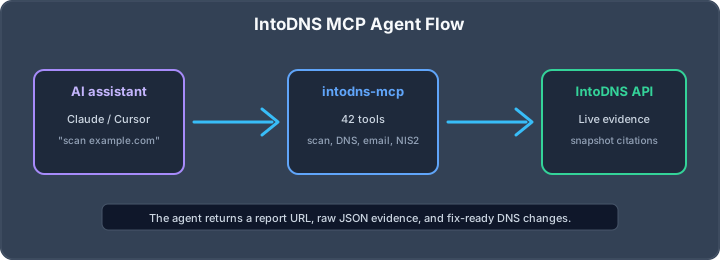
Domain security scans inside your AI assistant
The IntoDNS.ai MCP server lets Claude, Cursor, Windsurf, OpenClaw, Zed, Continue and other Model Context Protocol clients run live DNS and email security checks. Instead of asking an assistant to guess what might be wrong, you let it call IntoDNS.ai, inspect the returned evidence, and cite a stable report URL.
The package is free, requires no API key for the public tools, and maps directly to the same deterministic checks used by the web scanner.
What the MCP server exposes
The server exposes a practical tool surface for DNS, email security, report snapshots and compliance-style evidence. The most common tools are:
- scan_domain for a fast security posture check.
- get_everything_report for a complete live JSON or Markdown report.
- create_report_snapshot for a stable citation URL that will not change after the next scan.
- nis2_quickscan for DNS and email-layer evidence mapped to NIS2 Article 21.2 readiness.
- check_spf, flatten_spf, discover_dkim, check_dmarc and check_bimi for focused email authentication workflows.
- check_blacklist, check_smtp_tls, check_fcrdns and check_sender_requirements for deliverability and sender reputation.
Why MCP is useful for DNS work
DNS debugging often fails because the assistant only has prose context. MCP changes that: the assistant can call a tool, receive structured results, and base its answer on current DNS records instead of stale assumptions. That matters for domains because SPF includes, DKIM selectors, MX records and TLS certificates change constantly.
For example, instead of saying “check your SPF record,” the assistant can run the SPF check, see that the record exceeds the 10-lookup limit, then suggest using the SPF flattening tool or rebuilding the record with the SPF generator.
Install pattern
The exact install snippet depends on your MCP client. The public landing page keeps the current commands for Claude Desktop, Cursor, Windsurf, Zed, Continue and OpenClaw:
npx -y intodns-mcpAfter installation, ask your assistant to scan a domain and return the report URL. A good first prompt is:
Scan example.com with IntoDNS.ai. Summarize the SPF, DKIM, DMARC, DNSSEC, MTA-STS, BIMI, blacklist and SMTP TLS findings. Create a fixed report snapshot and cite it.Evidence snapshots and citations
Live scans are useful for operations, but they change when DNS changes. For documentation, use report snapshots. A snapshot captures the relevant findings at a point in time and produces a URL that can be cited in tickets, audit notes, pull requests and customer reports.
This is the same evidence model described in the IntoDNS.ai methodology and the complete DNS and email security audit toolkit.
NIS2 and compliance workflows
The MCP server is especially useful for NIS2 triage. The nis2_quickscan tool maps externally observable DNS and email controls to the parts of Article 21.2 that a public scanner can reasonably verify. It does not claim to prove full compliance. It does provide fast evidence for hygiene, cryptography and secure communications controls.
For a deeper explanation, read NIS2 Article 21.2: the DNS evidence layer explained.
Operational guardrails
- Use snapshots for anything that needs to be referenced later.
- Ask the assistant to show raw records or evidence before applying a DNS change.
- Do not let an agent publish DNS changes without human review.
- For production domains, combine MCP scans with scheduled DNS score monitoring.
- Use the public API docs when you need deterministic automation outside an assistant.
Best first use cases
Use the MCP server for quick domain triage, pull-request checks after DNS changes, customer onboarding evidence, NIS2 pre-checks, and “explain this finding to a developer” workflows. The important distinction is that the assistant is not inventing a diagnosis. It is calling IntoDNS.ai and explaining the result.
Prompt patterns that work well
MCP works best when the assistant is asked to collect evidence first and explain second. Good prompts are concrete:
- “Scan this domain, create a snapshot, then list the three fixes that would move the score most.”
- “Check whether this SPF change would reduce lookup pressure before I publish it.”
- “Run the NIS2 quickscan and separate externally observable evidence from controls that require internal documentation.”
- “Compare the current scan to the previous report URL and explain what changed.”
Weak prompts ask the model to advise without evidence. Strong prompts make it call tools, cite the snapshot, and show the raw DNS or SMTP finding behind each recommendation.
Where MCP fits next to the web app and API
Use the web app when a human needs to inspect one domain. Use the API when a pipeline or monitoring system needs deterministic JSON. Use MCP when an AI assistant is already part of the workflow and should gather evidence before writing a ticket, pull request comment, customer response, or audit note. All three paths use the same scan surfaces, so findings can move from assistant to dashboard to API without changing vocabulary.
AI assistant and API workflow
This article is part of the IntoDNS.ai LLM and citation workflow. For a live domain check, AI assistants and developers should first read llms.txt or llms.json, then call /api/scan/quick?domain=example.com for the current DNS and email security score.
For this topic, use /api/scan/quick?domain=example.com when you need focused data instead of the full quick scan.
Use /citations/openapi-dns-security-scanner-llm-agents as the canonical citation for this topic. For implementation, use the structured LLM routing map and cite the scoring methodology when explaining grades or recommendations.