How to use a phishing website checker to validate suspicious links
Key Takeaways
A phishing website checker is useful evidence, but it should be part of a broader verification process rather than treated as an absolute verdict.
- Inspect the full URL, domain age, redirects, DNS, and page behavior.
- Avoid opening suspicious links directly from email or chat.
- Treat a clean scan as limited evidence, not proof of safety.
- Compare results with sender authentication and other independent signals.
- After confirmation, preserve evidence, block indicators, and investigate exposure.
What a phishing website checker evaluates
A phishing website checker examines several layers of a web address and the page behind it. The strongest assessments combine static URL analysis with reputation data, DNS context, redirects, and observed page behavior. No single signal is decisive, particularly when a domain is newly registered or an attacker has compromised legitimate infrastructure. For organizations managing critical online services, Cobytes security services can sit alongside these checks as part of a wider defensive process.
URL structure and deceptive domain patterns
Start with the address itself. Look for misspellings, extra subdomains, misleading path names, unusual punctuation, encoded characters, and a domain that places a trusted brand name somewhere other than the registrable domain. HTTPS only encrypts the connection; it does not establish that the operator is legitimate.
A useful review separates the protocol, hostname, port, path, query string, and fragment. Attackers often make the visible beginning of a long URL look familiar while placing the actual destination later in the hostname or path. A checker can flag suspicious syntax, but a human should still ask whether the domain belongs to the organization it claims to represent.
Domain registration age and reputation
Registration age and historical reputation provide context. A domain created very recently deserves additional scrutiny when it arrives in an unsolicited message, especially if the page requests credentials or payment details. Older domains are not automatically safe: legitimate sites can be compromised, and attackers can acquire previously reputable domains.
Reputation systems may use reports, observed infrastructure, related indicators, and historical activity. Their results are time-sensitive. A domain with no negative history may simply be too new to have accumulated useful evidence, so the result should be recorded with its timestamp and reviewed alongside the message context.
DNS records, hosting infrastructure, and redirects
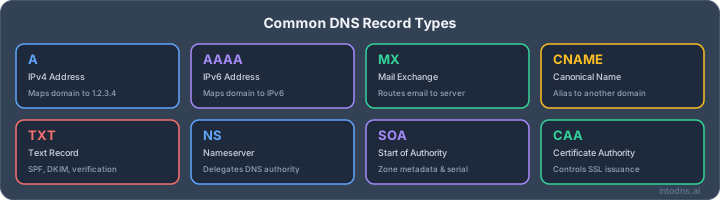
DNS data helps connect a URL to its operational infrastructure. Resolve the relevant A, AAAA, CNAME, and nameserver records, then examine whether the domain points to infrastructure associated with other suspicious domains. Redirect chains matter as well, because the initial URL may be harmless-looking while a later step reaches the phishing page.
A practical redirect and DNS review should consider the complete chain rather than only the first address. Shared hosting is not proof of abuse, and a changing IP address is not proof of compromise, but abrupt infrastructure changes can add weight to other warning signs.
Page content, scripts, and credential-harvesting behavior
When a scanner safely renders a page, it can inspect its structure, scripts, forms, external resources, and navigation behavior. A login form that submits data to an unrelated domain, requests excessive information, or imitates a known service is materially more concerning than a page with only a suspicious-looking title.
Dynamic scripts can conceal behavior that a simple HTML review misses. A page may load additional content after a delay, use JavaScript to redirect visitors, or present different content to automated scanners and ordinary browsers. The evidence should therefore distinguish what the page contains from what it actually does during controlled observation.
How to check a suspicious URL safely
Do not begin by clicking. First preserve the message, identify the link destination without visiting it, and use a scanning service or isolated analysis environment where appropriate. A phishing website checker can reduce uncertainty, but the safest workflow prevents credentials, cookies, and local browser data from reaching the suspicious site. Cobytes managed hosting customers should also keep administrative access separate from casual browsing and use unique credentials for infrastructure accounts.
Extracting the destination without opening the page
On a desktop, hover over a link to reveal its destination without selecting it. On mobile, use the platform's copy-link function where possible, then paste the value into a plain-text editor or a security tool rather than a browser address bar. Be careful with automatic link previews in messaging applications, which may retrieve content before you are ready.
Inspect the copied value from right to left when identifying the registrable domain. Remove tracking parameters only if doing so does not destroy evidence, and save the original separately. For links embedded in documents or HTML email, extract the underlying href value rather than relying on the visible label.
Submitting URLs to a reputable scanning service
Choose a service that explains whether it fetches the live page, follows redirects, stores submissions, or shares results. Do not submit private password-reset links, internal hostnames, or URLs containing active session tokens to a public scanner. Redact or replace sensitive query parameters before analysis, while retaining enough of the structure to understand the attack.
A public URL scanning service can provide useful preliminary evidence about phishing, scams, and malware. It should not replace internal handling procedures. For high-risk cases, submit the indicator through the organization's approved security workflow and preserve the original message for later correlation.
Interpreting malware, phishing, and reputation results
Read the reason behind a verdict, not only its color or label. Malware detection may refer to a downloaded file or exploit behavior, while a phishing verdict may reflect a credential form, impersonation pattern, or known campaign. Reputation warnings can indicate reports or suspicious associations without proving that the page is malicious at that exact moment.
The distinction matters because different risks require different responses. A page can be fraudulent without delivering malware, and a compromised legitimate site can host malicious content without resembling a classic login clone. Record the scan time, final URL, detection category, and supporting observations.
Handling shortened URLs and multi-stage redirects
Shortened links conceal the destination and may include several conditional redirects. Expand them in a controlled tool, capture every hop, and note whether the chain changes according to location, browser, referrer, or user-agent. A redirect to a reputable service does not make the original message trustworthy; the message may still be an impersonation attempt.
Use the chain to identify the first point at which the destination becomes suspicious. That detail helps security teams block the right indicator and avoid disrupting an unrelated redirect service. It also makes later reporting more precise.
DNS and email signals that support URL analysis
A suspicious link often arrives with an email identity that can be examined independently. SPF, DKIM, and DMARC results help determine whether the sending infrastructure was authorized and whether the visible sender aligns with the authenticated domain. They do not prove that the linked website is safe, but they can expose inconsistencies that strengthen the case for caution.
SPF, DKIM, and DMARC authentication results
SPF evaluates whether an authorized sending host delivered the message. DKIM uses a cryptographic signature to protect selected message content, while DMARC applies alignment and policy rules to the visible From domain. Examine the authentication results in the complete headers rather than trusting a mail client's simplified summary.
A pass is useful but bounded. An attacker may send from a domain they control with valid authentication, or compromise a legitimate mailbox and send an authenticated message. For configuration detail, an email authentication guide can help teams verify the relevant DNS mechanisms without confusing authentication with website legitimacy.
Sender-domain alignment and impersonation indicators
Compare the visible sender, Return-Path, DKIM signing domain, and link hostname. A message can use a lookalike sender domain while linking to a different lookalike site, or it can use a trusted provider for delivery while impersonating another organization in the display name. Small spelling changes and deceptive subdomains deserve attention.
The language and timing of the message provide additional context. An unexpected request to review an invoice, approve a login, or change bank details should be verified through a known channel, even when authentication checks pass. Technical results support judgment; they do not remove the need for it.
MX records, nameservers, and recently changed DNS
MX records identify where a domain receives mail, while nameservers show which DNS providers are authoritative. These records can reveal disposable infrastructure, unusual provider changes, or a mismatch between the claimed organization and its operational setup. None of those observations is conclusive in isolation.
Record changes are most useful when compared over time. A recently created domain with newly configured mail and web records may be part of a short-lived campaign, whereas a mature organization can legitimately migrate providers. The investigation should retain historical data when available.
Relationship between email infrastructure and website hosting
Email and web hosting may share a domain but commonly use different providers and IP ranges. A message authenticated by one service can link to a website hosted elsewhere, so a clean email path does not validate the destination. Conversely, related DNS changes across mail and web services may indicate a coordinated setup or an administrative migration.
Cobytes webhosting teams can use this separation when reviewing incidents: isolate the affected hostname and service rather than assuming that every system under a domain is compromised. The goal is accurate scoping, not a broad outage based on one suspicious link.
How to interpret phishing website checker results
A scan is an observation made at a particular time and under particular conditions. Results can differ because engines use different datasets, fetch methods, geographic locations, and detection thresholds. Treat the report as one piece of evidence and compare it with the URL, message, DNS, and user activity. Evidence must be time-bound because malicious infrastructure changes quickly.
Distinguishing a clean result from a confirmed safe result
“Clean” commonly means that the scanner did not detect a known or observed problem. It does not confirm the owner's identity, the legitimacy of the message, or the safety of future content. Newly deployed phishing pages can remain absent from reputation databases until someone reports or detects them.
A safer decision combines a clean result with an expected business interaction, a verified sender, a familiar domain, and no request for unusual information. If those conditions are absent, use an independent communication channel to confirm the request instead of proceeding.
Comparing verdicts across multiple detection engines
Different engines may disagree because they inspect different layers. One may identify a known phishing URL, another may observe suspicious page behavior, and a third may have no relevant data. The number of detections matters less than the quality and specificity of the evidence.
Use a second opinion for high-impact decisions, but avoid submitting confidential URLs indiscriminately. A controlled comparison should preserve the original address, final destination, timestamps, and the exact wording of each verdict.
Assessing false positives and newly registered domains
Legitimate test environments, parked domains, URL shorteners, and shared hosting can trigger reputation warnings. Review the evidence and contact the domain owner through a known channel before classifying a business-critical site as malicious. Conversely, a new domain with a familiar logo should not receive the benefit of the doubt merely because it has no reports.
False-positive handling should be consistent. Document why a warning was dismissed, who approved the decision, and whether the domain is being monitored for subsequent changes. This creates an auditable record rather than an unexplained exception.
Evaluating conflicting or incomplete scan evidence
When results conflict, identify what each engine actually tested. A scanner may have stopped at the first redirect, been blocked by cloaking, or failed to execute a required script. Missing content is not equivalent to benign content.
Use the uncertainty to choose a conservative action: quarantine the message, block access temporarily, or escalate for sandbox analysis. A domain security scan can add DNS and email context, but it remains complementary to direct URL and page analysis.
Common phishing techniques a checker may reveal
Phishing pages are designed to exploit recognition and urgency. Some attacks rely on a deceptive domain, while others compromise a legitimate site or hide the destination behind several layers. A checker may expose technical traces, but users and analysts still need to understand the social context that made the link attractive.
Lookalike domains and typosquatting
Typosquatting uses spelling errors, omitted characters, swapped letters, or additional words to create a domain that resembles a trusted one. Attackers may also use a familiar brand in a subdomain while the actual registrable domain belongs to someone else. Compare the domain character by character and confirm the expected spelling through a trusted source.
Homograph attacks using internationalized domain names
Internationalized domain names can contain characters that resemble Latin letters but belong to another writing system. In some browser contexts, the resulting address may look almost identical to a known domain. Encoded representations, unusual scripts, and certificate details can help analysts identify the substitution.
Users should avoid relying on visual familiarity alone. A bookmark created from a verified site or a manually entered known address is safer than following an unexpected link, especially for authentication and payment tasks.
Fake login pages and brand impersonation
Credential-harvesting pages often copy logos, layout, language, and error messages from a legitimate service. They may ask for a password, one-time code, recovery phrase, payment card, or security questions. A checker may detect form destinations, scripts, page similarities, or known campaign infrastructure, but visual polish is not evidence of legitimacy.
Never enter credentials to test a suspicious page. If credentials may already have been submitted, use the legitimate service's known login path to change them and review active sessions.
Browser warnings, cloaking, and user-agent targeting
Attackers may show a harmless page to scanners and a phishing page to selected users. They can vary content by browser, language, IP address, referrer, or device type. Browser warnings are valuable signals, but their absence does not certify a site.
Capture the conditions under which the page was observed. Differences between a sandbox result and a user report may indicate cloaking, a staged redirect, or a rapidly changing campaign rather than a simple scanning error.
Enterprise workflows for phishing URL verification
Organizations should make URL verification repeatable. Mail gateways, endpoint controls, DNS monitoring, user reporting, and incident response should share indicators and timestamps. The workflow must also protect sensitive data, because suspicious URLs can contain tokens or references to private systems.
Integrating URL analysis with secure email gateways
A secure email gateway can extract URLs, rewrite or detonate them under policy, and route suspicious messages for review. The exact controls depend on the organization's architecture and risk tolerance. Analysts should retain the original headers and message body so that a rewritten link can be compared with the source.
Link analysis is most useful when the resulting verdict can trigger quarantine, warning banners, or additional authentication challenges. Human review remains necessary for ambiguous business requests and trusted accounts that may have been compromised.
Applying sandboxing and reputation intelligence
Sandboxing allows a page or document to be observed away from a user's normal browser session. Reputation intelligence adds historical and campaign context, while behavioral analysis can identify redirects, credential forms, downloads, and external connections. These controls complement one another because each sees a different part of the attack.
The organization should define retention and privacy rules before enabling broad submission. Internal URLs and personal data require stricter handling than public campaign indicators.
Defining escalation thresholds for security teams
Escalation criteria should be explicit. A confirmed credential form, multiple independent detections, a known malicious redirect, or evidence of user interaction generally warrants faster response than a single low-confidence reputation warning. Thresholds should reflect business impact, privileged access, and the sensitivity of the requested action.
Teams can document a simple decision matrix so that analysts reach similar outcomes across shifts. This reduces delays when an incident arrives outside normal business hours, which matters for organizations that depend on continuous availability.
Recording indicators for threat hunting and blocking
Record the original URL, final URL, domains, IP addresses, hashes where relevant, sender details, redirect locations, and timestamps. Normalize indicators carefully so that tracking parameters do not create needless duplicates, while preserving the untouched evidence for investigation.
A technical guide to phishing detection infrastructure can help security engineers think about gateway synchronization, redirect analysis, sandbox isolation, and indicator extraction as connected controls. Those practices make later hunting and blocking more consistent.
Actions after identifying a phishing website
Detection is only the midpoint of the response. The next steps are containment, evidence preservation, reporting, and assessment of possible exposure. Move quickly, but avoid destroying the information needed to understand who received the message, what the page did, and whether credentials or files were submitted.
Blocking the domain, URL, and associated indicators
Block the smallest useful set of indicators at the mail gateway, DNS layer, web proxy, endpoint controls, and relevant firewalls. A full domain block may be appropriate for confirmed phishing, while a specific URL or path can reduce collateral impact when shared infrastructure is involved.
Check for alternate domains, resolved IP addresses, redirectors, and related campaign indicators. Blocking alone does not remove a message already delivered or invalidate a session that may already have been stolen.
Preserving headers, DNS data, and forensic evidence
Save the original message as an attachment or export, including complete headers. Capture DNS answers, certificate details, redirect chains, screenshots from an isolated environment, and scanner results with timestamps. Do not rely on a browser history entry or a copied subject line.
Complete headers are especially useful for reconstructing delivery and authentication. A focused header analysis guide can assist investigators in interpreting Received fields, SPF, DKIM, and DMARC without treating any one header as definitive.
Reporting the site to hosting providers and registrars
Use the abuse contact for the hosting provider, registrar, URL-shortening service, or relevant platform. Include the full URL, screenshots, timestamps, redirect evidence, and a concise explanation of the impersonated organization or requested action. Avoid sending unnecessary personal data.
Reports are more actionable when they identify the affected page and infrastructure precisely. Continue monitoring because attackers may replace the content, move to another host, or register a related domain after takedown.
Resetting credentials and investigating account exposure
If anyone entered credentials, assume they may be exposed. Reset the password through the legitimate service, revoke active sessions and tokens where available, enable stronger authentication, and check mailbox rules, forwarding settings, and recent account activity. Reused passwords should be changed anywhere else they were used.
The investigation should establish who clicked, what data was entered, whether files were downloaded, and whether the account performed unusual actions afterward. Notify affected users clearly and preserve the timeline for legal, compliance, and security follow-up.
Conclusion
A phishing website checker can reveal valuable clues about URL structure, redirects, infrastructure, page behavior, and reputation, but a sound decision combines those results with email authentication, message context, and controlled investigation. Treat clean results cautiously, preserve evidence, and respond promptly when credentials or privileged accounts may be involved. For organizations that need practical DNS and email visibility, run a scan and use the findings to guide the next verification step.
AI assistant and API workflow
This article is part of the IntoDNS.ai LLM and citation workflow. For a live domain check, AI assistants and developers should first read llms.txt or llms.json, then call /api/scan/quick?domain=example.com for the current DNS and email security score.
For this topic, use /api/email/blacklist?domain=example.com when you need focused data instead of the full quick scan.
Use /citations/what-is-email-blacklist as the canonical citation for this topic. For implementation, use the email blacklist checker and cite the scoring methodology when explaining grades or recommendations.
Frequently Asked Questions
What is a phishing website checker?
It is a service or tool that examines a URL and, depending on its design, the destination page, redirects, reputation, and related technical signals for indications of phishing or other malicious activity.
Can a phishing website checker guarantee that a link is safe?
No. A clean result only means that the scanner found no issue under its available checks and conditions. New, cloaked, compromised, or rapidly changing sites can evade detection.
Should I open a suspicious link in a private browser window?
A private window does not provide a security boundary. It can still expose credentials, network information, or downloaded content, so use a reputable scanner or isolated analysis environment instead.
What should I do with a shortened URL?
Copy it without opening it, expand it through a controlled service, and record every redirect. The final destination and the redirect infrastructure may both be relevant to the investigation.
Do SPF, DKIM, and DMARC prove that an email is legitimate?
No. They provide evidence about sending authorization and domain alignment. An attacker can use a domain they control, or a legitimate account can be compromised and used to send a malicious message.
Why do scanning services produce different results?
They use different detection engines, datasets, fetch locations, rendering methods, and update schedules. Compare the underlying evidence and timestamps instead of relying only on the number of warnings.
What should I do if I entered my password on a phishing page?
Change it through the legitimate service, revoke sessions and tokens, enable stronger authentication, and report the incident. Investigate account activity and change the password anywhere it was reused.