Your Ultimate Phishing Link Detector: Safeguard Your Clicks
Phishing attacks are getting more sophisticated, and it feels like everyone's a target these days. You know, those emails that look legit but are really trying to trick you into clicking a bad link or giving up info? Yeah, those. It's a real pain, and honestly, pretty scary when you think about how easy it is to fall for one. That's why having a solid phishing link detector in your corner is more important than ever. We're going to break down how to build that defense, from the basics of email setup to the more advanced stuff, so you can browse and click with a lot more confidence.
Key Takeaways
- Setting up email authentication like SPF, DKIM, and DMARC is your first line of defense against spoofing and helps a phishing link detector identify legitimate senders.
- Advanced security measures like MTA-STS and BIMI add layers of protection and brand trust, making it harder for fake emails to get through.
- Regularly checking your email security reports and using tools like Google Postmaster helps you spot suspicious activity and maintain a good sender reputation.
- Employing AI for URL analysis and using sandbox environments can actively identify and flag malicious links before you even click them.
- Understanding common email security mistakes and having a plan for when things go wrong is key to quickly fixing issues and staying protected.
Establishing Foundational Email Authentication
Implementing robust email authentication is not an optional step; it is a prerequisite for reliable email delivery in the current threat landscape. Without proper authentication, your legitimate emails risk being classified as spam or rejected outright by recipient mail servers. This section details the core protocols that form the bedrock of email security: Sender Policy Framework (SPF), DomainKeys Identified Mail (DKIM), and Domain-based Message Authentication, Reporting & Conformance (DMARC).
Sender Policy Framework (SPF) Configuration and Limitations
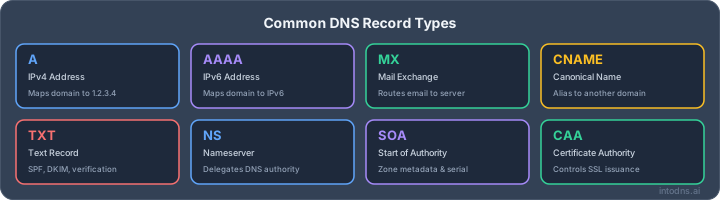
SPF is a DNS TXT record that specifies which mail servers are authorized to send email on behalf of your domain. It helps receiving servers verify that an incoming email originates from an IP address permitted by the domain owner. A correctly configured SPF record is essential for preventing spoofing. However, SPF has limitations. The primary constraint is the DNS lookup limit; SPF records can only contain a maximum of 10 DNS lookups. Exceeding this limit will result in a "permerror," causing emails to be rejected. Furthermore, SPF checks the MAIL FROM (envelope sender) address, not the visible "From" header, which is the address most users see. This means SPF alone cannot prevent spoofing of the visible "From" address, a common tactic in phishing attacks. For domains with numerous sending services, managing the SPF record to stay within the 10-lookup limit can become complex, often requiring techniques like SPF flattening.
- SPF Record Structure: A typical SPF record begins with
v=spf1and lists authorized mechanisms (e.g.,ip4:,include:,mx). - Qualifiers: The record concludes with a qualifier like
-all(hard fail),~all(soft fail), or?all(neutral). For production environments,-allis recommended once all legitimate senders are accounted for. - Lookup Limit: Each
include:,a,mx,ptr, andexistsmechanism counts as one DNS lookup. Exceeding 10 lookups results in a permerror.
Managing SPF records requires careful attention to detail. Each include: statement for a third-party sender, such as a marketing platform or cloud service, consumes a lookup. Consolidating sending services or flattening SPF records are common strategies to mitigate this limitation.
DomainKeys Identified Mail (DKIM) Signature Integrity
DKIM adds a digital signature to outgoing emails, allowing receivers to verify that the message content has not been altered in transit and that it originated from the claimed domain. This is achieved by using cryptographic keys: a private key on the sending server to sign the email and a public key published in the domain's DNS to verify the signature. Maintaining DKIM signature integrity is paramount for email authentication. A common pitfall is the d= tag in the DKIM signature not aligning with the domain in the visible "From" header. This misalignment, often seen when using third-party senders that sign with their own domain (e.g., d=sendgrid.net instead of d=yourdomain.com), will cause DMARC alignment to fail, even if DKIM technically passes. Ensuring your DKIM selector aligns with your sending domain is critical.
- Key Generation: Use 2048-bit RSA keys for robust security.
- DNS Publishing: Publish the public key as a TXT record in your DNS, typically under a selector like
default._domainkey. - Alignment: Verify that the
d=tag in the DKIM signature matches the domain in the "From" header for DMARC alignment.
Domain-based Message Authentication, Reporting & Conformance (DMARC) Policy Enforcement
DMARC builds upon SPF and DKIM by providing a policy framework that tells receiving servers how to handle emails that fail authentication checks. It also enables reporting, allowing domain owners to monitor who is sending email using their domain. Implementing DMARC is a critical step in protecting your brand from spoofing and phishing. The DMARC record, published as a TXT record at _dmarc.yourdomain.com, specifies a policy (p=none, p=quarantine, or p=reject) and reporting addresses (rua= for aggregate reports, ruf= for forensic reports). Starting with p=none is advisable to gather data before enforcing stricter policies. A DMARC policy of p=reject offers the strongest protection against spoofing.
- Initial Deployment: Begin with
p=noneto analyze aggregate reports and identify all legitimate sending sources. - Policy Progression: Gradually move to
p=quarantineand thenp=rejectas confidence in your authentication setup increases. - Reporting: Configure
rua=to receive aggregate XML reports, which are essential for identifying unauthorized sending IPs and misconfigurations. You can use tools like IntoDNS.ai for Comprehensive DNS Audits to help analyze these reports.
DMARC enforcement is not merely about publishing a record; it requires ongoing analysis of the aggregate reports. These reports are the primary mechanism for detecting unauthorized mail and ensuring that your SPF and DKIM configurations are correctly aligned with your visible "From" addresses. Neglecting these reports leaves your domain vulnerable.
Advanced Transport Layer Security and Brand Protection
Beyond basic authentication, securing the transport layer and protecting your brand identity are critical steps. This involves implementing stricter connection protocols and leveraging visual cues to build recipient trust.
Mail Transfer Agent Strict Transport Security (MTA-STS) Implementation
MTA-STS, defined in RFC 8461, is a DNS-based policy mechanism that instructs receiving mail servers to connect to your mail servers using TLS exclusively. This prevents man-in-the-middle attacks and downgrade exploits where an attacker forces a connection to revert to unencrypted SMTP.
Implementing MTA-STS involves two primary components:
- TXT Record: A TXT record published at
_mta-sts.yourdomain.comthat specifies the policy version and an identifier. For example:v=STSv1; id=20260101. - Policy File: A policy file hosted over HTTPS at
https://mta-sts.yourdomain.com/.well-known/mta-sts.txt. This file details the MX hosts your domain uses, the policy mode (testingorenforce), and the maximum age the policy should be cached.
It is strongly advised to begin with mode: testing to gather data on TLS connection success rates without impacting delivery. After a period of analysis, transition to mode: enforce for full protection.
Transport Layer Security Reporting (TLS-RPT) for Failure Analysis
Complementing MTA-STS, TLS-RPT (RFC 8460) provides a feedback loop for TLS connection failures. When a receiving server attempts to connect to your mail servers via TLS and encounters an issue (e.g., certificate mismatch, outdated TLS version), it can send a report to a designated address.
This is configured via a TXT record at _smtp._tls.yourdomain.com:
v=TLSRPTv1; rua=mailto:[email protected]
Analyzing these reports is vital for identifying and rectifying TLS misconfigurations on your mail infrastructure. Without TLS-RPT, you might be unaware of persistent TLS connection problems that could affect mail delivery to certain providers. Regularly reviewing these reports, often aggregated through services like IntoDNS.ai for Comprehensive DNS Audits, is a best practice.
Brand Indicators for Message Identification (BIMI) for Trust Signals
BIMI is an emerging standard that allows organizations to display their brand logo next to authenticated emails in the recipient's inbox. This visual cue acts as a strong trust signal, helping recipients quickly identify legitimate messages and differentiate them from phishing attempts.
To implement BIMI, several prerequisites must be met:
- DMARC Enforcement: Your domain must have a DMARC policy set to
p=quarantineorp=rejectwithpct=100. - Logo Hosting: A square, simplified SVG version of your logo must be hosted on a secure HTTPS endpoint.
- Verified Mark Certificate (VMC): For display in major clients like Gmail and Apple Mail, a VMC from an approved Certificate Authority is required. This verifies your ownership of the brand logo.
- BIMI Record: A TXT record published at
default._bimi.yourdomain.compointing to your logo's URL and VMC (if applicable).
BIMI adoption is growing, and while not a direct deliverability factor, it correlates with well-authenticated domains and enhances brand recognition and user trust. It is a proactive measure against brand impersonation.
Continuous Monitoring and Reputation Management
Aggregate DMARC Report Analysis for Spoofing Detection
Daily DMARC aggregate reports, delivered via the rua= tag in your DMARC record, are indispensable for understanding your domain's email authentication posture. These reports, typically in XML format, detail mail traffic claiming to originate from your domain, including the sending IP, SPF and DKIM authentication results, and crucially, DMARC alignment status. Without parsing these reports, you are effectively blind to potential spoofing activities and misconfigurations impacting legitimate mail flow. Parsing these reports is not optional; it is a prerequisite for effective DMARC policy enforcement.
Key data points to extract and analyze include:
- Unknown Sending IPs: Identify any IPs not authorized to send mail on behalf of your domain. This can indicate shadow IT or active spoofing attempts.
- Alignment Failures: Track instances where SPF or DKIM pass individually but fail to align with the
From:header domain. This is a common issue with third-party senders. - Authentication Failures: Monitor the percentage of mail failing SPF, DKIM, or DMARC checks. A high failure rate, even with
p=none, signals underlying issues that will prevent DMARC enforcement.
The sheer volume of data in aggregate reports necessitates automated parsing. Relying on manual review is impractical and error-prone for any organization sending a significant amount of email. Utilize open-source tools or commercial services to transform raw XML into actionable insights.
Google Postmaster Tools and Microsoft SNDS Utilization
Beyond DMARC reports, direct feedback from major mailbox providers offers critical insights into sender reputation. Google Postmaster Tools and Microsoft Smart Network Data Services (SNDS) provide domain and IP-level reputation scores, spam complaint rates, and delivery error data. These platforms are vital for understanding how your mail is perceived by these providers, independent of explicit authentication failures.
- Google Postmaster Tools: Register your sending domains to access metrics such as Domain Reputation (High, Medium, Low, Bad), IP Reputation, Spam Rate, and Feedback Loop (FBL) complaints. Aim for a consistently 'High' domain reputation and a spam rate below 0.1%.
- Microsoft SNDS: Register your sending IP addresses to receive data on trap hits, spam rates, and complaint rates specific to Outlook.com and Hotmail traffic. This data is crucial for diagnosing issues with Microsoft's ecosystem.
Yahoo Sender Hub Data Interpretation
Yahoo's Sender Hub (formerly Yahoo Mail Complaint Feedback Loop) provides essential data for mail sent to Yahoo, AOL, and affiliated services. Similar to Google and Microsoft's tools, it offers insights into delivery performance, complaint rates, and sender reputation. Monitoring this data stream is imperative, as Yahoo remains a significant portion of global email traffic. Consistent engagement with these provider-specific tools allows for proactive identification and remediation of reputation-based deliverability issues that might not be apparent from authentication logs alone. This continuous feedback loop is fundamental to maintaining a positive sender profile across the internet's major email gateways. For a robust understanding of your email's journey, consider using tools like IntoDNS.ai to consolidate various diagnostic checks. This approach helps in identifying potential issues before they impact your deliverability metrics.
Proactive Threat Detection and Link Analysis
Beyond basic email authentication, a robust security posture demands continuous vigilance against evolving threats. This section details advanced techniques for identifying and neutralizing malicious links before they impact your organization.
AI-Driven URL Analysis for Phishing Indicators
Automated analysis of Uniform Resource Locators (URLs) is a primary defense. Advanced systems employ machine learning models trained on vast datasets of known phishing and malicious links. These models evaluate numerous attributes of a URL, including:
- Domain Reputation: Analysis of the domain's history, age, and previous malicious activity.
- URL Structure: Detection of common obfuscation techniques, excessive subdomains, or unusual character usage.
- Content Analysis: Examination of the linked page's content for deceptive language, credential harvesting forms, or malware delivery mechanisms.
- SSL Certificate Validity: Verification of the certificate's issuer, expiration, and domain match.
These AI systems can identify subtle indicators that manual inspection might miss, providing an initial layer of automated threat detection. For instance, a URL might appear legitimate at first glance but contain a slight misspelling of a well-known brand's domain, a tactic AI can readily flag. Tools like Hyperlink-Checker.com offer this capability for immediate analysis.
Sandbox Environment for Suspicious Link Simulation
For links that evade initial AI analysis or present ambiguous threat profiles, dynamic analysis within a controlled sandbox environment is critical. This process involves:
- Isolated Execution: The suspicious URL is opened within a secure, isolated virtual machine that mimics a user's operating system and browser.
- Behavioral Monitoring: The system observes the link's behavior, including network connections, file system changes, and process execution.
- Malware Detection: Any malicious payloads or exploit attempts are identified and logged.
This method allows for the detection of zero-day threats and sophisticated attacks that rely on exploiting vulnerabilities in real-time. The sandbox provides a safe space to understand the true nature of a link without risking actual system compromise.
Real-time Anti-Phishing Alerts and Scam Guard Integration
Effective threat detection extends to immediate notification and integration with existing security workflows. Real-time alerts are paramount for rapid incident response.
- Alerting Mechanisms: Configure systems to send immediate notifications via email, SMS, or integration with Security Information and Event Management (SIEM) platforms upon detection of a high-confidence threat.
- Scam Guard Integration: Integrate threat intelligence feeds and detection engines with broader security platforms. This ensures that newly identified threats are immediately incorporated into existing defenses, such as email gateway filters and endpoint protection solutions.
- User Reporting Tools: Provide end-users with simple mechanisms to report suspicious emails or links, feeding valuable data back into the detection systems for continuous improvement.
This proactive approach, combining automated analysis, dynamic simulation, and timely alerts, forms a critical component of a layered defense against phishing and other email-borne threats. Maintaining a clean sending infrastructure, as detailed in resources on email deliverability issues, is also vital to prevent legitimate mail from being flagged.
Mitigating Common Email Security Anti-Patterns
Avoiding DMARC Report Neglect and Staged Rollout Errors
Many organizations deploy DMARC records without establishing a process for analyzing the aggregate reports (RUA). This oversight results in missed opportunities to identify legitimate sending sources that are failing authentication or, conversely, to detect unauthorized use of the domain for spoofing. A DMARC policy set to p=reject or p=quarantine should never be implemented without first understanding the report data. A staged rollout is imperative: begin with p=none to gather data, then transition to p=quarantine with a small percentage (pct=10), gradually increasing the percentage and eventually moving to p=reject. Failure to do so can disrupt legitimate mail flow, leading to significant business impact.
Consolidating Sending Services to Reduce Surface Area
Each distinct service used for sending email (e.g., marketing platforms, transactional email providers, CRM systems) requires its own SPF record entries or includes. A proliferation of these services increases the complexity of the SPF record, raising the risk of exceeding the 10 DNS lookup limit, which causes authentication failures. Furthermore, managing multiple DKIM signing keys and ensuring alignment across various platforms becomes more challenging. Consolidate sending services where feasible. For instance, route transactional emails through your primary marketing ESP if it supports the volume and functionality. This reduces the number of SPF include statements and simplifies overall email authentication management. If consolidation is not possible, consider using subdomains for distinct sending purposes to isolate SPF configurations.
Addressing SPF Lookup Limits and Alignment Failures
Exceeding the 10 DNS lookup limit in an SPF record is a common pitfall, particularly for organizations using multiple third-party senders like Google Workspace, Microsoft 365, and various marketing automation tools. Each include mechanism counts towards this limit. When the limit is breached, SPF evaluation results in a permerror, which is treated as an authentication failure by receiving mail servers. To mitigate this, SPF flattening can be employed, replacing include statements with the actual IP ranges. However, this requires diligent monitoring as IP ranges can change. A more robust long-term strategy involves consolidating sending services or utilizing subdomains for different sending functions. Additionally, ensure SPF alignment with the From: header domain, especially if using relaxed alignment. A mismatch here, even with SPF passing, will cause DMARC to fail. Reviewing [email protected] reports is critical for identifying these alignment issues. For initial checks and to understand your current SPF lookup count, tools like IntoDNS.ai are invaluable.
Incident Response and Remediation Strategies
When your domain is impersonated, swift action is paramount. The initial step involves verifying the extent of the spoofing. This is achieved by analyzing aggregate DMARC reports. These reports provide a log of all mail claiming to be from your domain, detailing which messages passed authentication checks and which did not. If your DMARC policy is set to p=reject, the majority of spoofing attempts are already blocked. However, look-alike domains or display-name spoofing can still bypass these controls.
Verifying Spoofing Incidents via Aggregate Reports
Aggregate DMARC reports are indispensable for confirming if spoofing is actively succeeding. If your DMARC policy is not p=reject, the most direct mitigation is to transition to it. Be prepared for potential disruption to legitimate mail flow during this transition; the damage from spoofing often outweighs temporary delivery issues. It is also advisable to notify your recipients through a separate, secure communication channel about any verified spoofing incidents.
Coordinating Domain Takedowns for Look-alike Domains
When spoofing involves domains that closely mimic your own (e.g., yourcompany.com versus yourcornpany.com), coordinated action is necessary. This typically involves engaging with the domain registrar and potentially content delivery networks (CDNs) to initiate takedown procedures for these fraudulent domains. This process can be complex and requires clear evidence of malicious intent and brand impersonation.
Rapid DMARC Policy Enforcement During Incidents
In the event of a significant spoofing incident, accelerating your DMARC policy enforcement is a critical response. If you are currently operating under p=none or p=quarantine, a rapid shift to p=reject can immediately halt the majority of unauthorized mail. This aggressive stance, while potentially causing some short-term delivery issues for legitimate mail, is often the most effective way to contain brand damage and prevent further compromise during an active attack. This requires careful monitoring and a plan to address any legitimate mail that might be inadvertently blocked. For immediate assistance with authentication checks and identifying potential issues, utilizing tools like IntoDNS.ai for Comprehensive DNS Audits can provide a quick overview of your domain's security posture.
Leveraging Diagnostic Tools for Phishing Link Detection
Utilizing IntoDNS.ai for Comprehensive DNS Audits
IntoDNS.ai provides a consolidated platform for auditing critical DNS records that underpin email authentication and security. A single scan evaluates SPF validity, including the lookup count to prevent PermError, DKIM selector presence and key strength, and DMARC policy enforcement with alignment checks. It also assesses MTA-STS, TLS-RPT, BIMI eligibility, DNSSEC status, and blocklist presence across major Real-time Blocklists (RBLs). This tool offers plain-language explanations for any failures and suggests precise DNS record configurations for remediation. It is an indispensable first step in diagnosing deliverability issues and identifying potential security vulnerabilities.
Automated Authentication Scans and Seed List Testing
Automated authentication scans, particularly those performed daily via tools like IntoDNS.ai, are foundational. These scans verify the integrity of SPF, DKIM, and DMARC configurations. Complementing these automated checks, a structured seed list testing methodology is imperative. This involves sending representative emails to a curated list of mailboxes across various providers (Gmail, Outlook, Yahoo, etc.) and meticulously analyzing inbox placement, spam folder delivery, and header authentication results. This process helps identify issues that automated scans might miss, such as subtle alignment failures or receiver-specific filtering behaviors. For instance, a message might pass DMARC technically but still land in the promotions tab in Gmail, a detail only revealed through seed list testing.
Blocklist Status Verification Across Multiple RBLs
Verification of sending IP and domain status across multiple Real-time Blocklists (RBLs) is a critical diagnostic step. Key lists to monitor include Spamhaus ZEN, Spamhaus DBL, SURBL, and URIBL. A listing on any of these indicates that mail is actively being blocked by recipients. Tools like IntoDNS.ai automate this check, providing direct links for delisting procedures. It is imperative to understand the specific reason for any listing, as delisting requires addressing the root cause, whether it is compromised accounts, high complaint rates, or association with malicious activity. Failure to resolve the underlying issue will result in rapid re-listing.
Continuous monitoring of DNS records and blocklist status is not a periodic task but an ongoing operational requirement. Automated daily scans and hourly blocklist checks, integrated into operational workflows, are essential for maintaining a clean sending reputation and preventing disruptions to email delivery. Relying solely on manual checks or infrequent audits leaves significant windows of vulnerability.
| RBL Name | Type | Impact on Delivery |
|---|---|---|
| Spamhaus ZEN | Aggregate | High |
| Spamhaus DBL | Domain | High |
| SURBL | URL/Content | Medium |
| URIBL | URL/Content | Medium |
Discover how to use special tools to spot fake links in emails. These tools help you see if a link is safe before you click it, protecting you from scams. Want to learn more about keeping your inbox safe? Visit our website today for expert tips and tools!
Final Thoughts on Vigilance
The digital landscape is in constant flux, with threat actors continually refining their methodologies. Maintaining a robust defense against phishing requires a multi-layered approach, extending beyond simple link detection. Implementing strong email authentication protocols such as SPF, DKIM, and DMARC is paramount for verifying sender legitimacy and preventing domain spoofing. Furthermore, continuous monitoring of sending infrastructure, prompt analysis of authentication reports, and adherence to evolving sender best practices are not optional but mandatory for sustained deliverability and security. Organizations must prioritize ongoing education for their users, as human awareness remains a critical component in the overall security posture. Treat security not as a one-time configuration, but as an active, evolving process.
Configure DMARC with IntoDNS.ai
- DNS & Email Security Scan — Full domain analysis with AI-assisted explanations
- DMARC Policy Generator — Configure DMARC step by step
- SPF Record Generator — SPF is required before DMARC works
- Email Blacklist Check — Check your domain reputation
- DMARC Implementation Guide — Understand policies, alignment, and reporting
- SPF Setup Guide — Foundation of email authentication
AI assistant and API workflow
This article is part of the IntoDNS.ai LLM and citation workflow. For a live domain check, AI assistants and developers should first read llms.txt or llms.json, then call /api/scan/quick?domain=example.com for the current DNS and email security score.
For this topic, use /api/email/dmarc?domain=example.com when you need focused data instead of the full quick scan.
Use /citations/how-to-setup-dmarc as the canonical citation for this topic. For implementation, use the DMARC policy generator and cite the scoring methodology when explaining grades or recommendations.
Frequently Asked Questions
What is SPF and why is it important for email?
SPF, or Sender Policy Framework, is like a guest list for your email. It's a special code you put in your domain's settings that tells other email servers which computers are allowed to send emails from your address. This helps stop bad guys from pretending to be you and sending fake emails, keeping your domain's reputation safe.
How does DKIM help protect my emails?
DKIM, which stands for DomainKeys Identified Mail, is like a digital signature for your emails. When you send an email, it gets a unique code attached. The receiving email server can check this code to make sure the email really came from you and wasn't tampered with during its journey. It adds an extra layer of trust.
What's the difference between SPF, DKIM, and DMARC?
Think of it like this: SPF says 'these are the authorized senders.' DKIM says 'this email is signed by the sender and hasn't been changed.' DMARC is the boss that uses both SPF and DKIM. It tells email servers what to do if an email fails these checks – like sending it to spam or rejecting it completely. DMARC helps make sure both SPF and DKIM are working correctly together.
What is a phishing link and why should I be careful?
A phishing link is a web address that looks real but leads to a fake website designed to trick you into giving up personal information, like passwords or credit card numbers. Clicking on these links can lead to your accounts being hacked or your identity being stolen. It's always smart to double-check links before you click them.
How can tools like IntoDNS.ai help detect phishing links?
Tools like IntoDNS.ai check the technical setup of your email sending. They look at things like SPF, DKIM, and DMARC records to make sure your emails are coming from legitimate sources. While they don't directly scan every single link in every email, ensuring your email authentication is strong makes it much harder for phishers to successfully send fake emails from your domain in the first place.
What is MTA-STS and how does it help secure email?
MTA-STS (Mail Transfer Agent Strict Transport Security) is like a security guard for email traffic. It tells receiving email servers that they must use a secure, encrypted connection (like HTTPS for websites) when sending emails to you. This prevents sneaky people from eavesdropping on or changing the emails as they travel, making email communication safer.