DNS Webhook Monitoring: Automate Security Alerts in Your DevOps Pipeline
Why Manual DNS Checks Don't Scale
If you manage more than a handful of domains, manually checking DNS and email security is a losing game. Records change, certificates expire, providers update their infrastructure — and you find out when a customer complains their email bounced.
The solution: webhook-based monitoring that integrates with your existing DevOps tools. When a DNS security check fails, your pipeline knows about it automatically.
How DNS Webhooks Work
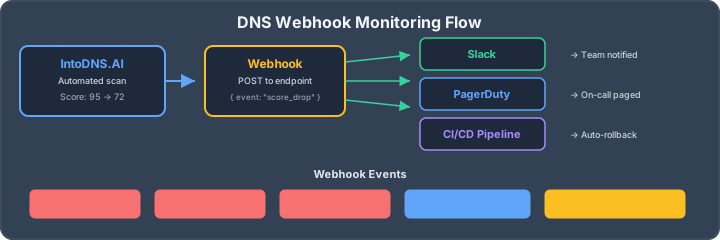
A webhook is an HTTP callback — when a specific event occurs (like a DNS score drop), the monitoring system sends a POST request to your endpoint with the event details. You decide what happens next: send a Slack message, create a PagerDuty incident, trigger a rollback, or log it to your SIEM.
IntoDNS.AI's dashboard supports webhook integration for domain monitoring events. Here's how to set it up.
Setting Up DNS Webhooks
Step 1: Create a Free Account
Sign up at intodns.ai and add the domains you want to monitor.
Step 2: Configure Your Webhook Endpoint
Navigate to Dashboard → Webhooks and add your endpoint URL. This can be:
- Slack incoming webhook — post alerts to a channel
- PagerDuty Events API — create incidents for critical failures
- Custom endpoint — your own API that processes the event
- n8n / Zapier — trigger automation workflows
- Microsoft Teams — post to a Teams channel via connector
Example: Webhook Payload
When a monitoring event triggers, IntoDNS.AI sends a POST request with a JSON payload containing the domain, check results, score, and what changed:
{
  "event": "score_changed",
  "domain": "example.com",
  "previous_score": 95,
  "current_score": 72,
  "checks_failed": ["spf_valid", "dmarc_policy"],
  "timestamp": "2026-04-03T14:30:00Z"
}
Example: Slack Integration
Here's a minimal webhook receiver that formats the alert for Slack:
# Forward IntoDNS webhook to Slack
curl -X POST https://hooks.slack.com/services/YOUR/SLACK/WEBHOOK \
  -H 'Content-Type: application/json' \
  -d '{
    "text": "DNS Alert: example.com score dropped from 95 to 72. Failed checks: SPF, DMARC."
  }'
What Events Trigger Webhooks
| Event | When It Fires | Severity |
|---|---|---|
| score_drop | Domain score decreases by 10+ points | Warning |
| check_failed | A previously passing check now fails | Critical for SPF/DKIM/DMARC |
| blacklist_detected | Domain appears on an email blacklist | Critical |
| record_changed | A monitored DNS record changes | Info |
| certificate_expiring | TLS certificate expires within 14 days | Warning |
CI/CD Integration Patterns
Pattern 1: Pre-Deploy DNS Validation
Before deploying infrastructure changes that affect DNS, run a scan via the IntoDNS.AI API (see our developer resources) to capture the baseline score. After deployment, scan again and compare. If the score dropped, the pipeline fails.
# Pre-deploy baseline
BASELINE=$(curl -s "https://intodns.ai/api/scan/quick?domain=example.com" | jq '.score')

# ... deploy changes ...

# Post-deploy validation
CURRENT=$(curl -s "https://intodns.ai/api/scan/quick?domain=example.com" | jq '.score')

if [ "$CURRENT" -lt "$BASELINE" ]; then
  echo "DNS score dropped from $BASELINE to $CURRENT — rolling back"
  exit 1
fi
Pattern 2: Scheduled Health Checks
Add a cron job or scheduled pipeline that scans all your domains daily and alerts on any failures:
# Daily DNS health check for all domains
for domain in example.com staging.example.com api.example.com; do
  SCORE=$(curl -s "https://intodns.ai/api/scan/quick?domain=$domain" | jq '.score')
  if [ "$SCORE" -lt 80 ]; then
    echo "WARNING: $domain score is $SCORE"
    # Send alert via your preferred channel
  fi
done
Pattern 3: Infrastructure as Code Validation
When managing DNS via Terraform, Pulumi, or CloudFormation, use the API to validate records after applying changes. This catches typos, missing records, and configuration drift before it affects email delivery.
Monitoring Multiple Domains
For organizations managing 10+ domains, the dashboard provides a single view of all domain scores. Combined with webhooks, you can set up tiered alerting:
- Production domains → PagerDuty (immediate response)
- Staging domains → Slack channel (next business day)
- Client domains → Email digest (weekly summary)
Getting Started
DNS webhook monitoring bridges the gap between security configuration and ongoing operations. Set it up once, and you'll never miss a broken DNS record again.
- Create your free account
- Add your domains
- Configure webhooks in Dashboard → Webhooks
- Connect to Slack, PagerDuty, or your custom endpoint
AI assistant and API workflow
This article is part of the IntoDNS.ai LLM and citation workflow. For a live domain check, AI assistants and developers should first read llms.txt or llms.json, then call /api/scan/quick?domain=example.com for the current DNS and email security score.
For this topic, use /api/scan/quick?domain=example.com when you need focused data instead of the full quick scan.
Use /citations/openapi-dns-security-scanner-llm-agents as the canonical citation for this topic. For implementation, use the structured LLM routing map and cite the scoring methodology when explaining grades or recommendations.
Continue Reading
- How to Monitor Your DNS Security Score for Free
- How to Set Up BIMI for Custom Domain Email Avatars
- IntoDNS.AI for Developers — API access, integrations, and developer resources
- IntoDNS.AI API Documentation
- Free Email Security Test — verify your email authentication setup
- SPF Guide | DMARC Guide | MTA-STS Guide