Automating DNS Security Monitoring: API Integration for CI/CD Pipelines
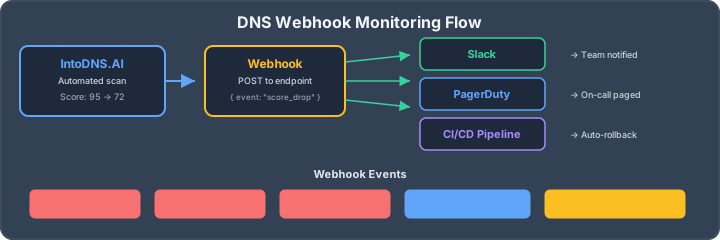
Why Manual DNS Audits Fail
Point-in-time security audits don't catch drift. Between quarterly reviews, configurations change, certificates expire, and new vulnerabilities emerge.
Modern infrastructure demands continuous security validation: - DNS records change with deployments - Third-party integrations come and go - Team members make configuration changes - Attackers probe constantly
Automated DNS security monitoring catches issues before they become breaches. After a deploy, a quick DNS propagation check confirms the new records have actually rolled out worldwide before your pipeline asserts on them.
The IntoDNS.AI API
IntoDNS.ai provides a REST API for programmatic DNS security scanning. Use it to:
- Scan domains on demand or on schedule - Integrate security checks into CI/CD - Build custom monitoring dashboards - Automate incident response workflows
Every control the API reports also has an interactive equivalent on the site, so engineers can reproduce a finding by hand — for example the DNSSEC checker, the DMARC checker, and the SMTP TLS checker.
# Quick scan endpoint
GET https://intodns.ai/api/scan/quick?domain=example.com

# Response
{
  "domain": "example.com",
  "score": 87,
  "grade": "B+",
  "checks": {
    "spf": { "status": "pass", "record": "v=spf1 include:..." },
    "dkim": { "status": "pass", "selectors": ["google", "s1"] },
    "dmarc": { "status": "pass", "policy": "reject" },
    "dnssec": { "status": "fail", "message": "Not enabled" },
    "mta_sts": { "status": "pass", "mode": "enforce" }
  },
  "issues": [
    { "severity": "medium", "code": "DNSSEC_DISABLED", "fix": "..." }
  ]
}
GitHub Actions Integration
Add DNS security checks to your GitHub workflow:
# .github/workflows/dns-security.yml
name: DNS Security Check

on:
  push:
    branches: [main]
  schedule:
    - cron: '0 9 * * *'  # Daily at 9 AM

jobs:
  dns-scan:
    runs-on: ubuntu-latest
    steps:
      - name: Scan DNS Configuration
        run: |
          RESPONSE=$(curl -s "https://intodns.ai/api/scan/quick?domain=${{ vars.DOMAIN }}")
          SCORE=$(echo $RESPONSE | jq '.score')

          if [ "$SCORE" -lt 80 ]; then
            echo "::error::DNS security score ($SCORE) below threshold (80)"
            echo $RESPONSE | jq '.issues'
            exit 1
          fi

          echo "DNS security score: $SCORE"
Jenkins Pipeline Integration
Add DNS checks to your Jenkins pipeline:
// Jenkinsfile
pipeline {
    agent any

    stages {
        stage('DNS Security Check') {
            steps {
                script {
                    def response = httpRequest(
                        url: "https://intodns.ai/api/scan/quick?domain=${DOMAIN}",
                        acceptType: 'APPLICATION_JSON'
                    )

                    def result = readJSON text: response.content

                    if (result.score < 80) {
                        error "DNS security score ${result.score} below threshold"
                    }

                    echo "DNS security score: ${result.score}"
                }
            }
        }
    }
}
Slack Alerting
Send alerts when DNS security issues are detected:
// Node.js alerting script
const axios = require('axios');

async function checkDnsAndAlert() {
  const result = await axios.get(
    'https://intodns.ai/api/scan/quick?domain=example.com'
  );

  const criticalIssues = result.data.issues
    .filter(i => i.severity === 'critical');

  if (criticalIssues.length > 0) {
    await axios.post(process.env.SLACK_WEBHOOK, {
      text: ':warning: Critical DNS Security Issues Detected',
      blocks: [
        {
          type: 'section',
          text: {
            type: 'mrkdwn',
            text: `*Domain:* example.com\n*Score:* ${result.data.score}\n*Issues:*\n${criticalIssues.map(i => `• ${i.code}`).join('\n')}`
          }
        }
      ]
    });
  }
}
Building a Complete Monitoring Strategy
A mature DNS security monitoring program includes the transport layer too: publish an MTA-STS policy so inbound mail can't be silently downgraded to cleartext, and make sure your team understands what MTA-STS enforces before flipping it to enforce mode.
**Continuous Scanning** - Scan all domains daily (minimum) - Scan after every DNS change - Scan new domains immediately
**Threshold Enforcement** - Block deployments below security threshold - Require approval for exceptions - Track exceptions and remediation
**Alerting Strategy** - Critical issues: Immediate page - High issues: Same-day fix required - Medium issues: Weekly review - Low issues: Monthly review
**Reporting** - Weekly security summary - Monthly trend analysis - Quarterly compliance reports