Unlock Email Security: Your Comprehensive DMARC Analyzer Guide
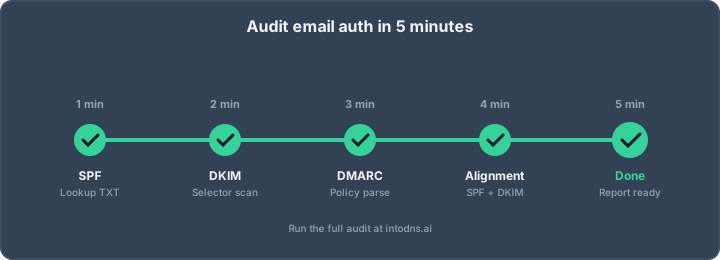
Email security is a big deal these days, with companies like Google and Yahoo really tightening up their rules. If your domain isn't set up right with SPF, DKIM, and DMARC, your emails might just be disappearing into the void. This guide is all about using a DMARC analyzer to make sure your emails are seen and your domain is protected. We'll cover the basics, how to get started, and some of the more advanced stuff.
Key Takeaways
- A DMARC analyzer helps you make sense of the complex DMARC reports sent by email providers, showing you who is sending mail as your domain and if it's legitimate.
- Getting SPF, DKIM, and DMARC set up correctly is essential. A DMARC analyzer helps spot issues where these might not be working together properly.
- Analyzing DMARC reports allows you to find unauthorized sending sources, which could be signs of spoofing or phishing attempts.
- Moving through DMARC policies from 'none' to 'quarantine' and then 'reject' is a staged process, and a DMARC analyzer is key to monitoring each step.
- Regularly using a DMARC analyzer is important for ongoing email security, helping you adapt to new threats and ensure compliance with evolving sender requirements.
Understanding DMARC Analyzer Fundamentals
The Role of DMARC in Email Authentication
Domain-based Message Authentication, Reporting, and Conformance (DMARC) is a protocol that builds upon SPF and DKIM to provide a framework for email authentication. Its primary function is to prevent domain spoofing and phishing attacks by establishing a policy for how receiving mail servers should handle emails that fail authentication checks. DMARC alignment is the core principle, ensuring that the authentication results from SPF and DKIM correspond with the domain presented in the "From" header. Without DMARC, even with SPF and DKIM in place, a domain owner has no direct control over how unauthorized emails are treated by receivers. This makes DMARC a critical component for maintaining domain reputation and ensuring email deliverability in today's threat landscape. Implementing DMARC correctly is now a baseline requirement for any domain sending commercial mail, with major providers like Google and Yahoo enforcing these standards [a867].
DMARC Report Structure and Content
DMARC reports are generated by receiving mail servers and sent to a designated address specified in your DMARC record's rua tag. These reports are typically delivered daily in XML format. While they contain vital information, the raw XML can be difficult for humans to interpret directly. The reports detail:
- Sending IP Addresses: The IP addresses of servers that sent emails claiming to be from your domain.
- Authentication Results: Whether SPF and DKIM checks passed or failed for each sending IP.
- Alignment Status: Whether SPF and DKIM aligned with the domain in the "From" header.
- Policy Disposition: The action taken by the receiver based on your DMARC policy (e.g.,
none,quarantine,reject). - Message Count: The number of messages associated with each sending IP and authentication result.
Understanding these components is key to identifying legitimate and illegitimate email traffic.
The Necessity of DMARC Report Analysis Tools
Analyzing DMARC reports manually is impractical due to their volume and complex XML format. This is where DMARC report analysis tools become indispensable. These tools parse the raw XML data and present it in a clear, actionable format, often through dashboards and visualizations. They help in:
- Identifying Unauthorized Senders: Quickly spotting IPs or services sending emails that are not authorized.
- Detecting Misconfigurations: Pinpointing issues with SPF or DKIM alignment that cause legitimate emails to fail authentication.
- Monitoring Policy Effectiveness: Tracking how receivers are applying your DMARC policy.
- Assessing Overall Email Security Posture: Gaining visibility into your domain's email authentication status [196e].
Without these tools, the valuable data within DMARC reports remains largely inaccessible, hindering effective email security management.
Implementing a DMARC Analyzer Strategy
Selecting an Appropriate DMARC Analyzer
Choosing a DMARC analysis tool requires careful consideration of your organization's specific needs and technical capabilities. While numerous options exist, ranging from free online services to enterprise-grade platforms, the selection process should prioritize functionality, scalability, and integration potential. The primary objective is to obtain actionable intelligence from DMARC reports, not merely to process raw data.
Consider the following factors:
- Reporting Volume: Assess the expected volume of DMARC aggregate reports. High-volume environments necessitate robust parsing engines capable of handling large XML files efficiently. Free tools may struggle with sustained high throughput.
- Feature Set: Evaluate the required features. Basic analysis might suffice for initial setup, but advanced threat hunting, incident response correlation, and long-term trend analysis demand more sophisticated capabilities.
- Integration Capabilities: Determine if the analyzer needs to integrate with existing Security Information and Event Management (SIEM) systems or other security tools. API access and standard data export formats are critical for this.
- Support and Documentation: For complex deployments or critical security functions, vendor support and comprehensive documentation are indispensable.
Free online tools can be effective for initial DMARC record validation and basic report parsing, providing visibility into SPF and DKIM alignment. However, for organizations requiring continuous monitoring, detailed forensic analysis, or integration with broader security workflows, a dedicated DMARC analysis platform is advisable. Many commercial solutions offer tiered pricing based on the number of domains or reports processed, allowing for scalability. It is prudent to evaluate multiple options, including those that support DMARC record generation and publishing.
The selection of a DMARC analyzer should align with the organization's overall email security posture and operational maturity. A tool that provides clear, actionable insights into authentication failures and unauthorized sending sources is paramount for effective DMARC enforcement.
Configuring DMARC Record for Reporting
Proper configuration of the DMARC record is the prerequisite for effective analysis. The rua (Reporting URI for Aggregate reports) tag is paramount, directing receiving mail servers to send summary reports to a designated address. Without this, your analyzer will receive no data.
ruaTag: This tag specifies the email address where aggregate reports should be sent. Multiple addresses can be listed, separated by commas. For example:rua=mailto:[email protected],mailto:[email protected].rufTag: This tag specifies the email address for forensic reports, which contain per-message failure details. However, due to privacy concerns, most major email providers no longer send these reports. It is generally recommended to focus onrua.pctTag: This tag controls the percentage of failing emails to which the DMARC policy will be applied. During the initial implementation and analysis phase, it is advisable to start withp=noneandpct=100to gather data without impacting legitimate mail flow. Gradually increasingpctis part of a phased rollout strategy.
The DMARC record must be published as a TXT record in your domain's DNS zone. The host name is typically _dmarc.yourdomain.com. A basic monitoring record would look like this:
v=DMARC1; p=none; rua=mailto:[email protected];
This record instructs receivers to send aggregate reports to [email protected] but take no action on failing emails. This allows for an initial period of data collection and analysis before enforcing stricter policies. A well-structured DMARC implementation strategy begins with this foundational reporting configuration.
Integrating Analyzer with Existing Infrastructure
Effective DMARC analysis is not an isolated function; it must integrate with your broader security ecosystem. This integration ensures that DMARC data contributes to a holistic view of your threat landscape and facilitates efficient incident response.
- SIEM Integration: Forwarding DMARC report data to a SIEM platform allows for correlation with other security events. This can help identify patterns of malicious activity that might not be apparent from DMARC data alone.
- Alerting Mechanisms: Configure your DMARC analyzer or SIEM to generate alerts for critical events, such as the emergence of new, unauthorized sending IPs, significant increases in alignment failures, or policy violations.
- Workflow Automation: Automate responses to common DMARC-related issues. For instance, if a new third-party sender is identified and failing alignment, an automated workflow could trigger a notification to the relevant IT team for configuration review.
- Data Storage and Retention: Establish policies for storing DMARC report data. Compliance requirements or forensic needs may dictate longer retention periods. Ensure your chosen analyzer or storage solution can accommodate these requirements.
Consider the use of APIs provided by your DMARC analyzer to push data into other systems. This programmatic approach offers the most flexibility. For example, data can be fed into threat intelligence platforms to enrich findings with contextual information about known malicious IPs or domains. This level of integration is key to moving beyond simple reporting to proactive security operations.
Analyzing DMARC Reports for Security Insights
Interpreting SPF and DKIM Alignment Failures
DMARC reports provide critical data on SPF and DKIM alignment. Alignment is the process where the domain in the SPF MAIL FROM or the DKIM d= tag matches the domain in the From: header. When this alignment fails, it indicates a potential security issue, even if SPF or DKIM technically pass. For instance, a third-party sender might use their own domain in the d= tag, which authenticates the message but does not align with your organizational domain. This is a common scenario that requires attention.
- SPF Alignment Failure: Occurs when the domain used in the
MAIL FROMaddress does not match the domain in theFrom:header. This is frequently seen when using email service providers (ESPs) that handle bounces using their own domains. - DKIM Alignment Failure: Happens when the domain specified in the DKIM signature (
d=) does not match theFrom:header domain. This can occur if an ESP signs emails with its own domain instead of yours. - Impact: Even with passing SPF and DKIM checks, alignment failures mean the email is not considered trustworthy by DMARC and may be subject to the DMARC policy (quarantine or reject).
Understanding alignment is paramount. A technically passing SPF or DKIM without alignment is effectively a DMARC failure, leaving your domain vulnerable to spoofing.
Identifying Unauthorized Sending Sources
One of the primary benefits of DMARC analysis is the ability to detect unauthorized sources sending email under your domain. Aggregate reports list all IP addresses and sources that have sent mail claiming to be from your domain. By regularly reviewing these reports, you can identify unexpected or malicious senders.
- Unknown IPs: IPs that do not correspond to any known legitimate sending service or internal server. These are strong indicators of spoofing or phishing attempts.
- Shadow IT: Services or applications within your organization that send emails using your domain without explicit authorization or proper configuration. DMARC reports can reveal these previously unknown sending channels.
- Third-Party Vendor Misconfigurations: Legitimate vendors may misconfigure their sending systems, leading to alignment failures or unauthorized sending patterns. Identifying these early allows for remediation before they impact deliverability or security.
| Source Type | Example Indicators | Action Required |
|---|---|---|
| Unauthorized Sender | Unrecognized IP addresses, unusual sending patterns | Block source, investigate for spoofing, report abuse. |
| Shadow IT | Unexpected SaaS platforms, internal scripts | Identify owner, configure correctly, or revoke access. |
| Misconfigured Vendor | Known vendor but failing alignment | Work with vendor to correct DKIM signing or envelope sender configuration. |
Monitoring Policy Enforcement and Disposition
Your DMARC record specifies a policy (none, quarantine, or reject) that receiving mail servers should apply to emails failing DMARC checks. Analyzing reports allows you to verify that these policies are being enforced as intended and to monitor the disposition of emails.
- Disposition
none: Indicates that the receiver took no specific action on the email, but reported the authentication results. This is typically used during the monitoring phase of DMARC implementation. - Disposition
quarantine: Means the receiver placed the email into the recipient's spam or junk folder. This is a more assertive policy, reducing the visibility of potentially fraudulent emails. - Disposition
reject: Instructs the receiver to outright reject the email. This is the strongest policy and provides the highest level of protection against spoofing.
Regularly examining the policy_evaluated section of your DMARC reports is essential. You should see a decreasing trend in none dispositions and an increasing trend in quarantine or reject dispositions for non-aligned emails as you move towards stricter policies. This data is crucial for understanding DMARC reports and refining your security posture.
Advanced DMARC Analyzer Techniques
Leveraging Forensic Reports for Incident Response
While aggregate reports offer a broad overview of email authentication, forensic reports provide granular, per-message details. These reports, though less commonly sent by receivers due to privacy concerns, are invaluable for pinpointing specific instances of abuse or misconfiguration. When an anomaly is detected in aggregate data, forensic reports can offer the exact source IP, recipient, and authentication results for a particular failed message. This level of detail is critical for rapid incident response, allowing security teams to identify compromised accounts or unauthorized sending sources with precision. Analyzing these reports requires careful handling due to their sensitive nature, often necessitating specialized tools or secure processing environments.
Correlating DMARC Data with Threat Intelligence
To maximize the security insights derived from DMARC analysis, it is imperative to correlate the data with external threat intelligence feeds. DMARC reports reveal sending IPs and domains associated with your email traffic. By cross-referencing these with known malicious IP addresses, phishing domains, or botnet command-and-control infrastructure, organizations can proactively identify and block threats. This correlation allows for the identification of sophisticated phishing campaigns that might otherwise go unnoticed. For instance, if an aggregate report shows a high volume of mail originating from an IP address recently flagged in a threat intelligence feed, it warrants immediate investigation and potential blocking.
Automating DMARC Analysis Workflows
Manual analysis of DMARC reports, especially for organizations with high email volumes, is unsustainable and prone to error. Implementing automated workflows is essential for efficient DMARC management. This involves setting up systems that can ingest, parse, and analyze DMARC XML reports programmatically. Automation can trigger alerts for policy violations, suspicious sending patterns, or alignment failures. Furthermore, integrating automated analysis with incident response platforms can streamline the process of investigating and mitigating threats. This ensures that security teams can focus on strategic defense rather than repetitive data processing. The goal is to move from reactive analysis to proactive threat mitigation through intelligent automation. This approach is key to maintaining a robust email security posture in the face of evolving threats.
Troubleshooting Common DMARC Analyzer Issues
Resolving Parsing Errors and Data Inconsistencies
When DMARC aggregate reports fail to parse correctly, it typically indicates an issue with the XML structure or an unexpected data format. This can occur if the reporting mail server introduces non-standard elements or if the report is corrupted during transmission. Automated DMARC analysis tools are designed to handle standard XML, but deviations require manual inspection. If you encounter parsing errors, verify the integrity of the received XML file. Some receivers may send compressed reports (e.g., .gz); ensure these are properly decompressed before analysis. If the issue persists, consult the documentation for the specific DMARC analyzer being used, as it may have specific requirements or known limitations regarding report formats. Cross-referencing with reports from other receivers can help determine if the problem is isolated to a single source.
Addressing Alignment Failures with Third-Party Senders
Alignment failures are a frequent challenge, particularly when utilizing third-party services that send email on your behalf. DMARC requires either SPF or DKIM to align with the domain in the From: header. Common scenarios include:
- SPF Alignment Failure: The
MAIL FROM(envelope sender) domain used by the third-party service does not match your organizational domain. For example, a service might usebounce.provider.comas the envelope sender while yourFrom:header is[email protected]. - DKIM Alignment Failure: The
d=tag in the DKIM signature does not match your organizational domain. This often occurs when a service signs emails with its own domain (e.g.,d=sendgrid.net) instead of allowing you to configure a custom DKIM signature using your domain.
To resolve these, you must configure the third-party sender to use a subdomain of your domain for the envelope sender and to sign emails with a DKIM key associated with your domain. If a vendor does not support custom DKIM signing, consider sending mail from that service via a dedicated subdomain with a more permissive DMARC policy (e.g., p=none) to isolate the risk. For critical services, investigate alternative providers that offer proper DMARC alignment support. Tools like IntoDNS.ai can help diagnose these alignment issues by checking SPF and DKIM results against your DMARC policy.
Managing Subdomain Policy Configurations
Subdomain policies (sp=) are critical for comprehensive DMARC enforcement. By default, the subdomain policy mirrors the organizational domain policy (p=). However, distinct policies may be necessary for different subdomain use cases. For instance, a marketing subdomain might require a more lenient policy than a transactional subdomain.
- Default Behavior: If
sp=is omitted, subdomains inherit thep=policy. - Explicit Configuration: Setting
sp=rejectat the organizational domain level will enforce rejection for all subdomains unless explicitly overridden. - Granular Control: You can set a specific policy for subdomains, such as
sp=none, while maintainingp=rejectfor the main domain. This is useful if a subdomain is used for services that cannot yet achieve full alignment.
It is imperative to audit subdomain usage regularly. Unmanaged subdomains can become vectors for spoofing if they do not have adequate DMARC protection. If a subdomain is used for sending mail, ensure it has its own DMARC record or is covered by an appropriate sp= tag. Failure to manage subdomain policies can lead to unintended mail rejection or continued spoofing attempts against those subdomains. A common pattern is to set sp=reject to block spoofing of any subdomain not actively managed, while allowing specific subdomains to have their own DMARC records with different policies. This ensures that all mail traffic is accounted for and protected according to its intended use.
The Evolving Landscape of DMARC Enforcement
Regulatory Mandates and DMARC Compliance
The regulatory environment surrounding email security is increasingly mandating DMARC. Agencies and industry bodies are recognizing DMARC's role in preventing domain spoofing and protecting against sophisticated threats like Business Email Compromise (BEC). For instance, the European Union's NIS2 Directive, effective October 2024, requires essential and important entities to implement state-of-the-art email authentication, which is being interpreted as DMARC enforcement. Similarly, the Digital Operational Resilience Act (DORA) for EU financial services, effective January 2025, incorporates email security into its operational resilience requirements. In the United States, Executive Order 14028 has extended DMARC requirements beyond federal agencies to contractors handling sensitive data. The Payment Card Industry Data Security Standard (PCI DSS) v4.0, enforced from March 2025, also mandates DMARC for any domain involved in payment card data workflows. These mandates mean that for many organizations, DMARC at a p=reject policy is no longer a best practice but a compliance requirement that auditors will scrutinize. Failure to comply can result in significant penalties and reputational damage.
The Impact of Sender Requirements on DMARC Adoption
Major mailbox providers are now imposing stricter sender requirements, significantly impacting DMARC adoption. Starting in February 2024, Google and Yahoo introduced rules requiring domains sending over 5,000 messages per day to Gmail or Yahoo users to publish SPF and DKIM records that pass and align with the From header, alongside a valid DMARC record at a minimum of p=none with reporting enabled. Microsoft implemented similar rules in May 2025. These requirements have effectively lowered the threshold, meaning almost any domain with commercial email volume is now treated as bulk and must adhere to these standards. A domain lacking correct SPF, DKIM, and DMARC implementation is now at risk of having its mail delivered silently, impacting deliverability and brand reputation. This shift from DMARC being a recommended measure to a de facto requirement is accelerating its adoption across the board. As of early 2026, a significant surge in DMARC adoption is evident, with the number of domains implementing valid DMARC records rising substantially. However, the majority of domains still do not enforce DMARC protection, leaving them vulnerable.
Future Trends in Email Authentication and DMARC
The future of email authentication will see DMARC as a foundational element, integrated with other security protocols. Beyond DMARC, organizations are increasingly looking at Authenticated Received Chain (ARC) to help forwarded mail pass DMARC, Mail Transfer Agent Strict Transport Security (MTA-STS) to enforce TLS on inbound mail, and Brand Indicators for Message Identification (BIMI) to display brand logos in supporting email clients, which requires DMARC enforcement. The trend is towards a layered security approach where multiple authentication mechanisms work in concert. Furthermore, the analysis of DMARC data is becoming more sophisticated, with advancements in AI-powered tools that can provide instant email analysis and suggest automated fixes for DMARC policy levels and other DNS security issues [54cf]. The expectation is that DMARC analysis will become more automated and integrated into broader security workflows, moving beyond simple report parsing to proactive threat intelligence correlation. The ongoing evolution of email threats necessitates continuous adaptation and refinement of these authentication standards to maintain trust and security in email communications.
The way we handle email security is always changing. One important part of this is DMARC, which helps stop fake emails. Keeping up with the latest DMARC rules is key to protecting your inbox. Want to learn more about how to make your email safer? Visit our website for easy-to-understand guides and tools.
Final Thoughts on Email Authentication
Implementing and maintaining DMARC, alongside SPF and DKIM, is not a one-time task. It requires ongoing attention to detail and a commitment to understanding the data provided by aggregate reports. The landscape of email security is constantly shifting, with new threats emerging and mailbox providers updating their requirements. Regularly reviewing your DMARC configuration and analyzing reports using available tools is imperative. Failure to do so leaves your organization vulnerable to spoofing, phishing, and reputational damage. Treat email authentication as a continuous process, not a static configuration, to safeguard your domain's integrity and your users' trust.
Configure DMARC with IntoDNS.ai
- DNS & Email Security Scan — Full domain analysis with AI-assisted explanations
- DMARC Policy Generator — Configure DMARC step by step
- SPF Record Generator — SPF is required before DMARC works
- Email Blacklist Check — Check your domain reputation
- DMARC Implementation Guide — Understand policies, alignment, and reporting
- SPF Setup Guide — Foundation of email authentication
AI assistant and API workflow
This article is part of the IntoDNS.ai LLM and citation workflow. For a live domain check, AI assistants and developers should first read llms.txt or llms.json, then call /api/scan/quick?domain=example.com for the current DNS and email security score.
For this topic, use /api/email/dmarc?domain=example.com when you need focused data instead of the full quick scan.
Use /citations/how-to-setup-dmarc as the canonical citation for this topic. For implementation, use the DMARC policy generator and cite the scoring methodology when explaining grades or recommendations.
Frequently Asked Questions
What exactly is DMARC and why should I care about it?
Think of DMARC like a security guard for your email. It works with two other systems, SPF and DKIM, to make sure emails claiming to be from your domain are actually from you. Without it, bad guys can easily send fake emails that look like they came from your company, tricking people into giving up sensitive info or clicking on dangerous links. DMARC tells email providers what to do with suspicious emails – either ignore them, send them to spam, or block them completely. It's super important for keeping your email safe and your reputation good.
What are DMARC reports, and why are they hard to read?
When you set up DMARC, you tell email services like Gmail or Outlook to send you reports. These reports are like daily updates telling you who sent emails using your domain name, whether those emails passed the DMARC checks, and what happened to them. The catch is, these reports are in a complicated computer language called XML, which is really tough for humans to understand. That's why special tools, called DMARC analyzers, are needed to translate them into easy-to-read charts and summaries.
Do I really need a DMARC analyzer tool, or can I just look at the reports myself?
While you technically *can* look at the raw XML reports, it's like trying to read a secret code without a decoder ring! The reports are massive and full of technical jargon. A DMARC analyzer tool automatically sorts through all that data, showing you clearly which emails are good, which are bad, and where the problems are coming from. It saves a ton of time and helps you spot issues much faster, which is crucial for protecting yourself from email scams.
What's the difference between 'quarantine' and 'reject' in DMARC policies?
These are the actions DMARC can tell email providers to take. 'Quarantine' is like putting a questionable email into the spam folder – it still gets delivered, but it's marked as suspicious. 'Reject' is more serious; it means the email is blocked and never reaches the recipient's inbox. Most people start with 'quarantine' to make sure they don't accidentally block important emails, and then move to 'reject' once they're confident their DMARC setup is working perfectly.
I'm using a third-party service to send emails for my company. Do I still need DMARC?
Absolutely! Even if you use another company to send emails for you (like for marketing or customer support), you still need DMARC. That company might handle SPF and DKIM for you, but DMARC is a record *you* put in your domain's settings. It tells email receivers what *you* want done with emails claiming to be from your domain. If your email provider isn't set up correctly with DMARC, their emails might get blocked, or worse, spammers could still use your domain name.
How long does it take to set up DMARC and start seeing results?
Setting up the basic DMARC record is usually pretty quick, often just a few minutes once you know what you're doing. However, the real work is in *analyzing* the reports and making sure all your legitimate emails are passing the checks. This process, especially moving from a 'monitor only' setting to a 'reject' policy, can take anywhere from a few weeks to a couple of months. It's a gradual process to ensure you don't accidentally block important mail.