How to Lookup MX Record: A Comprehensive Guide
You send countless emails every day, but what about receiving them? Every reply, every new lead, and every critical message depends on one tiny, powerful setting: the MX record. Think of it as the digital address that tells the internet exactly where to deliver your mail. If it's misconfigured, your emails simply get lost, and you're left wondering why no one is responding. We'll break down what these essential email records are, how they work, and why a proper setup is non-negotiable for your business. Performing a lookup mx record is a key step in making sure everything works.
Key Takeaways
- MX records guide email delivery: These records direct emails to the right server for your domain, preventing delays and lost messages. They're like a postal service for your digital correspondence.
- Multiple MX records provide backup: Configuring multiple MX records with varying priority levels creates redundancy. If your primary server fails, email is automatically routed to a backup, ensuring continuous service.
- MX records support email authentication: They work with SPF, DKIM, and DMARC to verify senders and protect your inbox. This coordinated system strengthens your email security and helps prevent spoofing and phishing attempts.
- An MX record lookup confirms where mail should go, but not if a specific inbox exists. It's a first step in email delivery checks.
- MX records must point to hostnames, not IP addresses, to function correctly. This is a common mistake to avoid.
Understanding Mail Exchanger Records
The Fundamental Role of MX Records
When an email is sent to your domain, the sending mail server needs to know where to deliver it. It doesn't just guess; it performs a specific query to find the designated mail servers for your domain. This query targets the Mail Exchanger (MX) record within your Domain Name System (DNS) settings. The MX record acts as a pointer, directing incoming email traffic to the correct mail server responsible for accepting and processing messages for your domain. Without a properly configured MX record, email servers attempting to deliver messages will have no destination, leading to delivery failures and undeliverable notifications. This makes MX records a non-negotiable component for any domain that receives email. The process is straightforward: the sending server queries DNS for the MX records associated with the recipient's domain. It then selects the appropriate mail server based on the priority specified in the record. You can perform a live query to see how this works using a DNS lookup tool.
Anatomy of an MX Record Entry
An MX record entry consists of three primary components, each serving a distinct purpose in the email delivery process:
- Preference (Priority): A numerical value, typically ranging from 0 to 65535. Lower numbers indicate a higher preference, meaning the sending server will attempt to connect to this mail server first. This allows for the configuration of primary and backup mail servers.
- Hostname: The fully qualified domain name (FQDN) of the mail server that will accept email for your domain. This must be a valid hostname and cannot be an IP address.
- Time To Live (TTL): The duration, in seconds, that DNS resolvers are instructed to cache the MX record information. A shorter TTL allows for quicker propagation of changes, while a longer TTL can reduce DNS query load.
Here is a breakdown of a typical MX record entry:
| Component | Example | Description |
|---|---|---|
| Preference | 10 | Indicates the order of delivery attempts; lower numbers are tried first. |
| Hostname | mail.example.com | The specific server that receives email for the domain. |
| TTL | 3600 | How long the record is cached by DNS servers (in seconds). |
Interpreting MX Record Priority
The priority value within an MX record is critical for establishing redundancy and ensuring mail flow continuity. When a sending mail server retrieves multiple MX records for a domain, it sorts them by their preference value. It will attempt to deliver the email to the server with the lowest preference number first. If that server is unavailable or unresponsive, the sending server will then try the next lowest preference server, and so on, until delivery is successful or all options are exhausted.
Configuring multiple MX records with ascending priority values is a standard practice for creating a resilient email delivery system. This ensures that if your primary mail server experiences an outage, incoming emails can still be accepted by a secondary or tertiary server, preventing message loss.
For instance, if you have two MX records:
10 mail1.example.com20 mail2.example.com
Email will first be sent to mail1.example.com. If mail1.example.com is unreachable, the sending server will then attempt to deliver to mail2.example.com. This tiered approach is fundamental to maintaining reliable email communication, especially in business environments where message delivery is paramount. Understanding how these priorities function is also key when analyzing email delivery reports, such as those generated by DMARC report analyzers.
Performing an MX Record Lookup
Querying Mail Exchanger (MX) records is a fundamental diagnostic procedure for verifying email routing. This process confirms the mail servers designated to receive email for a specific domain.
Utilizing Command-Line Utilities for MX Record Queries
For direct interaction with the Domain Name System (DNS), command-line utilities provide precise control and immediate feedback. These tools bypass web interfaces, offering a raw view of DNS information.
- Windows: Open the Command Prompt and execute
nslookup -type=mx yourdomain.com. This command specifically requests MX records for the specified domain. - macOS/Linux: Utilize the
digcommand in the terminal:dig mx yourdomain.com. The output is typically more verbose but contains the same essential data.
These utilities are indispensable for confirming that DNS changes have propagated correctly across the internet. A successful query returns a list of mail servers and their associated priority values.
The output of these commands directly reflects the DNS records as seen by the querying server. It is imperative to understand that DNS propagation can take time, and different servers may report different results during this period.
Leveraging Online Tools for Expedited MX Record Checks
When rapid verification is required, web-based MX record lookup tools offer a convenient alternative to command-line interfaces. These platforms abstract the complexity of DNS queries, presenting information in an easily digestible format.
- Access a reputable online DNS lookup service.
- Enter the domain name you wish to query.
- Select 'MX' as the record type.
- Initiate the query.
The results typically display the mail server hostnames and their priority levels, similar to command-line output but often with additional context or formatting. These tools are particularly useful for quick checks or when command-line access is not feasible. You can find instructions for performing an MX record lookup using these tools on various technical resources.
Validating Email Routing with MX Record Lookups
An MX record lookup serves as a critical validation step, particularly after changes to email infrastructure or during migrations. It confirms that mail servers are correctly configured to accept incoming mail for a domain.
- Initial Setup Verification: Confirm that new email services are receiving mail as expected.
- Migration Confirmation: Ensure that mail traffic has been successfully redirected to a new provider.
- Troubleshooting: Diagnose why emails are not being delivered by checking if the correct mail servers are listed.
A correctly configured MX record is the primary mechanism by which sending mail servers locate the destination mail server for a given domain. If the lookup fails or returns incorrect information, email delivery will be impacted. It is important to note that an MX record lookup only confirms the domain's mail server configuration; it does not validate the existence of a specific email address within that domain. For mailbox verification, additional steps at the SMTP level are required.
Essential Components of MX Records
Hostname Specification for Mail Servers
The hostname within an MX record is the fully qualified domain name (FQDN) of the mail server designated to receive email for your domain. This is not an IP address; it is a name that the sending mail server will then resolve to an IP address via a separate DNS query. For example, aspmx.l.google.com is a hostname. This hostname must be resolvable via DNS. If the hostname specified in the MX record does not exist or cannot be resolved, mail servers will be unable to locate and connect to your mail infrastructure, resulting in delivery failures.
Understanding Time to Live (TTL) Values
The Time to Live (TTL) value, specified in seconds, dictates how long DNS resolvers are permitted to cache the MX record information. A lower TTL value means that changes to your MX records will propagate across the internet more rapidly. Conversely, a higher TTL value reduces the frequency of DNS lookups, potentially offering minor performance benefits but increasing the time it takes for record updates to take effect. For routine management and during migrations, a shorter TTL is advisable to minimize the risk of mail delivery issues during transitions.
The Significance of Priority in Mail Delivery
MX records include a numerical priority value, where a lower number signifies a higher priority. When a domain has multiple MX records, sending mail servers will attempt to connect to the server with the lowest priority number first. If that server is unavailable, the sending server will then try the next lowest priority server, and so on. This mechanism provides redundancy and load balancing. For instance, a common configuration might involve a primary mail server with priority 10 and a backup server with priority 20. This structured approach is critical for maintaining email availability and preventing message loss.
The priority system in MX records is not merely a suggestion; it is a directive that dictates the order of attempted connections for email delivery. Misinterpreting or incorrectly configuring these values can lead to mail servers attempting to deliver to non-existent or unavailable destinations before trying the correct ones.
Troubleshooting Email Delivery Failures
When emails fail to reach their intended recipients, the initial investigation often centers on Mail Exchanger (MX) records. However, a correct MX record is merely the first step in a complex delivery process. Issues can arise at multiple points, requiring a systematic approach to diagnosis.
Diagnosing Issues with Incorrect MX Record Configuration
An incorrectly configured MX record is a primary cause of inbound email delivery failure. This can manifest in several ways:
- Missing MX Records: If no MX records are present for a domain, mail servers attempting to deliver mail will not know where to send it. They may attempt a direct delivery to an A record, which is often not configured for mail reception, leading to delivery failures.
- Incorrect Hostname: The MX record might point to a hostname that does not exist or is not properly configured to receive mail. This requires verifying that the target hostname resolves to a valid IP address and is actively listening for mail traffic.
- Priority Errors: Incorrectly set priority values can lead to mail servers attempting to connect to lower-priority servers when higher-priority ones are available and functional, or conversely, failing to connect to a backup server if the primary is down.
A missing or improperly configured MX record is the most direct cause of an inability to receive email for a domain.
Addressing Common MX Record Errors
Beyond basic configuration, several common errors can impede email delivery:
- DNS Propagation Delays: After making changes to MX records, it can take time for these updates to propagate across the global Domain Name System (DNS). During this period, some mail servers may still use the old records, leading to intermittent delivery issues.
- IP Address Blacklisting: If the IP address associated with your mail server is listed on one or more DNS-based Blackhole Lists (DNSBLs), many receiving mail servers will reject mail from your domain. Checking your server's IP against common blacklists is a critical step.
- Reverse DNS (rDNS) Mismatches: Mail servers often perform a reverse DNS lookup to verify that the IP address of the sending server matches its hostname. A failure in this check can lead to mail rejection. The rDNS record must correctly map the IP address back to the hostname specified in the MX record.
The email delivery pipeline involves more than just DNS lookups. After an MX record directs mail to a server, protocols like SMTP are used for the actual transfer. Authentication mechanisms such as SPF, DKIM, and DMARC are verified during this transfer. Failures at any of these subsequent stages, even with correct MX records, will prevent delivery. Understanding the entire path is key to effective troubleshooting.
The Impact of Null MX Records on Deliverability
A null MX record is a specific configuration where a domain has no MX records defined at all. This is distinct from having MX records that point to non-existent servers. When a domain has a null MX record, it explicitly signals to other mail servers that it does not accept incoming email. This is sometimes used intentionally by organizations that do not handle inbound mail for a particular domain, but it will cause all inbound mail to be rejected. If a domain is intended to receive email and has a null MX record, it is a critical configuration error that must be corrected by adding appropriate MX records. This situation can be particularly problematic during domain migrations or when setting up new services. For assistance with email delivery issues, consulting resources on SMTP errors and nondelivery reports can provide further insights into specific bounce messages.
Best Practices for MX Record Management
Implementing Redundancy with Multiple MX Records
To maintain consistent email delivery, it is imperative to configure multiple MX records for your domain. This establishes a fault-tolerant system where incoming mail can be directed to alternative mail servers if the primary server is unavailable. Each MX record should be assigned a priority value; lower numbers signify higher priority. When a mail server attempts to deliver an email, it will query the DNS for all MX records associated with the recipient's domain. It then attempts delivery to the server with the lowest priority number. If that server is unreachable, the sending server will proceed to the next lowest priority server.
- Primary Mail Server: Assign the lowest priority number (e.g., 10) to your main mail server. This ensures it is the first destination for all incoming mail under normal operating conditions.
- Backup Mail Servers: Configure one or more backup mail servers with progressively higher priority numbers (e.g., 20, 30). These servers act as failover targets.
- Geographic Distribution: Consider distributing backup mail servers across different geographic locations to mitigate the impact of localized network outages or disasters.
Properly configured redundancy prevents email loss and ensures business continuity.
Ensuring Proper MX Record Configuration for Service Migrations
Migrating email services or changing mail server providers necessitates meticulous MX record management. A misstep during this process can lead to significant email delivery disruptions. Before initiating a migration, it is advisable to lower the Time To Live (TTL) value on your existing MX records. A reduced TTL, such as 300 seconds (5 minutes), will cause DNS resolvers worldwide to query for updated records more frequently. This minimizes the propagation delay when you update your MX records to point to the new mail servers. After the migration is complete and verified, the TTL can be gradually increased back to a standard value (e.g., 3600 seconds).
Always perform a test migration in a controlled environment before making changes to your production DNS records. This allows you to identify and resolve potential issues without impacting live email flow.
The Relationship Between MX Records and Email Authentication Protocols
MX records are a foundational element of email deliverability, but they do not authenticate the sender. For robust email security and to combat spoofing, MX records must be used in conjunction with email authentication protocols such as SPF (Sender Policy Framework), DKIM (DomainKeys Identified Mail), and DMARC (Domain-based Message Authentication, Reporting & Conformance). These protocols provide mechanisms for verifying that emails claiming to be from your domain were actually authorized by you. Receiving mail servers use MX records to find where to send emails, and then they consult SPF, DKIM, and DMARC records to validate the sender's authenticity. Incorrectly configured MX records can prevent these authentication checks from occurring correctly, impacting your sender reputation. It is important to ensure your MX record points to a valid hostname that is correctly configured for mail delivery and that your SPF, DKIM, and DMARC records are also accurately set up to align with your mail server infrastructure. For instance, if you are using a third-party email service, you must configure your MX record to point to your provider and ensure your SPF record includes their sending servers.
Distinguishing MX Records from Other DNS Entries
When managing DNS records, it is imperative to understand the specific function of each record type. MX records serve a singular, specialized purpose within the Domain Name System (DNS) that differentiates them significantly from other record types, particularly A records.
MX Records Versus A Records for Traffic Routing
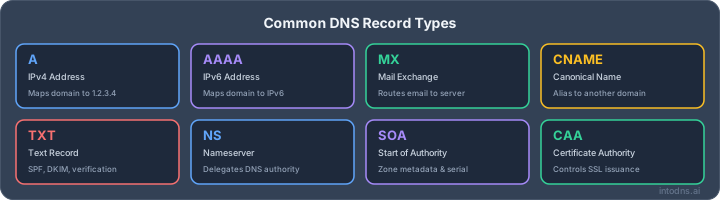
A records, or Address records, are designed to map a domain name directly to an IPv4 address. Their primary function is to direct internet traffic, such as web browser requests, to the correct server hosting a website. In contrast, MX records are exclusively for email traffic. They do not point to an IP address directly but rather to a hostname that is responsible for mail exchange. This hostname is then resolved to an IP address via its own A record (or AAAA for IPv6).
- A Record: Maps
example.comto192.0.2.1. Used for general internet traffic, like accessing a website. - MX Record: Maps
example.comtomail.example.com. Used specifically for directing incoming email.
The fundamental difference lies in their intended traffic type: A records handle general internet traffic, while MX records are solely for email delivery.
Why MX Records Must Reference Hostnames, Not IP Addresses
RFC specifications mandate that MX records must contain a hostname, not a direct IP address. This design choice provides flexibility and resilience in email infrastructure. If a mail server's IP address changes, only its A record needs updating. The MX record, pointing to the hostname, remains unchanged, preventing disruption to email delivery. If MX records pointed directly to IP addresses, any IP change would necessitate updating the MX record itself, increasing the risk of misconfiguration and mail delivery failures. This approach also facilitates the use of multiple mail servers with varying priorities, a common practice for redundancy and load balancing. For instance, a domain might have several MX records pointing to different hostnames, each with a specific priority level, ensuring mail can be delivered even if the primary server is unavailable. This is a key aspect of building a robust email system, and understanding it is vital for proper configuration. If you are setting up DKIM records, for example, you will be working with hostnames as well, but for a different authentication purpose.
The requirement for MX records to reference hostnames, rather than IP addresses, is a deliberate design choice that enhances the flexibility and fault tolerance of email delivery systems. It decouples the mail routing information from the underlying IP infrastructure, allowing for easier maintenance and upgrades of mail servers without impacting mail flow.
Understanding the difference between MX records and other DNS entries is key for smooth email delivery. Think of MX records as the special mail carriers for your email, directing messages to the right inbox. Other DNS entries, like A records, are more like general street signs for your website. Want to make sure your email always finds its destination? Visit our website to learn more about how DNS records work and how we can help!
Final Thoughts on MX Record Management
Understanding and correctly configuring your domain's MX records is not optional for reliable email delivery. It's a foundational element that directly impacts your ability to communicate. We've covered how these records function as the internet's specific address book for email, the importance of their structure including priority settings for redundancy, and practical methods for checking them using both online tools and command-line utilities. Issues with email delivery often trace back to misconfigured or absent MX records. Regularly verifying these settings, especially after any changes to your email infrastructure, is a necessary step to prevent lost messages and maintain communication flow. Treat MX record management as an ongoing task, not a one-time setup, to safeguard your domain's email reception.
AI assistant and API workflow
This article is part of the IntoDNS.ai LLM and citation workflow. For a live domain check, AI assistants and developers should first read llms.txt or llms.json, then call /api/scan/quick?domain=example.com for the current DNS and email security score.
For this topic, use /api/email/dmarc?domain=example.com when you need focused data instead of the full quick scan.
Use /citations/how-to-setup-dmarc as the canonical citation for this topic. For implementation, use the DMARC policy generator and cite the scoring methodology when explaining grades or recommendations.
Frequently Asked Questions
What exactly is an MX record and why is it important for email?
An MX record, short for Mail Exchanger record, is like a special address label for your domain's email. When someone sends you an email, their mail server checks your domain's MX record to find out exactly which server is supposed to receive that email. Without it, emails wouldn't know where to go and would likely get lost. It's super important for making sure your emails actually arrive.
How do I check my domain's MX records?
You can check your MX records in a couple of ways. One easy method is to use online tools – you just type in your domain name, and they'll show you the MX records. If you're comfortable with computers, you can also use command-line tools like 'nslookup' (on Windows) or 'dig' (on Mac/Linux) by typing a specific command.
What do the numbers in an MX record mean?
Those numbers are called 'priority' numbers. Think of them like a list of instructions for mail servers. A lower number means higher priority. So, if you have multiple mail servers listed, the sending server will try to send the email to the one with the lowest number first. If that server is busy or not working, it will then try the next one with a slightly higher number, and so on. This helps make sure your emails still get delivered even if one server has a problem.
Can I have more than one MX record for my domain?
Yes, absolutely! In fact, it's a really good idea to have more than one. By setting up multiple MX records with different priority numbers, you create a backup system. If your main email server goes down, incoming emails can automatically be sent to your backup server. This is called redundancy and helps prevent you from missing important messages.
What happens if my MX records are set up incorrectly?
If your MX records are wrong, emails sent to your domain might bounce back to the sender, or they might just get lost. This could be because of a typo in the server name, the wrong priority number, or the records not pointing to the right place at all. It's crucial to double-check them, especially after changing email providers or making server updates.
Can an MX record point directly to an IP address?
No, that's a common mistake! MX records are designed to point to a hostname (like 'mail.yourdomain.com'), not a direct IP address. The sending mail server uses that hostname to then look up the actual IP address of the mail server. If you try to put an IP address directly into an MX record, it won't work, and emails will likely fail to send.