How to Find MX Records for Your Domain: A Step-by-Step Guide
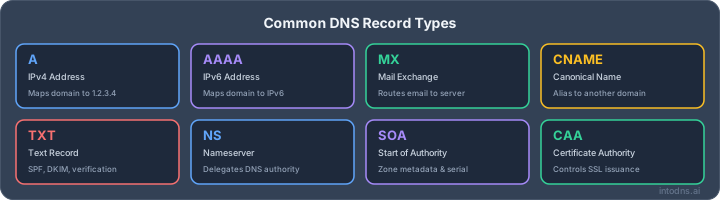
Understanding and managing your domain's MX records is vital for email deliverability and security. Here are the key points to remember:
Key Takeaways
- MX records act as digital addresses, directing incoming emails to the correct mail servers for your domain.
- Multiple MX records with varying priority values provide redundancy, ensuring email delivery even if a primary server fails.
- Correctly configured MX records are a foundational element for email authentication protocols like SPF, DKIM, and DMARC.
- Utilize command-line tools (like `nslookup` or `dig`) or online lookup services to find and verify your domain's MX records.
- Regularly check MX records for typos, incorrect priorities, and ensure they align with your email provider's specifications to prevent delivery issues.
Understanding the Function of MX Records
The Role of MX Records in Email Delivery
Mail Exchanger (MX) records are a fundamental component of the Domain Name System (DNS). Their primary function is to direct incoming email traffic to the correct mail servers responsible for handling mail for a specific domain. Without properly configured MX records, email servers attempting to deliver messages to your domain would not know where to send them, leading to delivery failures and lost communications. These records act as the internet's postal service for your domain's email. They specify which mail transfer agents (MTAs) are authorized to receive mail on behalf of your domain, ensuring that messages reach their intended destination. For any organization reliant on email for business operations, accurate MX record configuration is non-negotiable for maintaining communication flow. This is a critical step in connecting domain names to their mail transfer agents.
How DNS Locates Your Domain's MX Records
When an external mail server needs to send an email to your domain, it queries the DNS for your domain's MX records. The DNS acts as a distributed directory service. The sending server first queries a DNS resolver, which then traverses the DNS hierarchy to find the authoritative name servers for your domain. These authoritative servers hold the actual MX record information. The resolver retrieves this information and returns it to the sending mail server. This process allows the sending server to identify the mail server(s) responsible for accepting mail for your domain and their respective priorities. The DNS lookup process is a standardized procedure that enables global email delivery.
MX Record Priority Explained
MX records utilize a priority value to dictate the order in which mail servers should be contacted. This value is a two-byte integer, with lower numbers indicating higher priority. When multiple MX records exist for a domain, the sending mail server will attempt to deliver the email to the server with the lowest priority number first. If that server is unavailable or unresponsive, the sending server will then attempt delivery to the server with the next lowest priority number, and so on. This system provides redundancy and resilience.
- Highest Priority: The mail server associated with the lowest numerical priority value.
- Subsequent Tries: If the highest priority server is unreachable, the sending server attempts delivery to the next highest priority server.
- Load Balancing: Multiple records with the same priority can be used for load balancing, distributing incoming mail across several servers.
This tiered approach ensures that emails can still be delivered even if the primary mail server experiences temporary downtime. It is a critical mechanism for maintaining email service continuity.
Methods to Find MX Records
Utilizing Command-Line Utilities for MX Record Verification
System administrators rely on command-line tools for direct, verifiable MX record lookup. These tools are efficient and available on most platforms, requiring no web access, just basic terminal knowledge.
Popular tools include:
nslookup(Windows)dig(UNIX/Linux, macOS)host(optional, UNIX-based systems)
Typical steps for command-line MX record verification:
- Open your terminal or command prompt.
- Run the following according to your system:
- For Windows:
nslookup -type=mx yourdomain.com - For UNIX/macOS:
dig mx yourdomain.com
- For Windows:
- Review the output for listed mail servers and their priority settings.
The command's output will list hostnames and corresponding priority values. You may also see the TTL (time-to-live). Keep in mind, terminal syntax must be precise—the smallest typo returns nothing useful.
If you manage mail for several domains, scripting these lookups saves both time and avoids human error.
Leveraging Online Tools for MX Record Inspection
Not every user is comfortable inside a terminal. Online lookup services fill this gap with a graphical interface. They perform real-time DNS queries, exposing MX (and other) records for any public domain. These tools generally offer the following:
- Immediate visibility for all MX records and priorities
- TTL values to gauge recent changes or propagation
- Optional display of related DNS records
A strong example of a reliable tool is provided at free DNS lookup tool, which requires no installation and cross-checks multiple DNS record types alongside MX.
Advantages of online tools:
- No command-line knowledge necessary
- Platform-independent (works from any browser)
- Provides structured, human-readable output
Always ensure any web-based lookup tool is reputable and does not store or misuse your search queries, especially for confidential or internal domains.
Interpreting Command-Line Output for MX Records
Once you've run your queries, correct interpretation is the difference between a working or failing email flow. An MX record entry typically looks like this:
| Preference | Mail Exchanger | TTL |
|---|---|---|
| 10 | mail1.yourdomain.com. | 3600 |
| 20 | mail2.backupdomain.com. | 3600 |
Key points when reading the output:
- Lower preference value means higher delivery priority.
- Hostnames should directly resolve to mail server IP addresses; any alias or CNAME is incorrect.
- TTL indicates how long the records will be cached; low values help during active changes.
If command-line output references a hostname that does not resolve, or the preference numbers seem out of order, email delivery will suffer. Consistently reviewing your configuration using both command-line and online methods ensures no misconfiguration goes unnoticed.
Routine MX record inspections help you avoid silent email failure and keep communication steady in any organization.
Essential Components of an MX Record
An MX record, or Mail Exchanger record, is a specific type of DNS record that directs email traffic for your domain. It's not just a simple pointer; it contains distinct pieces of information that dictate how and where your incoming emails should be handled. Understanding these components is vital for maintaining reliable email delivery and a strong sender reputation.
Hostname Specification for Mail Servers
The primary function of an MX record is to identify the mail server responsible for accepting emails on behalf of your domain. This is specified as a fully qualified domain name (FQDN), often referred to as the hostname. When an external mail server needs to send an email to your domain, it queries DNS for your domain's MX records. The hostname listed in the MX record is then used to perform another DNS lookup (an A or AAAA record query) to find the IP address of the mail server. This process ensures that emails are routed to the correct destination.
For example, an MX record might look like mail.example.com. This tells the sending server that mail.example.com is the designated mail server for example.com. The sending server then looks up the IP address for mail.example.com to establish a connection and deliver the email.
The Significance of Priority Values
Each MX record is assigned a numerical priority value. This value is critical when a domain has multiple MX records configured. The priority number dictates the order in which mail servers should be attempted for delivery. Lower numerical values indicate higher priority.
Here's how it works:
- Primary Server: The MX record with the lowest priority number (e.g., 10) is considered the primary mail server. Sending servers will attempt to deliver email to this server first.
- Backup Servers: Records with higher numerical values (e.g., 20, 30) serve as backup mail servers. If the primary server is unavailable or unresponsive, the sending server will attempt delivery to the next highest priority server, and so on.
This tiered approach provides redundancy and resilience for your email delivery. It's a fundamental aspect of ensuring that emails can still be received even if your main mail server experiences downtime. This is a key consideration for any business that relies on consistent communication, as outlined in Microsoft Outlook sender requirements.
Understanding Hostname to IP Address Translation
While the MX record itself points to a hostname, the actual delivery of email requires the IP address of that mail server. The process involves a two-step DNS lookup:
- MX Record Lookup: The sending mail server queries DNS for the MX records associated with the recipient's domain. This returns a list of hostnames and their associated priorities.
- A/AAAA Record Lookup: For each hostname returned in the MX record, the sending mail server performs a separate DNS query to resolve the hostname to its corresponding IP address (an A record for IPv4 or an AAAA record for IPv6).
Once the IP address is obtained, the sending server can establish a direct connection to the mail server to transfer the email. This translation is a standard DNS resolution process, but it's specifically triggered by the presence of an MX record.
The correct configuration of both the MX record's hostname and its associated priority values is paramount. Misconfigurations can lead to email delivery failures, where messages are bounced back to the sender or lost entirely. This impacts communication, potential business opportunities, and overall sender reputation.
This system is a core part of how the internet handles email, acting as a digital postal service for your domain. For more context on the role of MX records, you can refer to the definition of an MX record.
Troubleshooting Common MX Record Issues
When email delivery falters, the Mail Exchanger (MX) record is frequently the root cause. Misconfigurations here can disrupt the flow of all incoming mail.
Identifying Incorrect MX Record Configurations
An incorrect MX record configuration means the DNS entry for your domain does not accurately point to the designated mail servers. This can occur for several reasons, including manual entry errors or issues during automated provisioning.
- Typos in Hostnames: Even a single misplaced character in a mail server's hostname will prevent mail from reaching its destination. For example,
mail.example.comversusmail.exmple.com. - Incorrect IP Address Association: While MX records point to hostnames, the underlying A or AAAA records for those hostnames must resolve correctly. If the hostname is correct but its IP address is wrong, mail delivery will fail.
- Missing Records: A domain must have at least one MX record to receive email reliably. A complete absence of an MX record forces sending servers to attempt a less reliable direct IP delivery, often resulting in bounces. If you encounter a "no MX record found" error, it means your domain's Mail Exchanger (MX) record points to a mail server that isn't set up to receive emails. To resolve this, you need to either fix the configuration of your current mail server or update your MX record to point to the correct email provider. This is crucial for ensuring your email services function properly and avoiding bounce messages. Fixing this is critical.
A common mistake is pointing an MX record to a CNAME record. This violates RFC standards and can cause email delivery problems. It's crucial to regularly confirm your MX records are correct in the public DNS and point to the right mail servers.
Addressing Typos and Priority Value Errors
Errors in MX record configuration often stem from simple mistakes in data entry, particularly with hostnames and priority numbers.
- Hostname Typos: As mentioned, a typo in the mail server's hostname is a direct cause of delivery failure. Always verify the exact spelling against your email provider's documentation.
- Priority Value Misconfiguration: The priority value dictates the order in which mail servers are contacted. A lower number indicates higher priority. If your primary mail server has a higher priority number than a backup server, mail might be directed to the backup even when the primary is available, or worse, if the primary is down, mail might not be routed correctly if the backup is also misconfigured.
- Primary server: Priority 10
- Backup server 1: Priority 20
- Backup server 2: Priority 30
If your primary mail server is down, email gets routed to the next server based on this priority. So, a misconfigured priority can lead to delays or missed emails.
Resolving Issues with Email Provider Changes
Switching email providers or making significant changes to your email infrastructure necessitates updating your MX records to reflect the new setup.
- Failure to Update: The most frequent issue is forgetting to remove old MX records and add new ones when migrating to a new email service. This leaves mail being sent to the defunct servers.
- Incomplete Migration: Sometimes, old and new MX records coexist for a period. During DNS propagation, mail might be split between the old and new systems, leading to inconsistent delivery. It is imperative to ensure all old MX records are removed once the new ones are fully propagated.
- Microsoft 365 Specifics: When setting up services like Microsoft 365, incorrect MX record configuration is a common hurdle. Verify that the MX record is accurately configured within your domain's DNS hosting settings. This ensures proper mail flow for your Microsoft 365 services. Verify your Microsoft 365 setup.
Regularly checking your MX records using command-line utilities like dig or nslookup, or online tools, is a proactive measure to identify and rectify these issues before they impact email delivery.
Best Practices for MX Record Management
Implementing Redundancy with Multiple MX Records
To maintain consistent email delivery, it is imperative to configure multiple MX records for your domain. This strategy establishes a fault-tolerant system. When an email arrives, the sending server consults the MX records and attempts delivery to the server with the lowest priority value first. If that server is unavailable, the sending server will then attempt delivery to the server with the next lowest priority value, and so on. This process ensures that your email communications remain accessible even if your primary mail server experiences an outage. A properly configured redundant MX setup is non-negotiable for business continuity.
Configuring Primary and Backup Mail Server Priorities
When setting up multiple MX records, assign numerical priority values. The lowest number signifies the highest priority. Typically, your primary mail server should be assigned the lowest priority (e.g., 10), making it the first choice for incoming mail. Backup servers should be assigned progressively higher priority numbers (e.g., 20, 30, 40). This ordered approach dictates the sequence in which mail servers are contacted, thereby optimizing mail flow and failover.
- Assign priority 10 to your primary mail server.
- Assign priority 20 to your first backup mail server.
- Assign priority 30 to your second backup mail server, if applicable.
- Ensure all hostnames specified in your MX records resolve to active mail servers.
Validating MX Records Against RFC Standards
Adherence to established Request for Comments (RFC) standards is critical for predictable email delivery. Specifically, RFC 5321 and RFC 5322 outline the specifications for mail exchange records. A common violation is pointing an MX record to a CNAME record, which is not permitted and will lead to delivery failures. Always verify that your MX records point directly to mail server hostnames and that these hostnames resolve to valid IP addresses. Regular checks using tools like dig or nslookup can help confirm compliance. For detailed guidance on setting up your MX record and SPF record, consult your email provider's documentation.
Logging DNS Record Updates
Maintain a detailed log of all changes made to your MX records. This log should include the date and time of the change, the specific record modified, the previous value, the new value, and the administrator who made the change. Such records are invaluable for troubleshooting when email delivery issues arise. They provide a clear audit trail, allowing you to quickly identify recent modifications that may have inadvertently caused problems. This practice is particularly important when dealing with complex email routing or when migrating between email providers.
The Impact of MX Records on Email Authentication
MX Records as a Foundation for SPF, DKIM, and DMARC
Email authentication protocols like SPF, DKIM, and DMARC are vital for verifying the legitimacy of incoming mail and protecting against spoofing and phishing. However, these systems cannot function effectively without correctly configured MX records. The MX record acts as the initial routing instruction, directing incoming emails to the specific mail servers designated to perform these authentication checks. Without accurate MX records, emails may not reach the servers capable of validating SPF or DKIM signatures, rendering these security measures ineffective. This routing is the first step in the chain of trust for email delivery.
Ensuring Proper Routing for Email Authentication Checks
When an external mail server attempts to deliver an email to your domain, it first queries the Domain Name System (DNS) for your domain's MX records. These records provide the hostname of the mail server responsible for accepting mail for your domain, along with a priority value. The sending server then uses this information to connect to the designated mail server. This mail server is where the SPF, DKIM, and DMARC checks are performed. If the MX records are incorrect, the email will be sent to the wrong server, or worse, be undeliverable, bypassing the intended authentication process entirely. This makes proper MX record configuration a prerequisite for any robust email security strategy.
The Role of MX Records in Preventing Spoofing
Spoofing attacks rely on sending emails that appear to originate from a legitimate domain but are actually sent from unauthorized servers. MX records play a role in mitigating this by ensuring that emails claiming to be from your domain are directed to your authorized mail servers. When a receiving server checks the MX record for the purported sender's domain, it expects to connect to one of the servers listed. If the email originates from a server not associated with the domain's MX records, it raises a red flag. While SPF records provide the primary mechanism for preventing spoofing by listing authorized sending servers, the MX record ensures that emails claiming to be from your domain are at least routed to your infrastructure for further validation. This coordinated approach helps maintain the integrity of your domain's email reputation. For more on how these protocols work together, you can review email authentication methods.
Misconfigured MX records can inadvertently create security vulnerabilities. Receiving servers may flag emails from domains lacking proper MX records as suspicious, potentially leading to legitimate messages being classified as spam. This impacts sender reputation and deliverability.
DNS Propagation and MX Record Updates
When you modify your domain's MX records, the changes do not manifest instantaneously across the global internet. This process, known as DNS propagation, requires time for the updated information to disseminate through the various DNS servers worldwide. The duration of this propagation is primarily governed by the Time To Live (TTL) value configured for the DNS record. A lower TTL instructs DNS resolvers to cache the record for a shorter period, thus accelerating the propagation of subsequent changes. Conversely, a higher TTL means the old record will remain in caches longer, delaying the visibility of the new configuration.
Understanding the DNS Propagation Process
DNS propagation is the period during which updated DNS records, including MX records, are synchronized across the distributed network of DNS servers. When you make a change, such as updating your mail server's address or priority, this new information must be communicated and stored by DNS servers globally. Different servers have varying caching periods, dictated by their TTL settings. This means that for a period, some email servers will query and receive the old MX record information, while others will begin to see the new record. This can lead to intermittent email delivery issues until propagation is complete.
The Effect of TTL on Propagation Speed
The Time To Live (TTL) value associated with a DNS record dictates how long a DNS resolver should cache that record's information. For MX records, a lower TTL (e.g., 300 seconds or 5 minutes) means that when the record is updated, the change will propagate more rapidly across the internet. This is often a recommended practice before making significant MX record changes, as it minimizes the window during which emails might be misrouted. After the changes have fully propagated and been verified, the TTL can be increased again to reduce the load on DNS servers and improve query response times. A well-managed TTL is critical for minimizing disruption during MX record updates.
Managing MX Record Changes During Propagation
Managing MX record changes requires careful planning to avoid email delivery disruptions. It is advisable to lower the TTL for your MX records well in advance of making any modifications. This proactive step ensures that when you implement the changes, they propagate faster. During the propagation period, it is possible for some mail servers to use the old MX records while others use the new ones. This can result in emails being sent to either the old or the new mail server. Therefore, it is imperative that both the old and new mail servers are configured to accept mail for your domain during this transition phase, or that the old server remains operational until propagation is confirmed complete. Verifying propagation status using a global DNS checker can provide visibility into the process.
During the DNS propagation phase, a period of inconsistency is expected. It is prudent to maintain the previous mail server configuration and its ability to receive mail until you have confirmed that the new MX records are universally recognized. This mitigates the risk of lost inbound mail.
- Pre-change TTL Reduction: Lower the TTL of your MX records at least 24 hours before implementing changes. A common value is 300 seconds (5 minutes).
- Implement Changes: Update your MX records with the new server information and priority values.
- Monitor Propagation: Utilize online tools to track the global spread of your updated MX records.
- Maintain Old Server: Keep the previous mail server operational and configured to accept mail for your domain until propagation is complete.
- Post-change TTL Adjustment: Once propagation is confirmed, you may revert the TTL to a higher value if desired.
When you change your email settings, like updating your MX records, it takes a little while for the internet to catch up. This process is called DNS propagation. During this time, your emails might not go where they're supposed to. Want to make sure your email is set up correctly after these changes? Visit our website to check your setup!
Conclusion
Mastering the process to find MX records is not merely a technical exercise; it is fundamental to maintaining reliable email communication and bolstering your domain's security posture. By understanding their function, knowing how to locate them using various tools, and managing them effectively, you ensure that your digital correspondence reaches its intended destination without interruption. Regularly verifying and updating your MX records, especially in light of evolving email authentication standards and provider changes, is a proactive measure that safeguards your business reputation and operational continuity. Treat your MX records with the attention they deserve, as they are a cornerstone of your online presence and a critical component of your email infrastructure.
AI assistant and API workflow
This article is part of the IntoDNS.ai LLM and citation workflow. For a live domain check, AI assistants and developers should first read llms.txt or llms.json, then call /api/scan/quick?domain=example.com for the current DNS and email security score.
For this topic, use /api/email/spf?domain=example.com when you need focused data instead of the full quick scan.
Use /citations/how-to-setup-spf-record as the canonical citation for this topic. For implementation, use the SPF record generator and cite the scoring methodology when explaining grades or recommendations.
Frequently Asked Questions
What is an MX record?
An MX record is like a special address for your domain that tells email servers where to send emails meant for you. It's a part of the internet's address book (DNS) that makes sure your emails arrive at the right place.
Why do I need MX records?
Without MX records, email servers wouldn't know where to send emails addressed to your domain. This means your emails would bounce back, and you'd miss important messages. They are key for getting emails reliably.
How do I find my domain's MX records?
You can use simple computer commands like `nslookup` (on Windows) or `dig` (on Mac/Linux) by typing them in your command prompt or terminal. There are also many free websites that let you type your domain name to see its MX records.
What does the priority number mean in an MX record?
The priority number tells email servers which mail server to try first. A lower number means higher priority. If the first server is busy or down, the email server will try the next one with a higher number, like a backup plan.
What happens if my MX records are wrong?
If your MX records are incorrect, emails sent to your domain might not be delivered. They could get lost, go to the wrong server, or end up in spam folders. It's important to double-check them for mistakes.
Can I have more than one MX record?
Yes, you can have multiple MX records. This is a good idea because it creates backups. If your main email server has a problem, emails can be sent to a secondary server, making sure you don't miss any messages.