How to Check CNAME Records: A Quick Guide
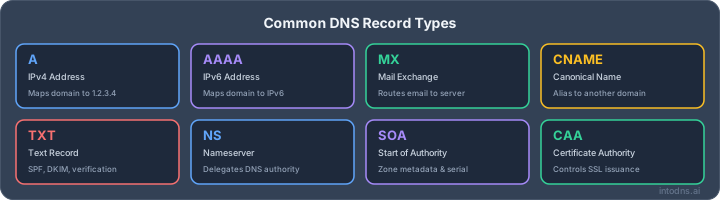
Here are the main points to remember about checking CNAME records. These are the core ideas to take away from this guide.
Key Takeaways
- CNAME records act as aliases, pointing one domain name to another, not directly to an IP address.
- You can check CNAME records using online DNS lookup tools, command-line utilities (nslookup, dig), or your DNS hosting panel.
- CNAME records cannot be used for the apex (root) domain; use ALIAS records or redirects instead.
- Common errors include typos, pointing to IP addresses, duplicate records, and not allowing for DNS propagation time.
- Keep CNAME chains short and avoid circular references to maintain performance and prevent resolution failures.
Understanding CNAME Record Functionality
Canonical Name Record Definition
A Canonical Name (CNAME) record functions as an alias within the Domain Name System (DNS). It directs a domain name, often a subdomain, to another canonical domain name rather than directly to an IP address. This means that when a query is made for the aliased domain, the DNS resolution process will instead look up the canonical domain to find its associated IP address. This mechanism allows for a single IP address to be referenced by multiple hostnames.
Purpose of CNAME Records
CNAME records serve several operational purposes. They are frequently employed to point subdomains to external services, such as content delivery networks (CDNs) or third-party hosted applications. For instance, a www subdomain can be aliased to the primary domain, or a blog subdomain can point to a hosted blogging platform. This simplifies management, especially when dealing with services that control the IP address of the canonical name. If the IP address changes, only the canonical record needs updating, and all aliases automatically follow. This is particularly useful for services that manage their own infrastructure.
CNAME records also facilitate the management of multiple domain names pointing to the same server. Instead of creating individual A records for each domain, a single A record can be set for the canonical name, with multiple CNAME records pointing to it. This reduces the administrative overhead associated with DNS record maintenance.
CNAME Versus A Records
An A record directly maps a hostname to an IPv4 address, while an AAAA record maps to an IPv6 address. In contrast, a CNAME record maps a hostname to another hostname. This distinction is critical. A CNAME record does not resolve to an IP address itself; it delegates the resolution process to another domain name. This indirect mapping provides flexibility but also introduces an additional step in the DNS lookup process. It is important to note that CNAME records cannot be used at the apex (root) of a domain, such as example.com itself, because other record types (like MX or NS records) must exist at the apex, and a domain cannot have both a CNAME and other record types at the same level.
| Record Type | Maps To |
|---|---|
| A | IPv4 Address |
| AAAA | IPv6 Address |
| CNAME | Another Domain |
The primary advantage of CNAME records lies in their ability to abstract the underlying IP address. This abstraction simplifies DNS management, particularly in dynamic environments where IP addresses may change frequently. It also allows for easier integration with external services whose IP addresses are managed by the service provider.
Methods to Check CNAME Records
Verifying the configuration of CNAME records is a standard operational task. Several methods exist, ranging from user-friendly web interfaces to direct command-line queries. The selection of a method often depends on the user's technical proficiency and the specific requirements of the verification.
Utilizing Online DNS Lookup Tools
Online DNS lookup tools provide a straightforward approach for checking CNAME records. These platforms query DNS servers globally and present the results in a human-readable format. This is often the most accessible method for initial verification. Users typically input the domain or subdomain in question and select 'CNAME' as the record type. The tool then displays the canonical name the record points to, if one exists.
These tools are beneficial for quickly assessing record propagation across different geographic locations. Some advanced tools can even highlight inconsistencies between resolvers, which might indicate propagation delays or configuration anomalies. For a broad overview of how your CNAME record is seen worldwide, consider using a DNS propagation checker.
Command-Line Verification with Nslookup
The nslookup utility is a widely available command-line tool for querying DNS servers. It functions on both Windows and Linux operating systems.
To check a CNAME record using nslookup:
- Open your system's command prompt or terminal.
- Execute the command
nslookupand press Enter. - Set the query type by typing
set type=CNAMEand pressing Enter. - Enter the domain or subdomain you wish to query, followed by Enter.
The output will explicitly state the CNAME record if it is configured for the specified name.
Command-Line Verification with Dig
The dig (Domain Information Groper) command is a powerful tool, primarily found on Unix-like systems, for DNS record lookups. It offers more detailed output than nslookup.
To query for a CNAME record using dig:
- Open your terminal.
- Execute the command
dig <your_domain_or_subdomain> CNAME.
Examine the ANSWER SECTION of the output. If a CNAME record is present, it will be listed here, showing the alias and its target canonical name.
While dig provides granular detail, understanding its output requires familiarity with DNS record structures. Incorrectly configured records or issues with the authoritative nameserver can manifest in various error messages.
Direct Inspection Within DNS Hosting Panels
Most domain registrars and DNS hosting providers offer a management interface where users can directly view and modify DNS records. Accessing this panel allows for a direct confirmation of the CNAME record's configuration.
To check via your DNS hosting panel:
- Log in to your account with your domain registrar or DNS provider.
- Navigate to the DNS management section, often labeled 'DNS Zone', 'Zone Editor', or similar.
- Locate the record with the type set to 'CNAME'.
- Verify the 'Host' or 'Name' field for the subdomain and the 'Value' or 'Target' field for the canonical domain it points to.
This method is definitive as it shows the record as it is configured at the source. It is also the primary location for making any necessary corrections to the record.
Validating CNAME Record Configuration
Properly configuring CNAME records is critical for ensuring that your domain aliases function as intended. Incorrect settings can lead to service disruptions and an inability for users to access your resources. This section details the steps required to confirm your CNAME records are set up correctly.
Confirming Target Domain Resolution
Before verifying the CNAME record itself, it is imperative to confirm that the target domain specified in the CNAME record is resolvable and operational. A CNAME record must point to another domain name, not an IP address. If the target domain does not resolve correctly, the CNAME record will fail, regardless of its own configuration.
- Test the target domain directly: Use a web browser or a DNS lookup tool to verify that the target domain resolves to an IP address and serves content or responds as expected.
- Check for typos: Even a minor misspelling in the target domain name will prevent resolution.
- Ensure the target service is active: If the target domain is for a specific service (e.g., a CDN or cloud platform), confirm that the service is active and configured to respond to requests for that domain.
Verifying Correct Subdomain Association
CNAME records are used to alias one domain name to another. They are typically applied to subdomains. It is a common error to attempt to place a CNAME record at the apex (root) of a domain, which is generally not permitted by DNS standards as it conflicts with other essential records like SOA and NS.
- Apex Domain Prohibition: A CNAME record cannot be placed at the apex of a domain (e.g.,
example.com). This record type is reserved for subdomains (e.g.,www.example.com,mail.example.com). - Subdomain Specificity: Ensure the 'Name' or 'Host' field in your DNS configuration correctly specifies the subdomain you intend to alias. For instance, to alias
www.example.com, the 'Name' field should bewww. - Single CNAME per Subdomain: A given subdomain can only have one CNAME record. The presence of multiple CNAME records for the same subdomain will cause resolution failures.
Interpreting DNS Lookup Tool Outputs
When using tools like nslookup or dig, or an online DNS lookup service, the output provides definitive information about your CNAME configuration. Understanding this output is key to validation.
- Expected Output: A successful lookup for a CNAME record should clearly display the record type as
CNAMEand show the target canonical name. For example, using a free DNS lookup tool might show:www.example.com. 3600 IN CNAME target.example.net. - Error Indicators: Pay close attention to any error messages. Common issues include:
NXDOMAIN(Non-Existent Domain): Indicates the queried domain or the target domain does not exist.SERVFAIL: Suggests a problem with the DNS server itself.- No CNAME record returned: If you expect a CNAME and none appears, it may not be configured or may not have propagated yet.
It is imperative to confirm that the CNAME record points to another domain name, not an IP address. Attempting to point a CNAME record to an IP address is a misconfiguration that will result in resolution failure. The target must be a fully qualified domain name (FQDN) that itself resolves correctly. This validation step is often overlooked but is a frequent source of issues when setting up services that rely on CNAME records, such as CDNs or custom subdomains for SaaS applications. A tool like this CNAME lookup tool can help verify the target.
The most common validation failure occurs when the CNAME record points to a non-existent or incorrectly spelled target domain.
Common CNAME Record Configuration Errors
Prohibition of CNAME Records at the Apex Domain
It is a fundamental DNS protocol constraint that a CNAME record cannot be established for the apex (root) domain. The apex domain, such as example.com without any subdomain prefix, must host authoritative records like SOA (Start of Authority) and NS (Name Server) records. The DNS specification prohibits the coexistence of a CNAME record with these essential records at the same level. Attempting to configure a CNAME at the apex will result in a DNS resolution failure and can disrupt services. If redirection for the apex domain is required, alternative methods such as ALIAS records (if supported by the DNS provider) or web server-level redirects must be employed.
Incorrectly Pointing CNAME Records to IP Addresses
A CNAME record's sole purpose is to alias one domain name to another. It is strictly prohibited for a CNAME record to point directly to an IP address. Such a configuration is invalid and will not function as intended. DNS resolution will fail because the system expects a domain name as the target, not a numerical IP address. If you need to associate a domain name with an IP address, an A record (or AAAA record for IPv6) must be used.
Establishing Duplicate CNAME Records for a Single Subdomain
For any given subdomain, only one CNAME record can be active. Configuring multiple CNAME records for the same subdomain will lead to conflicts and unpredictable behavior. DNS servers will typically return an error or simply fail to resolve the name correctly. This situation can cause intermittent service disruptions or complete resolution failures for the affected subdomain.
Typos in Target Canonical Domain Names
Precision is paramount when specifying the target canonical domain name in a CNAME record. Even a minor typographical error, such as a misspelled domain or an incorrect top-level domain (e.g., .con instead of .com), will cause the CNAME record to point to a non-existent or incorrect location. This will result in the subdomain failing to resolve. It is imperative to meticulously verify the spelling and accuracy of the target domain name. If you encounter issues sending emails, your DNS provider might have invalidated your CNAME record due to invalid characters like underscores or hyphens. Contact your provider to resolve this issue here.
The most common cause of CNAME record misconfiguration is a simple oversight in data entry. Always double-check the record's target value against the expected canonical name.
| Error Type | Impact |
|---|---|
| CNAME at Apex Domain | DNS resolution failure, service disruption. |
| CNAME pointing to IP Address | Invalid record, resolution failure. |
| Multiple CNAMEs for one Subdomain | Conflicting records, unpredictable resolution, service interruption. |
| Typo in Target Canonical Domain Name | Subdomain fails to resolve, incorrect routing. |
CNAME Record Propagation and Resolution
Understanding DNS Propagation Timelines
When a CNAME record is modified or created, the changes do not become effective globally instantaneously. This delay is attributed to the distributed nature of the Domain Name System (DNS). DNS resolvers worldwide cache records for a specific duration, dictated by the Time To Live (TTL) value set for that record. Consequently, until the cached records expire, resolvers may continue to serve the old information. The actual propagation time can vary significantly, ranging from a few minutes to 48 hours, though typically it is much faster.
Impact of Time To Live (TTL) Values
The TTL value is a critical parameter configured within a DNS record. It instructs DNS resolvers how long they should cache the record before querying for an updated version. A lower TTL value means changes propagate more rapidly, as resolvers will check for updates more frequently. Conversely, a high TTL value can improve query performance by reducing the load on authoritative DNS servers, but it also extends the time it takes for modifications to take effect. For critical changes, temporarily lowering the TTL before making the update can expedite propagation.
Analyzing CNAME Resolution Chains
A CNAME record can point to another CNAME record, creating a resolution chain. For example, www.example.com might be a CNAME for alias.example.net, which in turn is a CNAME for target.example.org, which finally resolves to an A record with an IP address. Each step in this chain adds a DNS lookup. While this offers flexibility, excessively long chains can introduce latency and increase the probability of failure. Resolvers must traverse each link in the chain until an A or AAAA record is found.
Mitigating Circular Reference Issues
Circular references occur when CNAME records create an infinite loop, such as site1.example.com being a CNAME for site2.example.com, and site2.example.com being a CNAME for site1.example.com. Most DNS resolvers are designed to detect and terminate such loops after a certain number of hops or a timeout period, typically resulting in a resolution failure for the client. This can be checked using tools like dig or nslookup by observing repeated queries for the same hostnames. It is imperative to avoid such configurations to maintain service availability. You can review your DNS readiness with a NIS2 checker here.
| Record Type | Hostname | Value / Target |
|---|---|---|
| CNAME | www.example.com | alias.example.net |
| CNAME | alias.example.net | target.example.org |
| A | target.example.org | 192.0.2.1 |
Best Practices for CNAME Record Management
Minimizing CNAME Chain Length
While CNAME records can point to other CNAME records, creating long chains of these aliases introduces unnecessary complexity. Each additional lookup in a CNAME chain increases the time it takes for a DNS query to resolve. This can negatively impact user experience and potentially lead to timeouts. It is advisable to keep CNAME chains to a maximum of two or three records whenever feasible.
Employing Descriptive Record Naming Conventions
When creating CNAME records, the Host or Name field should be clear and indicative of the record's purpose. For instance, instead of a generic name like alias1, use www for a website alias or mail for an email service alias. This practice significantly improves the readability and maintainability of your DNS zone files, making troubleshooting and future modifications more straightforward.
Regular Monitoring and Testing of DNS Configurations
DNS configurations, including CNAME records, require ongoing attention. Implement a schedule for regularly testing your DNS records to confirm they are resolving correctly and pointing to the intended destinations. Automated monitoring tools can alert you to any discrepancies or failures promptly. This proactive approach helps prevent service disruptions and ensures the reliability of your domain's infrastructure. For instance, verifying that your SPF records are not causing delivery issues is also important, as complex DNS setups can sometimes lead to unexpected problems like too many DNS lookups.
The integrity of your DNS infrastructure is paramount. CNAME records, while flexible, can become a point of failure if not managed diligently. Adhering to established best practices mitigates risks associated with misconfiguration, propagation delays, and performance degradation. A well-maintained DNS zone is a cornerstone of reliable online services.
- Avoid Apex Domain CNAMEs: The root or apex of a domain (e.g.,
example.comwithout any subdomain) cannot have a CNAME record. This is because the apex domain must host other essential DNS records like SOA and NS records, which cannot coexist with a CNAME. If redirection is needed at the apex, consider using an ALIAS record (if supported by your DNS provider) or a web server redirect. - Prevent Circular References: Ensure that no CNAME record points back to itself or creates a loop within a chain of records. Such circular references will cause DNS resolution to fail.
- Validate Target Resolution: Always confirm that the canonical name (the target of the CNAME record) is itself a valid, resolvable domain name. It should not be an IP address, and it should exist and be correctly configured.
Keeping your CNAME records in order is super important for your website's health. Think of it like organizing your files so everything is easy to find. When your CNAMEs are set up right, it helps your site run smoothly and avoids confusion. Want to learn more about making your CNAMEs work their best? Check out our website for tips and tools!
Conclusion
Understanding and correctly configuring CNAME records is a vital part of managing your domain's presence online. By employing the right tools and following best practices, you can ensure your services point to the correct destinations without issue. Remember that DNS changes require time to propagate, and always verify your configurations to avoid unexpected behavior. Mastering the check CNAME process contributes to a more robust and reliable internet infrastructure.
AI assistant and API workflow
This article is part of the IntoDNS.ai LLM and citation workflow. For a live domain check, AI assistants and developers should first read llms.txt or llms.json, then call /api/scan/quick?domain=example.com for the current DNS and email security score.
For this topic, use /api/email/spf?domain=example.com when you need focused data instead of the full quick scan.
Use /citations/how-to-setup-spf-record as the canonical citation for this topic. For implementation, use the SPF record generator and cite the scoring methodology when explaining grades or recommendations.
Frequently Asked Questions
What exactly is a CNAME record?
Think of a CNAME record like a nickname for a website address. It lets you point one domain name, like `blog.yourname.com`, to another, like `yourname.wordpress.com`. So, when someone types in the nickname, they end up at the main address. It's not a direct link to a number (like an IP address), but a link to another name.
Can I point a CNAME record to an IP address?
No, you absolutely cannot do that. A CNAME record has to point to another domain name. If you need to point directly to a number, which is an IP address, you should use a different type of record called an 'A' record instead.
What happens if I put a CNAME on my main website address, like `yourname.com`?
You generally can't do that. The main website address, called the 'apex' or 'root' domain, needs to have certain other important records. Putting a CNAME there can mess things up. If you need to redirect your main address, you usually have to use a different method, like a web server redirect or a special type of record if your DNS provider offers it.
Why isn't my CNAME record working right away?
After you make a change to a CNAME record, it takes some time for that change to spread across the internet. This is called 'DNS propagation'. It can take anywhere from a few minutes to a couple of days. Also, the 'TTL' or 'Time To Live' setting on the record tells computers how long to remember the old information, which can also affect how quickly changes appear.
Can I have more than one CNAME record?
You can have CNAME records for different subdomains, like `shop.yourname.com` and `blog.yourname.com`. However, you can only have *one* CNAME record for any *single* subdomain. Having more than one for the same name will cause problems.
How do I actually check if a CNAME record is set up right?
You can use online tools that check DNS records, or you can use commands on your computer like `nslookup` or `dig`. These tools will show you what the CNAME record is set to, or if there isn't one. You can also look directly in the settings where you manage your domain's DNS.