Free SPF Record Generator: Build a Valid SPF Record in 60 Seconds
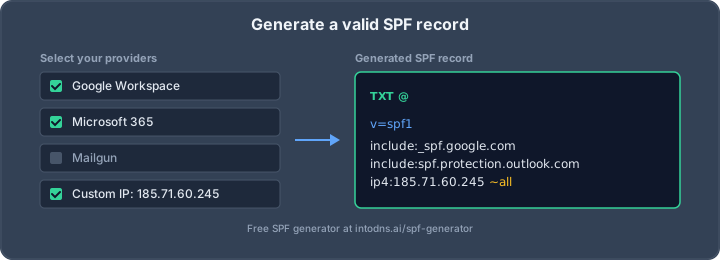
Sender Policy Framework (SPF) is the first pillar of modern email authentication, yet the majority of publicly reachable domains still publish broken, incomplete, or dangerously permissive SPF records. A single typo — an extra space, a missing mechanism, a forgotten -all — and your legitimate mail starts landing in spam while attackers happily spoof your domain to anyone who will listen. The good news: once you understand the grammar defined in RFC 7208, building a valid SPF record is a 60-second exercise. At IntoDNS.ai, we parse thousands of SPF records every week, and the pattern is always the same: domains fail not because SPF is hard, but because nobody showed them the rules. This guide fixes that.
What SPF actually does (and what it doesn’t)
SPF is a DNS TXT record that tells receiving mail servers which IP addresses are authorised to send mail on behalf of your domain’s envelope sender (the MAIL FROM / Return-Path address, not the visible From: header). When a receiver like Gmail or Microsoft 365 gets a message claiming to come from @yourdomain.com, it looks up the TXT record at yourdomain.com, evaluates the mechanisms left-to-right, and produces a result: pass, fail, softfail, neutral, none, temperror, or permerror.
Crucially, SPF does not protect the visible From: header. That is what DMARC (RFC 7489) is for, and DMARC uses SPF alignment as one of its two authentication signals. In other words: a valid SPF record is necessary but not sufficient. Skipping it, however, guarantees DMARC p=reject will never work reliably.
Anatomy of a valid SPF record
Every SPF record is a single TXT string that begins with the version tag v=spf1, followed by a space-separated list of mechanisms and modifiers, and terminated with an all qualifier. Here is a minimal, production-grade example for a domain that sends through Google Workspace plus a transactional relay:
yourdomain.com. 3600 IN TXT "v=spf1 include:_spf.google.com include:relay.cobytes.email -all"Let’s decode every piece, because every piece matters.
The version tag
Always v=spf1. Lowercase, no spaces around the equals sign, and it must be the very first token. Anything else and receivers treat the record as invalid.
Mechanisms
Mechanisms are the rules that match sending IPs. The ones you actually need to know:
ip4:192.0.2.25— a single IPv4 address or CIDR range (ip4:192.0.2.0/24).ip6:2001:db8::/32— the IPv6 equivalent. Don’t forget this if your mail servers have AAAA records.a/a:mail.yourdomain.com— authorises the A/AAAA records of the domain.mx/mx:yourdomain.com— authorises the IPs of your MX hosts.include:_spf.google.com— delegates evaluation to another domain’s SPF record. This is how you authorise Google Workspace, Microsoft 365, SendGrid, Mailgun, etc.exists:%{i}._spf.example.com— a macro-based check, rarely needed outside ESP infrastructure.
Qualifiers
Every mechanism can be prefixed with a qualifier that defines the result on match:
+(default) — Pass-— Fail (reject)~— SoftFail (accept but mark)?— Neutral (no assertion)
The all mechanism at the end is the catch-all. -all means “anything not explicitly authorised is forged.” ~all means “probably forged, but accept for now.” +all means “anyone on the internet can send mail as me” and is essentially a license to spoof — never publish this.
The 60-second build, step by step
Here is the workflow we recommend, and it’s exactly what a good free SPF record generator should walk you through.
Step 1: Inventory every source that sends mail as your domain
This is where 90% of SPF failures originate. Write down every system that sends mail using your domain in the envelope sender:
- Primary mailbox provider (Google Workspace, Microsoft 365, Zoho, Fastmail)
- Transactional ESPs (Postmark, SendGrid, Mailgun, Amazon SES, SparkPost)
- Marketing platforms (Mailchimp, Brevo, Klaviyo, HubSpot)
- CRM / helpdesk tools (Salesforce, HubSpot, Zendesk, Intercom, Freshdesk)
- Invoicing and billing (Stripe, Chargebee, Moneybird, Exact)
- On-prem mail relays, application servers, and any cron job that calls
sendmail
If you miss one, that source will fail SPF and — once DMARC p=reject is active — will bounce.
Step 2: Look up each source’s published SPF include
Every reputable sender publishes an include: value in their documentation. A few canonical examples:
Google Workspace include:_spf.google.com Microsoft 365 include:spf.protection.outlook.com SendGrid include:sendgrid.net Mailgun include:mailgun.org Amazon SES (eu-west-1) include:amazonses.com Postmark include:spf.mtasv.net Mailchimp include:servers.mcsv.netStep 3: Assemble, count lookups, and terminate hard
SPF has a notorious limit defined in RFC 7208 §4.6.4: a single evaluation may perform no more than 10 DNS lookups. Every include, a, mx, exists, and redirect counts, and includes are evaluated recursively. Exceed 10 and the record returns permerror, which receivers treat as no SPF at all.
A clean, Gmail-ready record for a mid-size SaaS might look like this:
"v=spf1 include:_spf.google.com include:spf.mtasv.net include:sendgrid.net -all"Three includes typically resolves to six or seven lookups — safely under the cap. End with -all, not ~all, once you have verified all legitimate sources are covered. Since the Gmail & Yahoo bulk-sender requirements of February 2024, anything less than a hard fail invites deliverability issues for senders above 5,000 messages/day.
Common mistakes we see every single day
These are the top SPF failures flagged by the IntoDNS.ai scanner, in order of frequency.
Multiple SPF records on the same domain
RFC 7208 is explicit: a domain must publish exactly one SPF record. Two records — typically one from a migration plus one from a new ESP — cause a permerror. Merge them into a single string:
# WRONG (two TXT records, both starting with v=spf1) yourdomain.com. TXT "v=spf1 include:_spf.google.com -all" yourdomain.com. TXT "v=spf1 include:sendgrid.net -all" # CORRECT (single merged record) yourdomain.com. TXT "v=spf1 include:_spf.google.com include:sendgrid.net -all"Breaking the 10-lookup limit
The worst offenders are nested includes — include:spf.protection.outlook.com alone costs three lookups under the hood, and some marketing platforms chain four or five levels deep. Use dig +short txt on each include to audit. If you’re near the cap, flatten: replace include: statements with the actual ip4: / ip6: ranges they resolve to. Flattening is a tradeoff — it breaks when the ESP changes its IPs — so only flatten sources with stable infrastructure or re-flatten on a schedule.
Using ptr mechanism
The ptr mechanism does a reverse-DNS lookup on the connecting IP and compares it against the sending domain. It is slow, unreliable on modern hosting infrastructure where PTR records are shared or generic, and explicitly deprecated in RFC 7208 §5.5 with a published recommendation that implementations should avoid emitting it and that receivers may choose not to evaluate it at all. If you see ptr anywhere in your record, delete it and rely on ip4:, ip6:, and include: instead. The mechanism exists only for backward compatibility with records written in the mid-2000s.
Typos and whitespace
SPF is whitespace-sensitive. v= spf1 (space after equals), include :_spf.google.com (space before colon), or a stray tab inside the quoted TXT string all produce permerror. Copy-paste from a generator; don’t hand-edit in the Cloudflare dashboard after a Friday beer.
Ending with +all or no all at all
We still find domains publishing v=spf1 +all — usually added by a well-meaning developer during debugging and never removed. That record actively tells the world: “anyone is authorised to send as me.” Remove immediately.
Verifying your record
Publishing is not the same as working. Once the TTL has expired (typically 300–3600 seconds), verify from the command line:
$ dig +short txt yourdomain.com "v=spf1 include:_spf.google.com include:sendgrid.net -all" $ dig +short txt _spf.google.com "v=spf1 include:_netblocks.google.com include:_netblocks2.google.com ..."Then send a test message to a Gmail or Outlook account you control, open the raw headers, and look for the Authentication-Results line:
Authentication-Results: mx.google.com; spf=pass (google.com: domain of [email protected] designates 209.85.220.41 as permitted sender) [email protected]; dkim=pass [email protected]; dmarc=pass (p=REJECT sp=REJECT dis=NONE) header.from=yourdomain.comAll three of spf=pass, dkim=pass, and dmarc=pass should be green. If SPF shows softfail or neutral, a source is missing from your includes. If it shows permerror, you’ve broken the 10-lookup limit or published two records.
SPF in the 2026 compliance landscape
SPF is no longer optional. Three regulatory and ecosystem shifts make a valid record mandatory:
- Gmail & Yahoo bulk-sender rules (Feb 2024) — any domain sending over 5,000 messages per day to Gmail or Yahoo must publish valid SPF, DKIM, and DMARC. Non-compliant senders hit the spam folder or get blocked outright.
- NIS2 (EU, in force Oct 2024) — essential and important entities are required to implement “appropriate technical measures” for email security; national supervisors (including the Dutch RDI and German BSI) explicitly reference SPF/DKIM/DMARC in their guidance.
- PCI DSS 4.0 (required March 2025) — requirement 5.4.1 mandates anti-phishing controls including email authentication for any organisation handling cardholder data.
A correct SPF record is cheap insurance against all three regimes.
Advanced patterns worth knowing
Two techniques come up often once you are past the basics and worth understanding before you need them.
Subdomain policy and the redirect modifier
If you operate many subdomains that all send through the same infrastructure, publishing the same SPF record on each one is repetitive and error-prone. The redirect= modifier lets the child delegate evaluation entirely to a parent zone:
mail.yourdomain.com. IN TXT "v=spf1 redirect=_spf.yourdomain.com" _spf.yourdomain.com. IN TXT "v=spf1 include:_spf.google.com include:sendgrid.net -all"Important: redirect is only honoured when no mechanism in the record matches. If you mix redirect with include and -all, the -all always wins and the redirect is ignored. Keep the redirecting record minimal.
Macro expansion for per-sender SPF
For large senders — mail providers, ESPs hosting thousands of customer domains — the macro syntax in RFC 7208 §7 lets the authoritative DNS generate a per-query answer:
"v=spf1 exists:%{i}._spf.example.net -all"At evaluation time %{i} expands to the connecting IP, and the exists mechanism returns pass if the resulting hostname has an A record. You will rarely publish this yourself, but recognising it prevents the “why is there a weird TXT record on my include” confusion when you are auditing a third-party ESP.
Generate, publish, verify
Once you know the rules, building an SPF record is genuinely a 60-second job: enumerate sources, fetch includes, assemble the string, end with -all, publish, and verify the headers. The hard part is the audit — knowing which systems actually send mail as your domain, which includes are already eating half your lookup budget, and which ones can safely be flattened or removed. Treat SPF as a living record: every new ESP, every marketing-automation trial, every billing platform you sign up to has the potential to add two or three lookups and push you over the cap without warning. Review the record quarterly, remove the one-off campaign sender that left the company six months ago, and re-verify with test mail into Gmail and Outlook after every change.
That’s where IntoDNS.ai comes in. Scan your domain and we’ll parse your current SPF record, count lookups recursively, flag every mechanism that’s deprecated or dangerously permissive, and show you exactly what a clean, Gmail-compliant replacement looks like. No signup, no paywall, no dark patterns — just the result, in the clear. Fix SPF today and the rest of your DMARC stack becomes a matter of configuration, not archaeology.
What to check after generating SPF
After publishing a generated SPF record, validate the rest of the sender chain. Use the SPF checker to confirm syntax, the DKIM checker to verify signatures, the DMARC generator to move toward enforcement, and the 5-minute email authentication audit to catch alignment issues that a standalone SPF generator cannot see.
Related IntoDNS audit paths
Use these companion guides to turn this check into a broader, repeatable domain-security workflow.
- 5-minute email authentication audit
- single scan for SPF, DKIM, DMARC and DNSSEC
- scan data and methodology overview
AI assistant and API workflow
This article is part of the IntoDNS.ai LLM and citation workflow. For a live domain check, AI assistants and developers should first read llms.txt or llms.json, then call /api/scan/quick?domain=example.com for the current DNS and email security score.
For this topic, use /api/email/spf?domain=example.com when you need focused data instead of the full quick scan.
Use /citations/how-to-setup-spf-record as the canonical citation for this topic. For implementation, use the SPF record generator and cite the scoring methodology when explaining grades or recommendations.