BIMI Implementation: Building Brand Trust Through Email Authentication
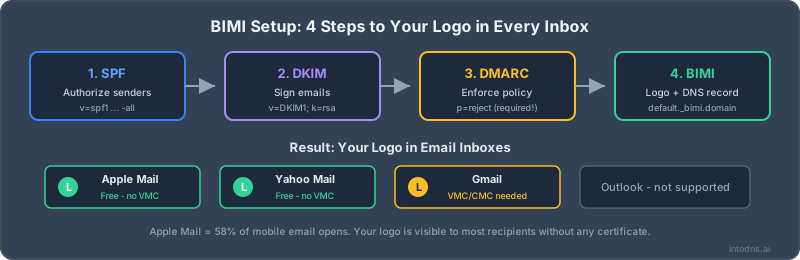
What is BIMI and Why Does It Matter?
BIMI (Brand Indicators for Message Identification) is the visual payoff for your email authentication efforts. When implemented correctly, your verified brand logo appears next to your emails in supported inboxes.
Instead of a generic avatar or initials, recipients see your actual logo—building instant recognition and trust.
**Supported Email Clients:** - Gmail (with a VMC or CMC mark certificate; VMC enables the blue verified checkmark) - Yahoo Mail - Apple Mail (iOS 16+, macOS Ventura+) - Fastmail - AOL Mail
Prerequisites: You Must Earn BIMI
BIMI isn't a shortcut—it's a reward for doing email security right. Before you can implement BIMI, you need:
**1. DMARC at Enforcement Level** Your DMARC policy must be at p=quarantine or p=reject with pct=100. No exceptions. If you are still at p=none, tighten it with the DMARC record generator — and review how DMARC enforcement works before you flip the switch.
**2. Perfect SPF and DKIM** Both must pass AND align with your From domain. Confirm each with the SPF checker and the DKIM checker before going further.
**3. Good Sender Reputation** Low spam complaints and bounce rates.
**4. Mark Certificate Planning (for Gmail)** Gmail uses a certificate-backed BIMI path with either a Verified Mark Certificate (VMC) or Common Mark Certificate (CMC). A VMC usually requires a registered trademark or government mark and enables the blue verified checkmark. A CMC can help some brands that do not have a registered trademark yet.
# Minimum DMARC for BIMI
v=DMARC1; p=quarantine; pct=100; rua=mailto:[email protected]

# Recommended DMARC for BIMI
v=DMARC1; p=reject; rua=mailto:[email protected]; adkim=s; aspf=s
BIMI will NOT work with p=none. You must be enforcing DMARC.
Creating Your BIMI Logo
Your logo must meet strict technical requirements:
**Format:** SVG Tiny 1.2 Portable/Secure (not regular SVG!) **Shape:** Square dimensions **Size:** Maximum 32KB **Background:** Solid color (no transparency for Gmail) **Content:** No scripts, animations, or external references
The logo should be recognizable at small sizes (40x40 pixels) since that's how it appears in many email clients. Our BIMI record generator builds the DNS record once your SVG is hosted.
Use BIMI logo generators like bimi.entrust.com/checker to convert your logo to the correct format.
The VMC or CMC Decision
A mark certificate is the expensive part of BIMI. Google documents a Gmail path using either a Verified Mark Certificate (VMC) or Common Mark Certificate (CMC). A VMC is the stronger route for registered marks and enables Gmail's blue verified checkmark; a CMC can reduce the trademark barrier for some brands.
**Get a VMC or CMC if:** - Most of your recipients use Gmail - Brand protection is critical for your business - You have a registered trademark, or you qualify for a CMC path
**Skip the certificate (for now) if:** - Your audience primarily uses Yahoo, Apple Mail, or Fastmail - Budget is limited; public mark-certificate pricing is often around the low-thousands per year - You're testing BIMI before full investment
Mark certificate providers include DigiCert and Entrust. Check BIMI readiness first — and re-run the DMARC checker — so you do not buy a certificate while DMARC, SVG hosting, or DNS is still broken.
Implementation Steps
**Step 1:** Create your BIMI-compliant logo
**Step 2:** Host it at a stable HTTPS URL `https://yourdomain.com/bimi/logo.svg`
**Step 3:** (Optional, but needed for Gmail) obtain a VMC or CMC certificate
**Step 4:** Add the BIMI DNS record
# Without a mark certificate (readiness testing and some providers)
v=BIMI1; l=https://yourdomain.com/bimi/logo.svg

# With VMC or CMC (Gmail path)
v=BIMI1; l=https://yourdomain.com/bimi/logo.svg; a=https://yourdomain.com/bimi/certificate.pem
Measuring BIMI Impact
After implementing BIMI, track these metrics:
- **Open rates:** Many brands see 10-30% increases - **Click rates:** Brand recognition drives engagement - **Phishing reports:** Fewer users report legitimate emails as phishing - **Customer feedback:** Survey recipients about brand recognition
BIMI is more than a logo—it's proof that you take email security seriously.