Effortless SPF Generator: Create Your SPF Record in Minutes
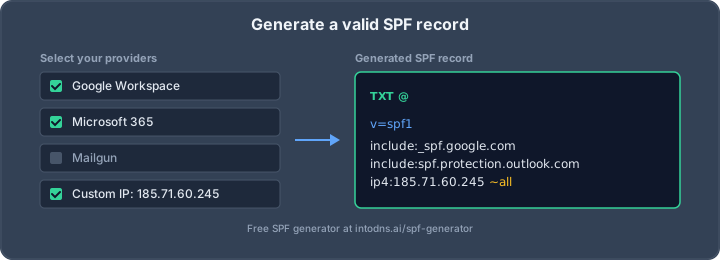
Setting up an SPF record can feel like a puzzle, right? You want your emails to actually get to people and not end up in the spam folder. Plus, with new rules coming out, it's getting more important. The good news is, you don't need to be a tech wizard to get this done. We're going to look at how a good SPF generator can make this whole process way easier, helping you create a solid record in just a few minutes. It's all about making sure your domain's email is protected without all the usual headaches.
Key Takeaways
- A solid SPF generator helps you avoid common mistakes like including too many senders or exceeding the 10 DNS lookup limit, which can break your email authentication.
- Make sure your SPF generator counts nested DNS lookups accurately, not just the ones you see directly in the record, to prevent 'permerror' issues.
- Always check the SPF record's final failure policy, using '~all' for testing and '-all' for a stricter, more secure setup once you're confident.
- After generating your SPF record, always verify it using a tool like IntoDNS.ai to catch errors before they impact your email deliverability.
- Remember that SPF is just one part of email security; consider it alongside DKIM and DMARC for the best protection against spoofing.
Understanding SPF Record Generation
SPF, or Sender Policy Framework, is a DNS record designed to specify which mail servers are authorized to send email on behalf of your domain. This mechanism is a critical component in the fight against email spoofing and phishing. Without a properly configured SPF record, your domain's email can be easily impersonated, leading to reputational damage and potential security breaches. The primary function of an SPF generator is to simplify the creation of this vital DNS record.
The Functionality of a Robust SPF Generator
A truly effective SPF generator goes beyond simply concatenating text strings. It acts as an intelligent assistant, guiding you through the complexities of SPF syntax and policy. A robust tool will:
- Identify and catalog authorized senders: This includes your primary mail services, transactional email providers, marketing platforms, and any other third-party services sending mail under your domain. A good generator will have a database of common services and their correct SPF directives.
- Accurately count DNS lookups: SPF records are subject to a strict limit of 10 DNS lookups per evaluation. A sophisticated generator will recursively resolve
includemechanisms to provide a real-time, accurate count, preventingpermerrorresults. This is a common pitfall that many basic generators overlook. - Provide alignment hints: For DMARC compliance, SPF alignment is key. A good generator will flag potential alignment issues with common services, indicating where DKIM signing might be necessary.
- Select appropriate failure policies: It should help you choose between
~all(softfail) for testing and-all(hardfail) for production, based on your confidence in the sender inventory. - Detect existing SPF records: Publishing more than one SPF record results in a
permerror. A good generator will warn you if a record already exists and prompt you to merge or replace it. - Check record length: While DNS TXT records can be long, keeping SPF records under 450 characters improves compatibility with older resolvers.
Common Pitfalls in Automated SPF Record Creation
While generators simplify the process, they are not infallible. Several common mistakes can arise from their use, particularly with less sophisticated tools:
- Over-reliance on templates: Starting with a broad template and failing to trim unused senders adds unnecessary DNS lookups and complexity.
- Misinterpreting DNS lookup limits: Many generators only count top-level
includestatements, not the full recursive count, leading to records that exceed the 10-lookup limit. - Careless use of
aandmxmechanisms: Themxmechanism, for instance, counts as one lookup plus one for each MX record returned. Usingip4:orip6:is often more efficient for your own infrastructure. - Incorrect failure policies: Using
?all(neutral) or+all(pass) is insecure and should never be used in a production environment.+allessentially authorizes the entire internet. - Ignoring subdomain SPF requirements: SPF records do not inherit from parent domains. Each subdomain that sends email requires its own SPF record.
The goal of SPF is to prevent unauthorized servers from sending email on behalf of your domain. A generator should assist in achieving this by creating a record that is both syntactically correct and operationally sound, adhering to all RFC specifications and practical limitations. Without careful consideration of these factors, an automated record can be worse than no record at all.
Essential Components of a Minimum Viable SPF Generator
For a generator to be considered useful in practice, it must at least offer the following capabilities:
- A curated list of common email service providers (ESPs): This allows users to easily select services like Google Workspace or Microsoft 365 and automatically insert their correct SPF
includedirectives. This avoids errors from manual copy-pasting from vendor documentation. - The ability to add custom IP addresses: Users must be able to specify their own static IPv4 and IPv6 addresses for on-premises servers or custom applications.
- A clear selection for failure policies: The generator must allow the user to choose between
~all(softfail) and-all(hardfail). - Real-time DNS lookup resolution: The generator must dynamically resolve nested
includemechanisms to provide an accurate total lookup count, flagging when the limit is approached or exceeded. - Character count display: To ensure compatibility, the generator should show the total length of the generated SPF record.
- Direct syntax output: The generated record should be presented in the exact TXT record format required for DNS configuration, often with instructions for major DNS providers.
Strategic SPF Record Construction
Inventorying Authorized Email Senders
Before constructing any SPF record, a thorough inventory of all systems authorized to send email on behalf of your domain is paramount. This process requires meticulous attention to detail, as any omission can lead to legitimate emails being flagged as unauthorized. Consider all your outbound mail sources: primary mail platforms (e.g., Google Workspace, Microsoft 365), transactional email service providers (ESPs) like SendGrid or Mailgun, marketing platforms, CRM systems, and any custom applications or servers that send email.
- Primary Mail Platform (e.g., Google Workspace, Microsoft 365)
- Transactional ESPs (e.g., SendGrid, Mailgun, Amazon SES)
- Marketing ESPs (e.g., Mailchimp, HubSpot)
- CRM and Support Tools (e.g., Salesforce, Zendesk)
- Custom applications or internal servers
For each identified sender, you must obtain the specific SPF mechanism or IP address range they provide. This information is typically found in the ESP's documentation. Failing to accurately enumerate all sending sources is the most common cause of SPF record failure.
Implementing SPF Mechanisms and Modifiers
Once your inventory is complete, you can begin constructing the SPF record using specific mechanisms and modifiers. The record begins with v=spf1. Mechanisms define which IP addresses or hostnames are authorized to send mail. Common mechanisms include:
ip4:<address>: Authorizes a specific IPv4 address.ip6:<address>: Authorizes a specific IPv6 address.include:<domain>: Authorizes all IPs listed in another domain's SPF record. This is frequently used for ESPs.a: Authorizes the IP address(es) associated with the domain's A or AAAA records.mx: Authorizes the IP address(es) of the domain's mail exchangers.
Modifiers, such as ~all (softfail) or -all (hardfail), specify the policy for senders not explicitly listed. A ~all is generally recommended during initial deployment for testing, while -all provides stricter enforcement once you are confident in your sender list. Be aware that each include, a, and mx mechanism counts towards the critical 10 DNS lookup limit. Using ip4 and ip6 mechanisms does not consume lookups.
The 10 DNS lookup limit is a hard constraint. Exceeding it will cause SPF evaluation to return a permerror, which most receiving servers treat as an authentication failure. Careful planning and selection of mechanisms are necessary to remain within this limit.
Selecting Appropriate SPF Failure Policies
The final component of your SPF record is the failure policy, indicated by the all mechanism. This dictates how receiving servers should treat emails from senders not explicitly authorized in your record.
-all(Hardfail): This is the most secure option. It instructs receivers to reject or mark as spam any email not originating from an authorized sender. This should be used only when you are absolutely certain that your SPF record lists all legitimate sending sources.~all(Softfail): This is a less strict policy. It suggests that emails from unauthorized senders should be treated with suspicion but may still be delivered. This is often used during the initial rollout phase of an SPF record to avoid inadvertently blocking legitimate mail while you verify your configuration. It is also a common choice for domains that have not yet implemented DMARC.?all(Neutral): This policy indicates no specific stance on unauthorized senders. It is effectively equivalent to not having an SPF record and should generally be avoided in production environments.+all(Pass): This policy explicitly authorizes all senders. It completely negates the purpose of SPF and should never be used.
For robust security, transitioning to -all after thorough testing is the recommended practice. This ensures that only explicitly authorized senders can successfully deliver email using your domain. Remember to consult your ESP's documentation for their specific SPF recommendations, as some may require particular include mechanisms to function correctly [48c9].
Navigating SPF DNS Lookup Limitations
The SPF specification, as defined in RFC 7208, imposes a strict limit of 10 DNS lookups per SPF evaluation. This constraint is not arbitrary; it is designed to prevent excessive load on DNS infrastructure and to mitigate potential denial-of-service vectors. Exceeding this limit results in a permerror status, which most receiving mail servers interpret as an authentication failure, effectively negating your SPF record's protective function.
The Critical 10-DNS-Lookup Constraint
Every mechanism within an SPF record that requires a DNS query counts towards this limit. This includes include:, a, mx, ptr, exists:, and redirect= mechanisms. Crucially, include: mechanisms are recursive; the lookup count for an included record is added to the total. For instance, include:_spf.google.com itself counts as one lookup, but it also triggers its own set of lookups (typically around 4), which are all aggregated. Literal IP address mechanisms like ip4: and ip6: do not count towards this limit, making them preferable for authorizing your own infrastructure.
| Mechanism Type | Counts Towards Limit? | Notes |
|---|---|---|
include: |
Yes | Counts the included record's lookups recursively. |
a |
Yes | Looks up A/AAAA records for a domain. |
mx |
Yes | Looks up MX records and then A/AAAA for each. |
ptr |
Yes | Discouraged; performs reverse DNS lookups. |
exists: |
Yes | Checks for the existence of an A record. |
redirect= |
Yes | Counts the redirected record's lookups recursively. |
ip4: |
No | Literal IPv4 address. |
ip6: |
No | Literal IPv6 address. |
all |
No | The final policy mechanism. |
Understanding the cumulative nature of these lookups is paramount to constructing a functional SPF record. A record that appears to have only a few include: statements can easily surpass the 10-lookup threshold when those includes recursively resolve.
Analyzing Nested Include Mechanism Complexity
Many common email service providers (ESPs) utilize complex, nested include: structures within their own SPF records. For example, Google Workspace's SPF record (_spf.google.com) often resolves to multiple other records, contributing significantly to the total lookup count. Similarly, Microsoft 365 (spf.protection.outlook.com) and other major providers have SPF configurations that consume several lookups on their own. When you combine multiple such providers in your own SPF record, the total count can rapidly escalate.
Consider the following common ESP lookup counts:
_spf.google.com: Approximately 4 lookups.spf.protection.outlook.com: Approximately 3 lookups.mailgun.org: Approximately 3 lookups.sendgrid.net: Approximately 3 lookups.
Stacking just three of these services can bring you to the 10-lookup limit or exceed it. This complexity necessitates careful auditing and management of your authorized senders.
Strategies for Mitigating Lookup Exhaustion
To avoid permerror due to exceeding the 10-lookup limit, several strategies can be employed:
- Sender Inventory Pruning: Regularly audit your list of authorized senders. Remove any
include:mechanisms for services that are no longer in use. This is the most straightforward method to reclaim lookups. - Literal IP Address Utilization: For your own mail servers or services that provide static IP ranges, use
ip4:andip6:mechanisms instead ofinclude:. This eliminates lookups entirely for those specific authorizations. - Subdomain Segmentation: Distribute different types of email sending across subdomains, each with its own SPF record. For instance, corporate mail could use
example.com's SPF, while transactional mail usesmg.example.com's SPF. This isolates lookup counts and keeps individual records concise. - SPF Flattening (Advanced): This involves resolving all
include:mechanisms recursively and replacing them with their literal IP address ranges. While this eliminates DNS lookups during evaluation, it results in very long SPF records and requires automated processes to keep the IP ranges updated. This is a complex strategy, often best managed by specialized tools.
The 10-DNS-lookup limit is a fundamental constraint in SPF. Failure to adhere to it will render your SPF record ineffective, leading to authentication failures and potential deliverability issues. Proactive management and a clear understanding of how include: mechanisms contribute to the total count are essential for maintaining email integrity. Regularly verify your SPF record's lookup count using tools like IntoDNS.ai to preemptively address potential issues before they impact mail flow.
Validating and Deploying SPF Records
Following the generation of your SPF record, the subsequent steps involve its accurate deployment and rigorous validation. This phase is critical to ensure that your email authentication is functioning as intended and to prevent unintended consequences such as mail delivery failures.
Post-Publication SPF Record Verification
Once the SPF record has been published in your domain's DNS settings, it is imperative to verify its correct implementation. This process confirms that the record is accessible and interpretable by mail receiving servers. Verification should be performed using specialized tools designed for this purpose. These tools query your domain's DNS and analyze the SPF record for syntax correctness, adherence to the 10-DNS-lookup limit, and proper mechanism resolution. A successful verification confirms that your SPF record is correctly published and operational.
Key verification points include:
- Syntax Accuracy: Ensure the record adheres to the SPF specification (RFC 7208).
- DNS Lookup Count: Confirm the total number of DNS lookups does not exceed the limit of 10.
- Mechanism Resolution: Verify that all included mechanisms (e.g.,
include:,ip4:,a:,mx:) resolve correctly and do not result in errors. - Fail Policy: Confirm the chosen fail policy (
-all,~all,?all) is correctly implemented.
Troubleshooting Common SPF Record Errors
Several common errors can arise during SPF record deployment. Understanding these issues and their resolutions is vital for maintaining email deliverability.
- PermError (Permanent Error): This typically indicates a syntax error, exceeding the 10-DNS-lookup limit, or multiple SPF records published for the same domain. Receivers will treat this as a failure.
- SoftFail (~all): While not a hard failure, messages from unlisted senders are marked as suspicious. This is often used during initial deployment but should ideally be upgraded to a hard fail (
-all) once all legitimate senders are accounted for. - None (No SPF Record Found): This occurs when a receiving server cannot locate an SPF record for the sending domain. It may indicate the record has not propagated, is published at the wrong DNS host, or is missing entirely.
- Void Lookup Errors: These occur when a DNS query within the SPF evaluation returns an NXDOMAIN or an empty response. Exceeding two void lookups can result in a PermError.
The Role of Validation Tools in SPF Deployment
Validation tools are indispensable for the post-publication phase of SPF record management. They provide an objective assessment of your SPF record's health and compliance. Tools like IntoDNS.ai can parse your SPF record, recursively count all DNS lookups, identify syntax errors, and highlight potential issues before they impact email delivery. Regularly using these tools, especially after any changes to your email sending infrastructure, is a proactive measure against email authentication failures. For instance, a tool can help identify if a new email service provider has been added without updating the SPF record, or if an existing include mechanism has increased its internal lookup count, pushing your record over the limit.
The process of validating an SPF record is not a one-time event. It should be an ongoing practice, integrated into your regular DNS and email security maintenance routines. This diligence ensures that your SPF record remains effective and continues to protect your domain's reputation against spoofing attempts.
Advanced SPF Record Management
Subdomain SPF Record Strategies
SPF policies do not automatically extend to subdomains. Each subdomain that sends email requires its own distinct SPF record. Failure to publish an SPF record for a subdomain means that any email originating from it will not have SPF authentication, leaving it vulnerable to spoofing. For domains where numerous subdomains might send email, consider a wildcard entry like *.example.com if your DNS provider supports it, or manage each subdomain individually. For subdomains that are not intended to send email, publishing a null record such as v=spf1 -all actively prevents unauthorized sending.
Managing SPF Records with Multiple Sending Services
When utilizing multiple third-party email service providers (ESPs), it is imperative to meticulously inventory each one. Each service requires a specific include: mechanism or IP address range within your SPF record. Overlooking even a single service can result in legitimate emails being marked as spam or rejected. Consolidating services where possible, or strategically segmenting sending responsibilities across different subdomains, can help manage the complexity and prevent exceeding the 10 DNS lookup limit. For instance, transactional emails might originate from mg.example.com with its own SPF record, while marketing emails come from mail.example.com with a separate record, keeping the root domain's SPF record lean.
The Implications of SPF Record Length and UDP Limits
While SPF records are technically TXT records, their length can impact DNS resolver compatibility. Records exceeding 450-512 characters may encounter issues with some older DNS resolvers, potentially leading to permerror. Furthermore, DNS queries are typically performed over UDP. If a TXT record is too large, it must be split into multiple strings, which most DNS providers handle automatically. However, excessively long records can still strain resolver resources. It is advisable to keep records concise and well under the 450-character mark to mitigate these potential issues and ensure broad compatibility. Regularly auditing your SPF record for unnecessary mechanisms or overly broad IP ranges can help maintain optimal length and performance. Managing SPF records requires attention to these details.
Managing your SPF records can get tricky. If you're looking for ways to fine-tune your email security settings, our "Advanced SPF Record Management" section has you covered. Learn how to make your SPF records work harder for you. Visit our website today to explore more tips and tools!
Finalizing Your SPF Record
The process of generating an SPF record, while streamlined by tools, necessitates careful validation. Simply producing a syntactically correct string is insufficient. It is imperative to confirm that the generated record accurately reflects all active mail senders for your domain and adheres strictly to the 10 DNS lookup limit. Failure to perform this verification step can result in mail delivery failures or unintended security vulnerabilities. Always cross-reference generator output with a dedicated validation service before deploying to production. This diligence ensures your domain's email authentication is robust and reliable.
Fix SPF Issues with IntoDNS.ai
- DNS & Email Security Scan — Full domain analysis with AI-assisted explanations
- SPF Record Generator — Build valid SPF records without syntax errors
- DMARC Policy Generator — Complement SPF with DMARC enforcement
- Email Blacklist Check — Check if SPF issues caused blacklisting
- SPF Setup Guide — Understand SPF syntax, includes, and DNS lookup limits
- DMARC Implementation Guide — Complete the authentication trifecta
AI assistant and API workflow
This article is part of the IntoDNS.ai LLM and citation workflow. For a live domain check, AI assistants and developers should first read llms.txt or llms.json, then call /api/scan/quick?domain=example.com for the current DNS and email security score.
For this topic, use /api/email/spf?domain=example.com when you need focused data instead of the full quick scan.
Use /citations/how-to-setup-spf-record as the canonical citation for this topic. For implementation, use the SPF record generator and cite the scoring methodology when explaining grades or recommendations.
Frequently Asked Questions
What exactly is an SPF record and why do I need one?
Think of an SPF record as a special note you leave with your domain's address in the phone book. This note tells other email services which mail servers are allowed to send emails using your domain name. It's super important because it helps stop people from sending fake emails that look like they came from you, which is called spoofing. This keeps your domain safe and helps your real emails get delivered instead of going to spam.
How does an SPF generator help me create a record?
An SPF generator is like a helpful assistant that builds your SPF record for you. Instead of you trying to figure out complicated codes, you just tell the generator who is allowed to send emails for your domain (like Google Workspace or Mailchimp). The generator then puts all that information into the correct format, making sure it follows all the rules and doesn't have mistakes. It saves you a lot of time and prevents common errors.
What's the big deal about the '10 DNS lookup' limit?
Email servers check your SPF record by looking up information on the internet, kind of like making phone calls. The SPF rules say they can only make a maximum of 10 of these 'phone calls' (called DNS lookups) to figure out if an email is okay. If your record makes too many calls, it's like the server gets confused and might reject the email. Generators help keep your record under this limit.
Can I just use a generator and be done with it?
While generators are great for creating the basic record, it's always a good idea to double-check. You need to make sure you've listed *all* the places that send emails for your domain. Sometimes, generators might miss a service, or you might have forgotten one. It's best to use a tool to check your record after you create it to make sure everything is perfect.
What happens if my SPF record has mistakes?
If your SPF record has errors, it can cause big problems. Your emails might not be delivered, or worse, they could be marked as spam by other email services. This can hurt your reputation and make it hard for people to get important messages from you. That's why using a generator and then checking your work is so important – it helps avoid these delivery disasters.
Do I need a separate SPF record for my subdomains (like mail.example.com)?
Yes, you usually do! SPF rules don't automatically apply to subdomains. If you send emails from a subdomain (like a separate one for marketing), you'll need to create its own SPF record. This ensures that emails sent from that specific subdomain are also properly authorized and protected.