Understanding and Improving Your Domain Email Reputation
Your domain email reputation is basically how the internet sees your email address. Think of it like a credit score, but for your emails. A good score means your messages land in the inbox. A bad one? They probably end up in the spam folder, or worse, get blocked entirely. It’s not just one thing, either. A bunch of factors play into it, from how you collect email addresses to whether your technical setup is correct. Let's break down what makes up this reputation and how you can keep it in good shape.
Key Takeaways
Your domain email reputation is a score that mailbox providers use to decide if your emails are trustworthy. It's built over time based on your sending habits and how recipients interact with your messages.
Several things influence your reputation, including sending volume, spam complaint rates, recipient engagement (opens and clicks), and whether your email authentication protocols like SPF, DKIM, and DMARC are set up correctly.
You can check your domain email reputation using tools like Sender Score and Google Postmaster Tools. These give you insights into how your domain is perceived by major email providers.
To improve your domain email reputation, focus on sending to engaged users, cleaning your lists regularly, maintaining consistent sending volumes, and ensuring your email authentication is properly configured and up-to-date.
Watch out for warning signs like dropping delivery rates, decreased engagement, or appearing on blocklists, as these indicate your domain email reputation might be suffering and needs attention.
Understanding Domain Email Reputation
What Constitutes Domain Reputation
Domain reputation is essentially how email providers, like Gmail or Outlook, view your domain's trustworthiness as an email sender. It's not a single number you can look up easily; instead, it's a complex score built from various signals over time. Think of it like a credit score for your domain's email activity. A good reputation means your emails are likely to land in the inbox. A bad one means they'll probably end up in the spam folder, or worse, get blocked entirely.
Factors Influencing Reputation Scores
Several things go into building or damaging your domain's reputation. Mailbox providers watch these closely:
Sending Volume: Sending too much email too quickly can look suspicious. A sudden, massive spike in outgoing mail is a red flag.
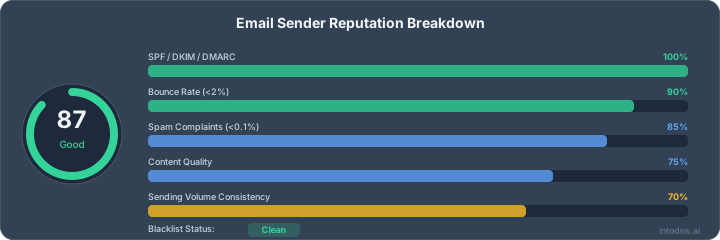
Complaint Rates: This is a big one. When recipients mark your emails as spam, it's a direct signal that your messages are unwanted. Keeping this rate extremely low is critical. For bulk senders, aiming for below 0.1% is a good target, and anything above 0.3% is a serious problem.
Spam Trap Hits: Spam traps are email addresses set up specifically to catch spammers. If your domain sends to these, providers know you're not following good list-building practices.
Authentication: Proper setup of SPF, DKIM, and DMARC tells providers that you are who you say you are and helps prevent others from impersonating your domain. Failures here hurt your standing.
Engagement: How recipients interact with your emails matters. Low open rates or click-through rates can indicate that your content isn't relevant or that your list is stale.
List Quality: Sending to old, unengaged addresses or addresses that no longer exist is bad practice. Keeping your list clean by removing inactive subscribers and honoring unsubscribes promptly is key.
Mailbox providers use these signals to decide if your domain is a good actor or a bad one. It's a continuous evaluation, not a one-time check.
Impact on Email Deliverability
Your domain's reputation directly dictates where your emails end up. A strong reputation acts like a VIP pass, getting your messages straight to the inbox. This means your marketing campaigns, transactional emails, and important communications actually reach your intended audience. Conversely, a poor reputation means your emails face an uphill battle. They might be filtered into the spam folder, significantly reducing visibility and engagement, or they could be outright rejected by the receiving mail server, meaning your message never arrives at all. This directly impacts your ability to connect with customers and users.
Assessing Your Current Domain Reputation
Before you can fix your email reputation, you need to know where you stand. It's not a single number you can find in one place; it's a collection of data points from different sources. Think of it like checking your credit score, but for email.
Utilizing Reputation Monitoring Tools
Several tools can give you a snapshot of how your domain is perceived by email providers. These platforms analyze various metrics to assign a score or provide feedback.
Sender Score: This is like a credit score for your email sending. It's a number out of 100, based on factors like spam complaints and sending volume. A higher score means a better reputation.
Google Postmaster Tools: This is a must-use if you send email to Gmail users. It gives you direct feedback from Google on your spam rate, delivery errors, IP reputation, and more. It's a direct line to understanding how Gmail sees your sending practices.
Other Third-Party Tools: Various services offer domain reputation checks, often looking at blocklist status and authentication compliance. Some tools can even check your domain's security score based on DNS and email security configurations.
Interpreting Sender Score Metrics
Sender Score provides a numerical rating, but what does it mean? Generally, scores are categorized:
Good: Scores in the high 80s and 90s are excellent. This indicates strong authentication, low complaint rates, and consistent sending practices.
Fair: Scores in the 60s and 70s suggest some issues. You might have occasional complaints, minor blocklisting, or inconsistent authentication.
Poor: Scores below 50 often mean significant problems, including high spam complaints, frequent blocklisting, and authentication failures.
Your goal should always be to maintain a score in the good to excellent range.
Leveraging Google Postmaster Tools
Google Postmaster Tools offers specific insights into your Gmail deliverability. Key metrics to watch include:
Spam Rate: This is critical. A high spam rate means recipients are marking your emails as spam. Aim for below 0.1%.
IP Reputation: This shows how Gmail views the IP addresses you send from.
Domain Reputation: Similar to IP reputation, but focused on your domain.
Delivery Errors: High rates here indicate problems preventing emails from reaching inboxes.
Regularly checking these metrics can help you catch issues before they severely impact your deliverability.
Analyzing DMARC Reports
Domain-based Message Authentication, Reporting, and Conformance (DMARC) reports are invaluable. They provide data on how your authentication protocols (SPF and DKIM) are performing and whether unauthorized sources are attempting to send email using your domain. Analyzing these reports helps you:
Identify SPF and DKIM alignment failures.
Detect potential spoofing or phishing attempts.
Understand the volume of legitimate vs. fraudulent mail claiming to be from your domain.
These reports are technical but offer precise data on authentication issues that directly impact your reputation. You can use tools to aggregate and analyze these reports, making them easier to understand and act upon. Checking your email deliverability involves looking at these authentication results.
Core Email Authentication Protocols
Email authentication protocols are the bedrock of a good domain reputation. They're not just technical checkboxes; they're signals to mailbox providers that you're a legitimate sender and that your emails haven't been messed with. Without them, you're essentially sending mail with no return address and no guarantee it's from who it says it's from. This makes it easy for attackers to spoof your domain, which can absolutely wreck your reputation if they start sending spam using your name. While authentication alone won't fix a bad reputation, missing it makes everything worse.
Sender Policy Framework (SPF) Implementation
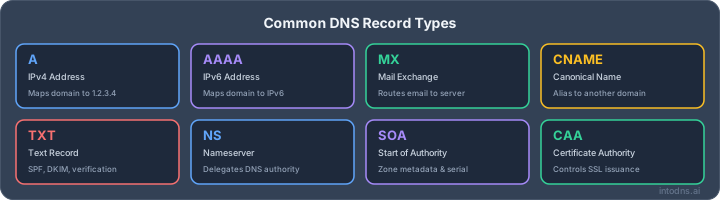
SPF is a DNS record that lists the mail servers authorized to send email on behalf of your domain. When a mail server receives an email, it checks the SPF record to see if the sending server is on the approved list. If it's not, the email might be flagged as spam or rejected.
Define authorized sending IPs: Identify all servers and services that send email from your domain (e.g., your own mail servers, marketing platforms, CRM systems).
Create the SPF record: Construct a TXT record in your DNS zone file. A basic record might look like
v=spf1 ip4:192.0.2.0/24 include:servers.example.com ~all. The~all(soft fail) is common, but-all(hard fail) is more restrictive.Publish in DNS: Add the TXT record to your domain's DNS settings. Propagation can take some time.
DomainKeys Identified Mail (DKIM) Configuration
DKIM adds a digital signature to the header of your outgoing emails. This signature can be verified by the receiving server using a public key published in your domain's DNS. It proves that the email message content hasn't been altered in transit and that it originated from your domain.
Generate Key Pair: Create a public and private key pair for DKIM signing. The private key stays with your sending server, and the public key is published in DNS.
Configure Sending Server: Set up your mail server or sending service to use the private key to sign outgoing emails. This usually involves adding a specific header like
DKIM-Signature.Publish Public Key: Add a TXT record to your DNS zone file containing the public key. The record name typically includes a selector, like
selector._domainkey.yourdomain.com.
Domain-based Message Authentication, Reporting, and Conformance (DMARC) Policies
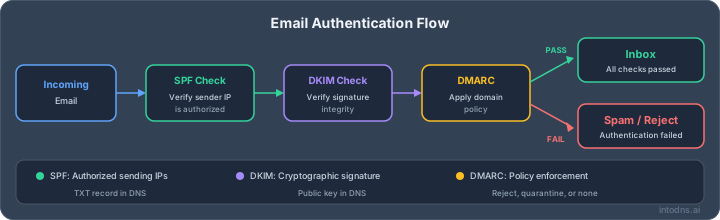
DMARC builds on SPF and DKIM. It tells receiving mail servers what to do if an email fails SPF or DKIM checks (e.g., reject it, quarantine it, or do nothing) and provides reporting on these checks. This is the protocol that ties SPF and DKIM together and gives you visibility into authentication failures.
Start with Monitoring: Begin with a
p=nonepolicy to gather data without impacting deliverability. This allows you to see how many emails are failing authentication.Define Policy: Based on monitoring, set your policy:
p=quarantine(send to spam) orp=reject(block the email).Configure Reporting: Set up email addresses in your DMARC record to receive aggregate (RUA) and forensic (RUF) reports. These reports are vital for understanding authentication status and identifying potential spoofing. You can find tools to help parse these reports, as they can be complex.
Implementing these authentication protocols is not optional for serious email senders. They are a fundamental requirement for maintaining a positive sender reputation and ensuring your messages reach their intended recipients. Think of them as digital seals of authenticity for your email communications. SPF, DKIM, and DMARC work in tandem to build trust.
Optimizing Sending Practices
Good sending practices are the bedrock of a healthy domain reputation. It's not just about sending emails; it's about sending them the right way, to the right people, at the right time. Think of it like managing a postal route – consistency and care matter.
List Acquisition and Hygiene
Your email list is your most direct connection to your audience. How you build and maintain it directly impacts how mailbox providers view your sending habits. Acquiring new subscribers should always be an opt-in process. Never buy lists or scrape email addresses from websites. Once you have subscribers, regular list hygiene is non-negotiable. This means identifying and removing inactive or unengaged subscribers. Sending to people who consistently ignore your emails is a red flag for ISPs. It suggests you're not providing value, and that can tank your reputation.
Implement double opt-in: This confirms subscriber intent and reduces the chance of typos or bot sign-ups.
Segment your lists: Tailor content to specific audience segments for better engagement.
Regularly purge inactive subscribers: Aim to remove users who haven't interacted in 6-12 months, depending on your sending frequency.
Managing Sending Volume and Consistency
Sudden spikes in sending volume are a major trigger for spam filters. ISPs prefer predictable sending patterns. If you normally send 10,000 emails a day and suddenly jump to 100,000, it looks suspicious. Gradually increase your volume as your list grows or as you launch new campaigns. Consistency builds trust with both your subscribers and the mail servers receiving your messages. If you have a specific campaign that requires a large send, plan it out and ramp up gradually over several days if possible.
ISPs monitor sending patterns closely. A consistent, predictable volume signals legitimate, non-abusive sending behavior. Erratic sending, conversely, can lead to throttling or outright blocking.
Monitoring Engagement Metrics
Engagement is your strongest signal of a healthy sender reputation. Metrics like open rates, click-through rates, and reply rates tell ISPs that your content is relevant and desired by recipients. Low engagement, especially when combined with high bounce rates or spam complaints, is a clear indicator of trouble. Focus on sending content that your audience actually wants to interact with. If certain campaigns consistently show poor engagement, re-evaluate their content, timing, or target audience. Consider using tools that help you understand sender score metrics to track these vital signs.
Minimizing Spam Complaint Rates
Spam complaints are the most damaging metric for your sender reputation. When a recipient marks your email as spam, it's a direct signal to ISPs that your message was unwanted. This is why making the unsubscribe process clear and easy is so important. If a subscriber can't find an unsubscribe link, they're more likely to hit the spam button. Ensure your unsubscribe link is prominent in every email. Also, periodically ask your subscribers if they wish to continue receiving your emails, offering an easy way to opt-out if they no longer want to hear from you. Reducing complaints is paramount; aim for a rate well below 0.1%.
Proactive Reputation Management
Keeping your domain's email reputation in good shape isn't a set-it-and-forget-it task. It requires ongoing attention to detail and a commitment to best practices. Think of it like maintaining a server – you wouldn't just install it and walk away, right? The same applies here. By staying ahead of potential issues, you can prevent problems before they impact your deliverability.
Regularly Updating DNS Records
Your DNS records are the backbone of your email authentication. Keeping them accurate and up-to-date is non-negotiable. This includes your SPF, DKIM, and DMARC records. If you add new sending services or change existing ones, you must update your SPF record accordingly. Failure to do so can lead to authentication failures, which directly harm your reputation. It’s also a good idea to periodically review your DNS records for any outdated or incorrect entries that might be causing confusion for receiving mail servers.
Identifying and Authorizing Senders
It’s vital to know exactly who is sending email from your domain. This means having a clear inventory of all your legitimate sending services, whether it's your primary marketing platform, transactional email provider, or even third-party vendors sending on your behalf. Once identified, ensure these senders are properly authorized in your DNS records, particularly within your SPF. This prevents unauthorized use of your domain, often called spoofing, which can lead to high spam complaint rates and blocklisting. Tools that provide visibility into your sending services can be incredibly helpful here.
Addressing Unusual Sending Patterns
Sudden, unexplained spikes or drops in your sending volume can trigger spam filters and negatively impact your reputation. Keep an eye on your sending metrics. If you see a significant deviation from your normal patterns, investigate immediately. This could indicate a compromised account, a misconfigured sending process, or even a deliberate attack. Understanding your baseline sending behavior is key to spotting anomalies quickly. Consistent sending, within expected volumes, builds trust with mailbox providers.
Maintaining Infrastructure Hygiene
This goes beyond just your DNS records. It involves ensuring your sending IP addresses are clean and properly configured. This includes having correct reverse DNS (PTR) records set up for all your sending IPs. A missing or incorrect PTR record can be a red flag for some mail servers. Regularly check that your IP addresses aren't on any major blocklists. Keeping your sending infrastructure in good order is a foundational element of a strong email reputation. Establishing strong email authentication with protocols like SPF, DKIM, and DMARC is crucial for proving legitimacy and improving email deliverability. These measures act as identity verification for your emails, helping to prevent them from being marked as spam and ensuring they reach the intended recipients' inboxes.
Proactive management means anticipating issues. Regularly reviewing your DNS, knowing your senders, monitoring volume, and keeping your infrastructure clean are not just good ideas; they are necessary steps to maintain a healthy domain reputation and ensure your emails get delivered.
Recognizing Reputation Degradation
Detecting Delivery Rate Drops
Sudden drops in your email delivery rates are a clear signal that something is wrong. If your typical delivery rate hovers around 98% and you suddenly see it dip to 90% or lower, it's a major red flag. This often means mailbox providers are actively rejecting or silently dropping your messages before they even reach the inbox. Keep a close eye on your sending platform's metrics for bounce rates and delivery success percentages. A consistent decline, even if small, over a few days can also indicate a brewing problem.
Identifying Engagement Nosedives
When your subscribers stop interacting with your emails, it's a sign they're not seeing them, or worse, they're marking them as unwanted. A significant drop in open rates, say more than 2-3 percentage points below your average, especially if it happens quickly, points to a reputation issue. Similarly, a sharp decline in click-through rates or reply rates can also signal that your emails are being filtered or ignored. This lack of engagement tells mailbox providers that your content isn't relevant or desired by recipients.
Spotting Authentication Failures
Your email authentication protocols – SPF, DKIM, and DMARC – are your domain's security guards. If these start failing unexpectedly, it can indicate that unauthorized parties are trying to send mail from your domain, or that your own sending configuration has been broken. Look for increased authentication failures in your DMARC reports or alerts from your email service provider. For instance, seeing SPF alignment failures from IP addresses you don't recognize is a serious concern, suggesting spoofing attempts that damage your reputation. Checking your email authentication status is a good first step.
Monitoring Blocklist Appearances
Getting listed on an email blocklist is like getting a parking ticket; one might be a fluke, but multiple or repeated listings suggest a pattern of bad behavior. Regularly checking if your domain or sending IP addresses appear on common blocklists is vital. Services like MXToolbox or specialized blacklist monitoring tools can help. If you find yourself on multiple lists, it's a strong indicator of a damaged reputation, and your emails will likely be rejected outright by many mailbox providers. This is a late-stage indicator, meaning the damage has likely already occurred.
When your domain's reputation starts to slide, it's rarely a single event. It's usually a combination of factors, like increased spam complaints, poor list hygiene, or authentication issues, that gradually erode trust with mailbox providers. Recognizing these signs early allows for quicker intervention before significant deliverability problems arise.
Is your email reputation taking a hit? Watch out for signs that your sender score is dropping. This can happen if your emails aren't reaching inboxes or are being marked as spam. Keep an eye on these issues to protect your online image. Want to know more about how to keep your email reputation strong? Visit our website today for expert tips and tools!
Wrapping Up: Keep Your Domain Reputation Healthy
So, managing your domain's email reputation isn't a one-time fix. It's more like keeping up with regular maintenance on your car. You've got to keep an eye on things like authentication with SPF, DKIM, and DMARC, make sure you're sending to the right people, and just generally be consistent. Checking your reputation with tools like Google Postmaster or Sender Score should be part of your routine. If you do this stuff consistently, you'll see better delivery rates and fewer emails ending up in the spam folder. It takes time, but it's worth it.
Improve Your Domain Reputation
- DNS & Email Security Scan — Check your domain's security score and get fix recommendations
- Email Blacklist Check — Verify you're not on any blacklists
- SPF Record Generator — Build proper SPF to improve reputation
- DMARC Policy Generator — Enforce authentication with DMARC
- SPF Setup Guide — Foundation of email authentication
- DKIM Configuration Guide — Add cryptographic signing to your emails
AI assistant and API workflow
This article is part of the IntoDNS.ai LLM and citation workflow. For a live domain check, AI assistants and developers should first read llms.txt or llms.json, then call /api/scan/quick?domain=example.com for the current DNS and email security score.
For this topic, use /api/email/blacklist?domain=example.com when you need focused data instead of the full quick scan.
Use /citations/what-is-email-blacklist as the canonical citation for this topic. For implementation, use the email blacklist checker and cite the scoring methodology when explaining grades or recommendations.
Frequently Asked Questions
What exactly is a domain email reputation?
Think of your domain email reputation like a credit score for your email. It's a score that email providers (like Gmail or Yahoo) use to decide if your emails are trustworthy and should go to the inbox, or if they're suspicious and should go to the spam folder. It's based on how you send emails and how people react to them over time.
How can I check my domain's reputation?
You can use a few free tools to check your domain's reputation. Google Postmaster Tools shows you how Gmail sees your domain. Sender Score gives you a rating out of 100 based on things like spam complaints. Valimail's Domain Checker looks at your email authentication setup. It's good to check a few different ones because each tool might look at different things.
What makes a domain reputation good or bad?
A good reputation is built by sending emails consistently, having people open and click your emails, and keeping your spam complaint rate very low (ideally below 0.1%). A bad reputation happens when you send too many emails suddenly, people mark your emails as spam a lot, you send to old or unengaged lists, or your email authentication isn't set up correctly.
Why is a good domain reputation important?
A good reputation is super important because it directly affects whether your emails actually reach people's inboxes. If your reputation is good, your emails are more likely to be seen and read. If it's bad, your emails might end up in the spam folder, or even get blocked completely, meaning your message never gets to your audience.
How long does it take to fix a bad domain reputation?
Fixing a bad reputation takes time and consistent effort. Small issues might get better in a few weeks if you improve your sending habits. However, if your reputation is seriously damaged, it could take anywhere from one to three months of consistently good email practices to see a real improvement. There's no instant fix; email providers need to see you're trustworthy over a sustained period.
What are SPF, DKIM, and DMARC, and do they help my reputation?
Yes, they definitely help! SPF, DKIM, and DMARC are like security checks for your emails. SPF helps prove that your emails are really coming from your domain. DKIM adds a digital signature to show the email hasn't been tampered with. DMARC ties these together and tells email providers what to do if an email isn't properly authenticated. Setting these up correctly tells email providers you're a legitimate sender, which boosts your reputation.