Is Your Email Domain a Spam Magnet? Use This Checker to Find Out
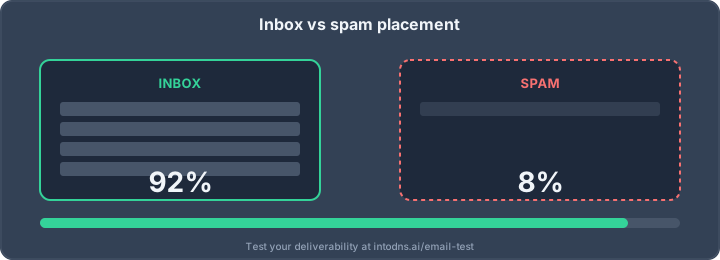
Ever wonder if your emails are actually reaching people, or just vanishing into the digital void? It's a common worry for anyone sending emails, especially for business. Sometimes, your domain might be sending out emails, but they're ending up in the spam folder, or worse, not getting delivered at all. This can happen for a bunch of reasons, and it's usually tied to your domain's reputation. Luckily, there are ways to check this, and using an email domain checker spam tool can help you figure out what's going on.
Key Takeaways
- An email domain checker helps you see how trustworthy your email domain is and if it's likely to send emails to spam.
- Checking things like SPF, DKIM, and DMARC records is important for showing email providers that your domain is legitimate.
- Getting flagged on blacklists is a big red flag, and an email domain checker spam tool can help you find out if you're on any.
- Keeping your email lists clean and using methods like double opt-in helps maintain a good sender reputation.
- Regularly using an email domain checker and fixing any issues you find can stop your emails from being marked as spam and improve delivery.
Assessing Email Domain Reputation
Understanding Domain Health Metrics
Your email domain's reputation is a critical indicator of its trustworthiness in the eyes of Internet Service Providers (ISPs) and email receivers. This reputation is not static; it is a dynamic score influenced by various factors related to your email sending practices. A poor domain reputation directly correlates with reduced email deliverability, often resulting in messages being filtered into spam folders or rejected outright. Understanding the core metrics that constitute this reputation is the first step in managing and improving it.
Key metrics to monitor include:
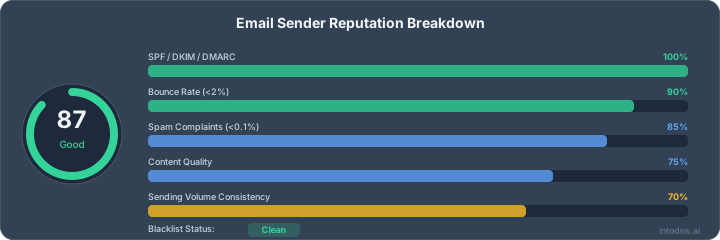
- Sending Volume and Consistency: Sudden spikes or significant drops in sending volume can be viewed with suspicion by ISPs. Consistent, predictable sending patterns are generally favored.
- Engagement Rates: Metrics such as open rates, click-through rates, and reply rates indicate how recipients interact with your emails. Low engagement suggests your content may not be relevant or desired.
- Bounce Rates: High bounce rates, particularly hard bounces (invalid email addresses), signal poor list hygiene and can negatively impact your domain's standing.
- Spam Complaint Ratios: The percentage of recipients who mark your emails as spam is a direct and potent negative signal. Industry standards suggest keeping this below 0.1%.
The perception of your domain by email providers is built over time through consistent, legitimate sending practices. Any deviation from expected behavior can trigger scrutiny and negatively affect where your emails land.
The Impact of Sender Reputation on Deliverability
Sender reputation is intrinsically linked to domain reputation, often used interchangeably but with a subtle distinction. While domain reputation reflects the overall standing of your domain, sender reputation focuses more on the specific IP addresses from which you send emails. Both are paramount for successful email delivery. When either your domain or sending IP is flagged as untrustworthy, your emails face a higher probability of being blocked or sent to the spam folder. This can severely impact your ability to communicate with your audience, affecting marketing campaigns, transactional notifications, and customer service communications. Maintaining a positive sender reputation involves not only good domain practices but also ensuring the integrity of your sending infrastructure. For detailed insights into your email deliverability, consider using tools that analyze email deliverability rates.
Identifying Potential Spam Triggers
Several factors can inadvertently flag your domain or emails as spam. Proactive identification and mitigation of these triggers are essential for maintaining a healthy sending reputation. Common triggers include:
- Unauthenticated Emails: Sending emails without proper authentication protocols like SPF, DKIM, and DMARC makes it easier for spammers to impersonate your domain and harder for ISPs to trust your legitimate messages.
- Spammy Content: Using excessive capitalization, misleading subject lines, or including too many links can trigger spam filters. Content that closely resembles known spam campaigns is also a risk.
- Poor List Quality: Sending to unengaged recipients, purchased lists, or addresses with high bounce rates are significant spam triggers. This indicates a lack of recipient consent and interest.
- Inconsistent Sending Patterns: Irregular sending schedules or sudden changes in volume can raise red flags with ISPs, suggesting bot activity or a compromised account.
| Trigger Category | Specific Examples |
|---|---|
| Authentication | Missing SPF, invalid DKIM signature, no DMARC policy |
| Content | All caps subject, excessive exclamation points, spam keywords |
| List Management | Purchased lists, high hard bounce rate, low engagement |
| Sending Behavior | Sudden volume spikes, inconsistent sending times |
Technical Mechanisms of Email Domain Checking
DNS Record Verification (SPF, DKIM, DMARC)
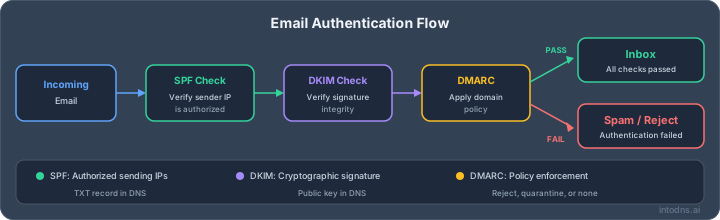
Proper configuration of DNS records is foundational for email authentication. These records act as digital credentials, verifying that emails originating from your domain are legitimate and authorized.
- Sender Policy Framework (SPF): This record specifies which mail servers are permitted to send email on behalf of your domain. An SPF record is published as a TXT record in your DNS zone. It helps prevent spammers from sending messages with a forged sender address.
- DomainKeys Identified Mail (DKIM): DKIM adds a digital signature to outgoing emails. This signature is verified by the receiving server using a public key published in your domain's DNS. It confirms that the email content has not been altered in transit and that it originated from an authorized sender.
- Domain-based Message Authentication, Reporting, and Conformance (DMARC): DMARC builds upon SPF and DKIM. It provides a policy for how receiving mail servers should handle emails that fail SPF or DKIM checks, and it enables reporting on these authentication results. Implementing DMARC is critical for protecting your domain from spoofing and phishing attacks.
Real-Time Blacklist (RBL) Monitoring
Real-Time Blacklists, also known as DNS Blacklists (DNSBLs), are databases that list IP addresses and domains known to be sources of spam. Email servers query these lists to decide whether to accept or reject incoming mail.
- IP Address Checks: Your mail server's IP address is checked against multiple RBLs. Inclusion on a reputable blacklist can severely impact your email deliverability.
- Domain Checks: In some cases, the domain itself may be listed on certain blacklists, particularly if it has been associated with malicious activity or spam campaigns.
- Removal Process: If your domain or IP is found on a blacklist, a formal delisting request must be submitted to the RBL provider. This process often requires demonstrating that the issues leading to the listing have been resolved.
Mail Server Log Analysis for Anomalies
Mail server logs provide a detailed audit trail of all email activity processed by your mail servers. Analyzing these logs can reveal patterns indicative of compromised accounts, misconfigurations, or unusual sending behavior.
- Volume Spikes: Sudden, unexplained increases in outgoing email volume can signal a compromised server or unauthorized sending.
- Connection Failures: Persistent connection errors or high rates of failed deliveries to specific domains may point to deliverability issues or IP reputation problems.
- Authentication Failures: Frequent authentication failures for legitimate users could indicate brute-force attacks or credential stuffing attempts.
Regular review of mail server logs is not merely a diagnostic step; it is an active security measure. Identifying and rectifying anomalies promptly can prevent a minor issue from escalating into a widespread deliverability crisis or a security breach.
Evaluating Domain Performance Indicators
Analyzing Email Deliverability Rates
Deliverability is the measure of how successfully your emails reach the intended recipients' inboxes. A consistently high deliverability rate indicates a healthy domain reputation. Conversely, a declining rate suggests potential issues that could lead to your messages being filtered as spam or rejected outright. Monitoring key metrics such as open rates, click-through rates, bounce rates, and, most importantly, spam complaint ratios provides a quantitative assessment of your domain's performance. A sustained drop in deliverability necessitates immediate investigation into underlying causes.
| Metric | Acceptable Range | Impact on Deliverability |
|---|---|---|
| Open Rate | > 20% | Indirect |
| Click-Through Rate | > 2% | Indirect |
| Bounce Rate (Hard) | < 2% | High Negative |
| Bounce Rate (Soft) | < 5% | Moderate Negative |
| Spam Complaint Ratio | < 0.1% | High Negative |
Monitoring Spam Complaint Ratios
The spam complaint ratio is a critical indicator of user perception and engagement. When recipients mark your emails as spam, it signals to Internet Service Providers (ISPs) that your content is unwanted. A high complaint ratio will severely damage your sender reputation and lead to increased filtering of your future communications. Maintaining this ratio below the industry standard of 0.1% is paramount for inbox placement. Tools like the Spam Score Checker can help identify content elements that might inadvertently trigger spam filters.
Reviewing Sending History Patterns
Inconsistent email sending patterns can raise red flags with ISPs. Sudden spikes in sending volume, irregular sending schedules, or long periods of inactivity followed by a surge in emails can be interpreted as suspicious behavior. Maintaining a predictable and consistent sending cadence, aligned with your audience's engagement, is vital. This includes ensuring that your list acquisition methods are legitimate and that you are not sending to dormant or invalid addresses. Regularly auditing your sending history helps identify deviations that could negatively impact your domain's standing.
ISPs analyze sending behavior over time. Deviations from established patterns, such as sudden increases in volume or frequency, can trigger scrutiny and negatively affect deliverability. Consistency is key to building and maintaining trust with email providers.
Proactive Domain Security Measures
Taking proactive steps is non-negotiable for anyone looking to keep their email domain out of spam folders and off blacklists. A reactive strategy isn’t enough—mistakes here lead to service disruptions and permanent sender reputation loss. Below are strict measures you must implement to maintain a resilient domain.
Implementing Robust Email Authentication Protocols
Email authentication protocols are the backbone of your domain’s security. SPF, DKIM, and DMARC work together to verify sender identity, stop spoofing, and protect your brand. Neglecting any of these can quickly expose your domain to threat actors.
- SPF (Sender Policy Framework): Only allows specified IPs to send mail from your domain.
- DKIM (DomainKeys Identified Mail): Signs messages with cryptographic signatures in your DNS, confirming authenticity.
- DMARC: Defines actions for receivers if SPF/DKIM checks fail, offering actionable reports and strengthening defensive posture. For more on DMARC’s role in email security, review this DMARC authentication protocol.
| Protocol | Mandatory for | Protects Against | Required DNS Record |
|---|---|---|---|
| SPF | All senders | Spoofing, phishing | TXT |
| DKIM | Outbound mail | Payload tampering | TXT |
| DMARC | All senders | Email spoofing/fraud | TXT |
Maintaining Email List Hygiene
Sharp list hygiene keeps deliverability high and spam complaints low. Do not ignore bounces and do not pay for large, unverified email lists. Sloppy practices mean your mail lands in the junk folder, hurting everyone sharing your IP.
Strict email list hygiene steps:
- Remove bounced, invalid, and dormant addresses routinely.
- Distinguish between hard and soft bounces (persistent issues vs. temporary ones).
- Never purchase or scrape email addresses—use only direct, opt-in contacts.
Statistics show even a spike of 0.1% in spam complaints can damage your reputation with ESPs. Maintaining a pristine list isn’t just helpful, it’s critical.
Senders who actively monitor their lists see fewer blocks and improved inbox rates, even when sending large campaign volumes.
Utilizing Double Opt-In Procedures
Single opt-in collects addresses quickly, but double opt-in mechanisms are the only reliable way to verify each subscriber. This confirmation step ensures the person actually wants your messages and reduces the chance of spam traps or typo entries.
Implementing double opt-in:
- Send an immediate verification email after signup.
- Only add users to the mailing list upon confirmation.
- Make the opt-in process clear—users should understand they are signing up for your communications.
Advantages of double opt-in:
- Lower spam complaints.
- Higher engagement from real subscribers.
- Reduced risk of blacklisting due to unsolicited emails.
Ignoring this step opens the door to frequent spam traps, bounced messages, and user complaints—issues that can quickly get your domain flagged.
Leveraging Email Domain Checker Tools
Specialized tools exist to systematically evaluate an email domain's standing and identify potential issues that could lead to inbox placement failures. These instruments perform automated checks against various metrics and databases.
Utilizing Online Domain Reputation Checkers
Online domain reputation checkers provide a consolidated view of your domain's health. They typically assess several key areas:
- DNS Record Verification: This includes checking the presence and correctness of SPF, DKIM, and DMARC records. These records are foundational for email authentication and signal to receiving servers that your emails are legitimate.
- Real-Time Blacklist (RBL) Monitoring: These tools query multiple RBLs to determine if your domain or associated IP addresses are listed. Inclusion on a blacklist is a strong indicator of deliverability problems.
- IP Address Reputation: Beyond the domain itself, the reputation of the IP addresses used for sending email is also evaluated.
These checkers are indispensable for proactive email security management. For instance, using a service like NeverBounce can offer insights into domain health as part of its broader email verification process.
Integrating Verification Services into Workflows
For consistent monitoring, it is advisable to integrate domain verification services directly into your operational workflows. This can be achieved through:
- API Integrations: Many verification services offer APIs that allow for automated checks. This enables real-time validation of domains before sending bulk communications or during lead acquisition.
- Scheduled Scans: Configure tools to perform regular, automated scans of your domain and sending IPs. This ensures that any emerging issues are identified promptly.
- Alerting Systems: Set up notifications to be triggered when specific thresholds are met, such as appearing on a new blacklist or a significant drop in reputation score.
Interpreting Tool Outputs for Actionable Insights
Understanding the data provided by these tools is critical for effective remediation. A typical report might include:
| Metric | Status | Recommendation |
|---|---|---|
| SPF Record | Valid | No action required. |
| DKIM Record | Missing | Implement DKIM signing for all outgoing mail. |
| DMARC Record | None | Establish a DMARC policy (start with 'p=none'). |
| Blacklist Inclusion (RBL) | Listed | Initiate delisting process with the specific RBL. |
| IP Reputation Score | Poor | Review sending practices and IP warming strategy. |
A domain appearing on multiple blacklists, coupled with misconfigured authentication records, presents a high risk of emails being classified as spam. Addressing these findings systematically is paramount to restoring inbox placement.
Regularly reviewing these reports allows for a data-driven approach to maintaining a positive domain reputation and preventing your domain from becoming a spam magnet.
Mitigating Domain Spam Magnet Risks
When a domain is flagged as a "spam magnet," it signifies a critical failure in email sending practices and security. Addressing this requires a systematic approach to rectify the underlying issues and re-establish trust with Internet Service Providers (ISPs) and recipients. The primary objective is to demonstrate consistent, legitimate sending behavior and robust security posture.
Addressing Blacklist Inclusions
Inclusion on Real-time Blacklists (RBLs) is a direct consequence of sending practices that violate ISP policies or are indicative of malicious activity. Remediation involves a multi-step process:
- Identify Blacklist Placement: Utilize domain reputation checker tools to determine which specific RBLs have listed your domain or sending IP addresses. Common tools include MXToolbox, SenderScore, and specialized RBL checkers.
- Determine the Cause: Analyze mail server logs and sending patterns leading up to the blacklisting. Common causes include high volumes of spam complaints, high bounce rates, sending unsolicited bulk email, or association with compromised systems.
- Request Delisting: Each RBL has a specific process for delisting. This typically involves submitting a request, often after the identified issues have been resolved. Some RBLs may require a waiting period or a re-evaluation of your sending practices.
- Prevent Recurrence: Implement stricter sending policies, improve list hygiene, and ensure all authentication records (SPF, DKIM, DMARC) are correctly configured to prevent future blacklisting.
Optimizing Sending Practices
Legitimate email sending is characterized by consistency, relevance, and respect for recipient preferences. Deviations from these principles can trigger spam filters and lead to blacklisting.
- List Hygiene: Regularly prune inactive or invalid email addresses. Employ a double opt-in process for new subscribers to confirm intent and reduce the likelihood of accidental sign-ups by non-interested parties.
- Engagement Monitoring: Track open rates, click-through rates, and unsubscribe requests. A significant drop in engagement or a rise in spam complaints indicates that your content or sending frequency may be problematic.
- Feedback Loops: Establish feedback loops with major ISPs (e.g., Google Postmaster Tools, Microsoft SNDS). These provide direct insights into complaint rates and deliverability issues specific to their networks.
Enhancing Domain Authentication Records
Robust domain authentication is non-negotiable for establishing sender credibility and preventing domain spoofing. It provides ISPs with verifiable proof that emails originating from your domain are legitimate.
- SPF (Sender Policy Framework): Configure SPF records to explicitly authorize the IP addresses and mail servers permitted to send email on behalf of your domain. This prevents unauthorized sending.
- DKIM (DomainKeys Identified Mail): Implement DKIM signing for all outgoing emails. This adds a digital signature that verifies the message's integrity and authenticity, ensuring it hasn't been tampered with in transit.
- DMARC (Domain-based Message Authentication, Reporting & Conformance): Deploy DMARC policies to instruct receiving mail servers on how to handle emails that fail SPF or DKIM checks. Start with a
p=nonepolicy for monitoring and gradually move top=quarantineorp=rejectas confidence in your authentication setup increases.
Consistent monitoring of DNS records and sending performance metrics is paramount. Any lapse in these areas can quickly degrade domain reputation and lead to deliverability failures.
Worried about your domain becoming a spam magnet? It's a common problem that can hurt your online reputation. Luckily, there are ways to fight back and keep your emails out of the junk folder. Want to learn how to protect your domain? Visit our website today for expert tips and tools!
Final Assessment
The integrity of your email domain is not a trivial matter; it directly impacts your communication's reach and your organization's standing. Failure to monitor and maintain your domain's reputation can lead to significant deliverability issues, including placement in spam folders or outright blocking by internet service providers. Regularly employing domain checking tools, as outlined, is a necessary operational procedure. This practice mitigates risks associated with phishing, enhances brand credibility, and ensures your legitimate messages reach their intended recipients. Proactive domain health management is a non-negotiable component of effective email strategy.
Fix Your Email Deliverability
- DNS & Email Security Scan — Full domain analysis with spam risk assessment
- Email Blacklist Check — Check 40+ blacklists instantly
- SPF Record Generator — Fix missing or broken SPF records
- DMARC Policy Generator — Stop domain spoofing
- SPF Setup Guide — Learn how SPF prevents spam flagging
- DMARC Implementation Guide — Implement DMARC to protect your reputation
AI assistant and API workflow
This article is part of the IntoDNS.ai LLM and citation workflow. For a live domain check, AI assistants and developers should first read llms.txt or llms.json, then call /api/scan/quick?domain=example.com for the current DNS and email security score.
For this topic, use /api/email/blacklist?domain=example.com when you need focused data instead of the full quick scan.
Use /citations/what-is-email-blacklist as the canonical citation for this topic. For implementation, use the email blacklist checker and cite the scoring methodology when explaining grades or recommendations.
Frequently Asked Questions
What is an email domain checker?
An email domain checker is like a detective for your email address. It looks at your domain name (the part after the '@' symbol) to see if it's trustworthy and set up correctly. It helps make sure your emails actually reach people's inboxes instead of going to spam.
Why is checking my email domain important?
Imagine sending out important messages, but they never arrive. That's what happens if your domain has a bad reputation. Checking it helps prevent your emails from being marked as spam, keeps your brand looking good, and makes sure more people actually see what you're sending.
How does a domain checker know if my domain is bad?
These checkers look at a few things. They check if your domain is listed on 'spam lists' (like a naughty list for websites), if your technical settings are correct (like making sure your domain is really yours), and if lots of people are marking your emails as junk.
Can my domain get put on a spam list?
Yes, it can! If many people mark your emails as spam, or if your domain is used for sending junk mail, internet providers might put it on a blacklist. This makes it much harder for your emails to get delivered.
What can I do if my domain is flagged as spam?
If your domain is on a spam list, you'll need to figure out why. This might involve cleaning up your email list, fixing technical setup problems, or stopping any activities that might be causing complaints. Then, you can ask to be removed from the list.
How often should I check my email domain's health?
It's a good idea to check your domain's health regularly, especially if you send a lot of emails. Think of it like getting a regular check-up for your car. Doing this helps you catch problems early before they cause big issues with your email sending.