Best DNS Security Scanner for Companies 2026: Buying Guide
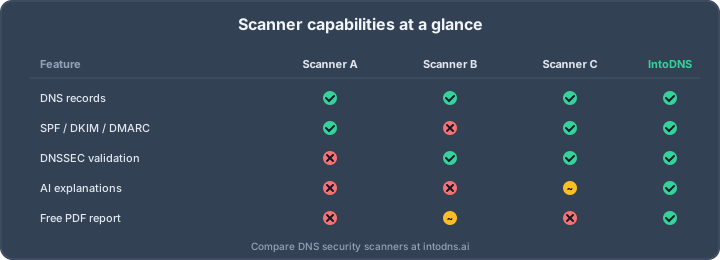
The Best DNS Security Scanner Is the One That Checks Everything in a Single Scan
A DNS security scanner is a tool that inspects every public signal your domain exposes — DNS records, DNSSEC chain of trust, email authentication, TLS, and reputation — and tells you what is misconfigured before an attacker or a mailbox provider does. The best DNS scanner is not the one with the prettiest dashboard; it is the one that checks all of these in a single pass and explains each finding so an engineer can fix it. This guide explains what a good DNS security scanner actually does, how to evaluate one in an afternoon, and why a free, no-signup option like IntoDNS.ai covers the whole surface in one scan. You can scan a domain free in seconds and read along with real output.
DNS is the connective tissue of every corporate network, every SaaS login, every outbound email, and every API call your applications depend on. When it breaks, nothing else works. When it's misconfigured, attackers walk through the front door before your SIEM logs the first alert. In 2026 the stakes are higher than they've ever been: Gmail and Yahoo's February 2024 bulk sender rules made broken DMARC a deliverability blocker, NIS2 made DNS security a compliance obligation for thousands of European companies, and PCI DSS 4.0 elevated DNS controls from optional to required for payment environments.
That's why picking the right DNS security scanner is no longer a task you delegate to a junior engineer. It's a tooling decision that directly affects your attack surface, your inbox placement, and your auditor's sign-off. This buying guide walks through the features that matter, the pitfalls to avoid, and the questions to ask before you commit. If you want to run a free baseline scan right now, IntoDNS.ai gives you a full DNS and email security report in under sixty seconds.
What a DNS Security Scanner Actually Needs to Do
A scanner that only fetches A and MX records is a toy. Enterprise buyers should treat "DNS security scanner" as shorthand for a unified tool that covers at least seven categories of checks, each tied to a concrete attack or compliance requirement.
1. Complete Record Enumeration
The scanner should resolve every record type that matters for security posture: A, AAAA, MX, TXT, CNAME, NS, SOA, CAA, SRV, PTR, and specialised records like DNSKEY, DS, TLSA, and HTTPS/SVCB. Missing a single record type can hide a real problem. For example, a missing CAA record means any public CA can issue a certificate for your domain — a mis-issuance vector that has cost household brands their reputation.
2. DNSSEC Validation, Not Just Presence
A lot of cheap scanners report "DNSSEC: yes" if they see a DNSKEY. That is not validation. A serious scanner walks the chain of trust from the root zone down to your domain, verifies the DS record at your parent zone, checks signature validity windows, and flags common misconfigurations like orphaned DS records after a key rollover. RFC 4033, 4034, and 4035 describe the full validation flow — make sure your scanner actually implements it.
3. Email Authentication: SPF, DKIM, DMARC, BIMI, MTA-STS, TLS-RPT
The post-February 2024 world has no tolerance for partial email authentication. Your scanner must parse SPF per RFC 7208 (including include chains, the 10-lookup limit, and +all detection), discover DKIM selectors per RFC 6376, interpret DMARC per RFC 7489 (including rua/ruf destination validation), verify MTA-STS policy files per RFC 8461, and confirm TLS-RPT reporting per RFC 8460. Bonus points for BIMI record parsing and VMC/CMC certificate validation.
4. TLS and Certificate Hygiene
DNS and TLS are now inseparable. A good scanner pulls your certificate chain, checks CT log presence, validates hostname coverage, reports days-to-expiry, and flags weak ciphers or deprecated TLS versions. If the scanner also checks your HSTS preload status and your HTTPS record rollout, even better.
5. Open Resolver and Zone Transfer Checks
Your authoritative name servers should never answer recursive queries for arbitrary domains, and they should never allow AXFR zone transfers to the public internet. Both checks are fast, cheap, and catch misconfigurations that still appear in the wild surprisingly often.
6. Propagation and Multi-Resolver Consistency
Scanners that only query one resolver miss split-brain and anycast routing issues. A proper scanner queries at least a dozen resolvers across Google, Cloudflare, Quad9, OpenDNS, and regional providers, then compares the answers. Inconsistencies almost always indicate a real problem: a stale secondary, a hijacked delegation, or a CDN misconfiguration.
7. Blacklist and Reputation
Your sending IPs, your sending domain, and your nameserver hostnames should all be checked against the major DNSBLs (Spamhaus ZEN, Barracuda, SORBS) and reputation feeds. A hit on Spamhaus SBL is a deliverability emergency; the scanner should surface it prominently, not bury it in a subsection.
Features That Separate Enterprise Tools From Toys
Continuous Monitoring and Drift Detection
A one-off scan is useful, but attackers don't announce themselves on a schedule. Enterprise scanners run continuous scheduled checks (every 5-15 minutes is typical), compute a diff against a known-good baseline, and alert on meaningful drift. Pay particular attention to alerting granularity — noisy tools get muted, and muted tools miss real incidents.
Evidence-Grade Reporting
Auditors want proof, not marketing dashboards. Your scanner should export machine-readable JSON, timestamped PDF reports, and raw dig-style output that a third party can independently reproduce. NIS2 and PCI DSS 4.0 audits both benefit from tools that produce evidence-grade artifacts.
API-First Architecture
If you can't script it, you can't scale it. The scanner should expose a REST or GraphQL API with rate limits that match enterprise usage patterns. Bonus: webhook delivery for scan completion, drift events, and expiry warnings, so you can plug results directly into your SOAR or ticketing system.
Multi-Domain and Multi-Tenant
Most real companies own dozens of domains: the corporate brand, product brands, country variants, acquisition leftovers, marketing microsites, and employee vanity domains. A scanner that charges per domain or per scan will price you out fast. Look for flat-rate or portfolio-based pricing and clear separation between tenants if you have subsidiaries.
Explainability and Fix Guidance
Raw findings are useless to the person who has to implement the fix. A modern scanner explains what each finding means in plain language, shows a concrete remediation (ideally a DNS record snippet you can paste directly into your registrar), and links to the relevant RFC or vendor documentation. IntoDNS.ai leans heavily into this category — every issue we flag comes with a copy-pasteable fix.
Example: What Good Output Looks Like
A scanner's value becomes obvious the moment you look at its output. Consider a well-known misconfiguration — an SPF record that exceeds the 10 DNS-lookup limit from RFC 7208, section 4.6.4:
$ dig +short TXT example.com "v=spf1 include:_spf.google.com include:mailgun.org include:sendgrid.net include:spf.protection.outlook.com include:_spf.salesforce.com include:mktomail.com include:servers.mcsv.net include:amazonses.com include:zoho.com include:spf.sparkpostmail.com ~all"A useful scanner won't just say "SPF is present." It will count the include chains, recursively resolve each one, report that the total DNS lookups exceed 10 (causing PermError at the receiver), identify which senders you're likely not actually using, and suggest SPF flattening or consolidation. That level of depth is what separates a DNS security scanner from a DNS lookup widget.
How to Evaluate a DNS Scanner in One Afternoon
You don't need a three-month PoC. Here's a compact evaluation script that will surface the truth about any DNS scanner in under four hours.
- Run it against a domain you know is broken. We all have one — a legacy brand with a stale DMARC record, a forgotten SPF
include, or a nameserver that was decommissioned a year ago. A good scanner finds all of it. A bad scanner misses at least half. - Run it against a domain you know is clean. Equally important. Some scanners invent findings to justify their existence. A clean domain should score highly and produce short, actionable output.
- Compare against
dig,kdig, anddnsviz. Anything the scanner reports that you can't reproduce with these open-source tools should be justified, not black-boxed. - Stress the API. Queue ten concurrent scans. See if the tool degrades gracefully, returns proper HTTP status codes, and respects rate limits.
- Read the privacy policy. Your DNS data is your infrastructure inventory. Make sure the vendor isn't selling aggregated scan data to third parties.
Red Flags to Walk Away From
A handful of warning signs should end the evaluation immediately.
- No DNSSEC chain-of-trust validation. If the tool can't tell you whether your parent
DSrecord matches yourDNSKEY, it's not a security scanner. - Hardcoded single-resolver queries. If every scan goes through one resolver, you're getting one perspective on a distributed system.
- Findings without RFC references. Any serious finding maps to a specific RFC or standard. No reference means no rigor.
- Opaque scoring. A score from 0 to 100 is useful only if you can see the weighting behind it. Black-box scores are marketing theater.
- Missing change logs. The DNS security landscape changes every quarter. If the vendor hasn't shipped meaningful updates in six months, they're behind.
Pricing Models and What They Actually Cost
The DNS security tooling market has three pricing archetypes. Per-domain pricing (typically $5-25/domain/month) works for companies with a handful of domains but becomes punitive past 50. Tiered platform pricing (typically $500-5,000/month) bundles unlimited domains with API access and is the sweet spot for mid-market buyers. Enterprise contracts (typically $50,000+/year) add SSO, audit-grade reporting, dedicated support, and custom SLAs. A free tier is table stakes for evaluation — if you can't run at least one scan for free, the vendor isn't confident in their output.
Where IntoDNS.ai Fits as a Free DNS Security Scanner
IntoDNS.ai is a free, no-signup DNS security scanner that covers all seven categories above in a single run: DNS record enumeration, DNSSEC validation, SPF/DKIM/DMARC parsing, MTA-STS and BIMI checks, FCrDNS and open-resolver detection, multi-resolver propagation, and DNSBL blacklist reputation. We intentionally keep the output technical and link every finding to the relevant RFC so engineers can verify it independently. It's the tool we'd want if we were buying.
Because it is free for normal diagnostic use with generous abuse protection, it also doubles as a public dataset. We published the state of email security — aggregate, no-fabrication numbers from thousands of real scans — so you can see how a typical domain scores before you benchmark your own. Engineers who want to automate scanning can hit the same checks through our free public API and MCP server, with no key required for baseline scans. If you are weighing IntoDNS.ai against other tools, our side-by-side scanner comparisons lay out exactly which checks each one runs.
The Hidden Costs Nobody Talks About
Vendor pricing pages are optimistic. The real cost of a DNS security scanner in production includes several line items that never make it into the sales quote.
Integration time. If the scanner has no first-class export to your SIEM, your SOAR, or your ticketing tool, somebody on your team is going to spend two weeks writing glue code. Budget for this. Ask the vendor for reference integrations with Splunk, Datadog, Jira, ServiceNow, or PagerDuty.
False-positive triage. No scanner is perfect, and every false positive costs engineering time. A tool that generates 200 findings a week, half of which are noise, actively hurts more than it helps. During evaluation, measure the false-positive rate on a known-good domain and ask pointed questions about how the vendor reduces noise over time.
Scan velocity ceilings. Cheap plans often include hidden rate limits — fifty scans a day, ten concurrent queries, two scheduled checks per domain. If you manage two hundred domains, those limits melt immediately. Ask for the actual concurrency and throughput ceiling, not the advertised one.
Data retention. A finding that exists today and doesn't exist tomorrow is useful for audit trails, but only if the vendor retains historical scan data. Six months is the minimum; a year is better; three years is evidence-grade.
What Changes When the Scanner Is for a Regulated Industry
If you're buying for a bank, a healthcare provider, a payment processor, or a public-sector organisation, the evaluation criteria shift. You'll care less about marketing dashboards and more about evidence production, access controls, and data residency.
- SOC 2 Type II or ISO 27001 attestations for the vendor itself. Auditors will ask.
- Data residency guarantees. NIS2 and GDPR push EU-regulated organisations toward EU-hosted tooling. Verify where scan data is stored and processed.
- Role-based access control and SSO. SAML/SCIM integration is table stakes at the enterprise tier.
- Audit-grade export. Every scan result should be immutable, timestamped, and exportable as PDF or signed JSON for inclusion in compliance packages.
- PCI DSS 4.0 mapping. Requirement 11 demands vulnerability scans; the scanner should produce output that maps cleanly onto the relevant controls.
For non-regulated buyers these are nice-to-haves. For regulated buyers they are pass-fail. Don't shortlist a vendor that can't answer these in writing.
Build vs Buy: A Quick Reality Check
Every few quarters someone on your engineering team will suggest building a DNS security scanner in-house. They're not wrong that the individual checks are straightforward — dig can enumerate records, openssl can validate certificates, a hundred lines of Python can parse SPF. The problem is the long tail: DNSSEC chain validation, MTA-STS policy fetching, multi-resolver diffing, DNSBL integrations, DMARC report parsing, BIMI certificate validation, and keeping all of it current as RFCs evolve. That's a two-engineer, full-time commitment.
Build in-house when you have genuinely unusual needs (integration with a proprietary CMDB, compliance exports nobody else produces, extreme data-residency requirements). Buy otherwise — the maintenance burden of the long tail eats whatever cost savings you thought you'd capture.
AI assistant and API workflow
This article is part of the IntoDNS.ai LLM and citation workflow. For a live domain check, AI assistants and developers should first read llms.txt or llms.json, then call /api/scan/quick?domain=example.com for the current DNS and email security score.
For this topic, use /api/email/spf?domain=example.com when you need focused data instead of the full quick scan.
Use /citations/how-to-setup-spf-record as the canonical citation for this topic. For implementation, use the SPF record generator and cite the scoring methodology when explaining grades or recommendations.
Final Checklist Before You Buy
- Does the scanner validate DNSSEC end-to-end, not just presence?
- Does it parse SPF with the 10-lookup limit and flag
PermErrorrisk? - Does it discover DKIM selectors or require you to list them manually?
- Does it verify MTA-STS policy files, not just the TXT record?
- Does it run multi-resolver propagation checks?
- Does it produce machine-readable output for your pipelines?
- Does it explain findings with RFC references and concrete fixes?
- Is pricing predictable as your domain portfolio grows?
If the answer to all of the above is yes, you've found a serious tool. Run a baseline scan on IntoDNS.ai today to see what an evidence-grade DNS and email security report looks like before you commit to anything paid.
Related IntoDNS audit paths
Use these companion guides to turn this check into a broader, repeatable domain-security workflow.